
SabasSpeedIndicator
This mod is a two in one speed indicator and speed on join mod with a cool menu.
Screenshots
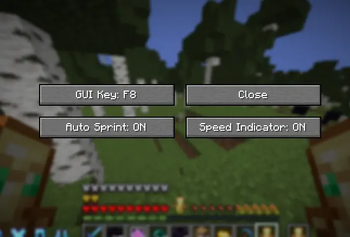

About this Mod
SabaSpeed is a lightweight quality-of-life mod that combines two useful features into a single package: a real-time speed indicator and automatic sprint activation when joining a world or server.
The speed indicator allows players to monitor their current movement speed directly in-game, making it useful for parkour, movement practice, racing, testing different terrain, or simply keeping track of how fast they are traveling. The display is designed to be simple and easy to read without cluttering the screen.
In addition to the speed indicator, SabaSpeed includes an automatic sprint feature. When enabled, the mod automatically activates sprinting when you join a world, removing the need to manually double-tap a movement key or press the sprint key every time you log in. This provides a smoother gameplay experience and helps players get moving immediately.
The mod also includes an in-game configuration menu that allows players to customize settings without editing configuration files manually. This makes it easy to adjust the mod to fit different playstyles and preferences.
Available Versions
How to Install SabasSpeedIndicator on Your Server
Order Server
Order a Minecraft Java server with at least 3 GB RAM (4 GB recommended).
Set fabric Loader
In the panel under "Egg", select the fabric loader and matching Minecraft version (1.21.11).
Install Mod
Open the mod browser in the dashboard and search for "SabasSpeedIndicator". Click "Install" – done! Alternatively, upload the .jar via SFTP to the /mods folder.
Compatibility
Mod Loaders
Minecraft Versions
1.21.11, 1.21.10
Server-side
✗ UnsupportedRecommended RAM
4 GB(min. 3 GB)Frequently Asked Questions
SabasSpeedIndicator server crashes on startup – what to do?
Most common cause: wrong fabric version or insufficient RAM. Check the server log (latest.log) for "OutOfMemoryError" or "Mixin" errors. With Mado Hosting: ensure at least 3 GB RAM is allocated and the loader matches the mod version (1.21.11). You can switch loaders with one click in the panel.
Is SabasSpeedIndicator compatible with fabric?
SabasSpeedIndicator officially supports fabric for Minecraft 1.21.11, 1.21.10. The Mado dashboard automatically detects incompatible loader combinations.
Server lagging with SabasSpeedIndicator – how to optimize performance?
Recommended RAM: 4 GB (per 8 players). Use /spark profiler to check if SabasSpeedIndicator consumes the most tick time. Common fixes: reduce server view-distance to 8-10, install "performant" or "starlight" as supplementary mods on Forge. With Mado Hosting, your server runs on NVMe SSDs with dedicated CPU cores for minimal latency.
Similar Mods




Rent Modded Server
Install SabasSpeedIndicator with just one click on your server.