
SpeedrunUtils
A comprehensive speedrun mod with timer, blindness mechanics, and run management commands.
Screenshots
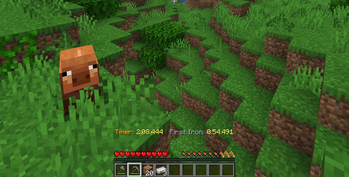
About this Mod
SpeedrunUtils
A Minecraft Fabric mod for managing speedruns with built-in timer, blindness mechanics, and run tracking.
Note: This mod is still in development and is (mostly) generated by AI.
Note: This mod is meant to be installed server-only, but can be installed on a client (untested).
Requirements
- Minecraft 1.21.11
- Fabric Loader >= 0.18.4
- Fabric API
- Java 21+
Installation
- Install Fabric Loader
- Install Fabric API
- Place the mod JAR in your
modsfolder
Features
Gameplay Flow
- Server Start: All players join with blindness effect applied
- Run Start: Any player runs
/startrunto begin the countdown - Speedrun: Players complete the game while the timer runs
- Completion: Timer automatically stops when a player exits through the End portal after defeating the Ender Dragon
Automatic Features
- Blindness on Join: Players automatically receive blindness when joining before a run starts or during a pause
- Time Freezing: Time is frozen before the run starts and during pauses, and unfrozen when the run starts/resumes
- Player Freezing: Players are completely frozen in place (movement and interactions) before the run starts and during pauses using packet-based freezing that prevents all client actions including breaking blocks, placing blocks, attacking, and moving
- Timer Display: Action bar shows elapsed time at the bottom of the screen, updating 20 times per second (each tick)
- Splits: Automatically records key milestones, broadcasts them to chat, and shows them on a sidebar scoreboard during the run
- Auto-Complete Detection: Run automatically completes when the Ender Dragon is defeated & a player teleports
through the End portal back to the Overworld (after the credits screen) - Run Tracking: All runs are logged to
speedruns.txtwith:- Date and time
- Player names
- Final time (formatted as HH:MM:SS.mmm or MM:SS.mmm)
- Completion status
- Splits (when recorded)
Splits
Splits are recorded automatically while a run is RUNNING. Each split is:
- Broadcast to all players as a chat message
- Added to a sidebar scoreboard titled Speedrun Splits
- Reflected next to the timer as the latest split in the action bar
- Saved under a Splits: section in
speedruns.txtwhen the run is saved
Current split list
- First Iron: Get the "Acquire Hardware" advancement (smelt/obtain an iron ingot)
- Entered Nether: First time a player enters the Nether during the run
- Entered Nether Fortress: Get the "A Terrible Fortress" advancement (enter a nether fortress)
- First Blaze Rod: First blaze rod retrieved by any player during the run
- Blaze Rods Done: Server-wide total blaze rods across all online players reaches 7
- First Ender Pearl: First ender pearl retrieved by any player during the run
- Ender Pearls Done: Server-wide total ender pearls across all online players reaches 14
- First Ender Eye: First time an Eye of Ender is crafted
- Stronghold Found: Get the "Eye Spy" advancement (enter a stronghold)
- Entered End: First time a player enters the End during the run
Commands
/startrun
- Permission Level: 0 (all players)
- Description: Starts a speedrun with a 3-second countdown
- Behavior:
- Can only be run once per speedrun (before the run starts)
- Displays a 3-second countdown to all players
- Removes blindness effect from all players
- Unfreezes time
- Starts the scoreboard timer
- Plays sound effects for countdown and start
/pauserun
- Permission Level: 0 (all players)
- Description: Pauses the current speedrun
- Behavior:
- Stops the timer
- Freezes time
- Applies blindness to all players
- Shows "Run already paused!" if the run is already paused
/resumerun
- Permission Level: 0 (all players)
- Description: Resumes a paused speedrun
- Behavior:
- Continues the timer
- Unfreezes time
- Removes blindness from all players
- Shows an error message if the run is not paused
/stoprun
- Permission Level: 0 (all players)
- Description: Stops the current speedrun and clears the timer
- Behavior:
- Stops the run (if one is active)
- Clears the timer
- Unfreezes time
- Removes blindness from all players (in case the run was paused)
- Broadcasts: "Run stopped. Timer cleared."
/newrun
- Permission Level: 0 (all players)
- Description: Saves the current run and prepares for a new speedrun
- Behavior:
- Stops the run (if one is active)
- Saves the current run data to
speedruns.txtin the server root - Records: timestamp, player names, time, and completion status
- Resets the run state
- Freezes time
- Applies blindness to all players
- Notifies players about server restart for world regeneration
Available Versions
How to Install SpeedrunUtils on Your Server
Order Server
Order a Minecraft Java server with at least 3 GB RAM (4 GB recommended).
Set fabric Loader
In the panel under "Egg", select the fabric loader and matching Minecraft version (1.21.11).
Install Mod
Open the mod browser in the dashboard and search for "SpeedrunUtils". Click "Install" – done! Alternatively, upload the .jar via SFTP to the /mods folder.
Compatibility
Mod Loaders
Minecraft Versions
1.21.11
Server-side
✓ RequiredRecommended RAM
4 GB(min. 3 GB)Frequently Asked Questions
SpeedrunUtils server crashes on startup – what to do?
Most common cause: wrong fabric version or insufficient RAM. Check the server log (latest.log) for "OutOfMemoryError" or "Mixin" errors. With Mado Hosting: ensure at least 3 GB RAM is allocated and the loader matches the mod version (1.21.11). You can switch loaders with one click in the panel.
Is SpeedrunUtils compatible with fabric?
SpeedrunUtils officially supports fabric for Minecraft 1.21.11. The Mado dashboard automatically detects incompatible loader combinations.
Server lagging with SpeedrunUtils – how to optimize performance?
Recommended RAM: 4 GB (per 8 players). Use /spark profiler to check if SpeedrunUtils consumes the most tick time. Common fixes: reduce server view-distance to 8-10, install "performant" or "starlight" as supplementary mods on Forge. With Mado Hosting, your server runs on NVMe SSDs with dedicated CPU cores for minimal latency.
Similar Mods




![[ETF] Entity Texture Features](https://cdn.modrinth.com/data/BVzZfTc1/af683d206d50b05258d865b0d6e4aa2f2cee12f2_96.webp)
![[EMF] Entity Model Features](https://cdn.modrinth.com/data/4I1XuqiY/6e5bbd0d06b1741bfdab6c0cfab6de8fdaf0064c_96.webp)
Rent Modded Server
Install SpeedrunUtils with just one click on your server.