
Splasher!
Why don't splash? Splasher is a mod which makes splash texts fully customizable.
Screenshots
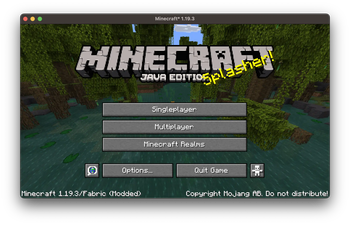
About this Mod

Customize Minecraft's Splash Texts at Your Will!
Contributing a Translation
Splasher turns Minecraft splashes.txt into .json files, and supports multi languages.
You will find en_us.json under assets/splasher/lang/ and feel free translate it into your favorite language.
After translation, rename it to xx_xx.json (e.g., zh_cn.json), and enjoy! You can also create a pull request to contribute.
Adding a Customization
Splasher supports custom splash texts to append, or replace the original ones.
Custom splash texts are .txt files stored under .minecraft/config/splasher/ and should be named the same as your target language (en_us.txt etc.).
In these files, every single splash takes a single line, and § Formatting Code is under supported, the same as the Minecraft splashes.txt under directory .minecraft/assets/minecraft/texts/.
Configuring Splasher
Splasher is using Cloth Config API and is fully configurable, you can find the config file under .minecraft/config/splasher.toml.
Every option is well documented, and you can achieve different effects by changing the values, for example:
- Disabling all splashes
- Only enabling custom splashes
- Enabling both original and custom splashes, and not following the client language
- And more...
Available Versions
How to Install Splasher! on Your Server
Order Server
Order a Minecraft Java server with at least 3 GB RAM (4 GB recommended).
Set fabric Loader
In the panel under "Egg", select the fabric loader and matching Minecraft version (1.21.1).
Install Mod
Open the mod browser in the dashboard and search for "Splasher!". Click "Install" – done! Alternatively, upload the .jar via SFTP to the /mods folder.
Compatibility
Mod Loaders
Minecraft Versions
1.21.1, 1.21, 1.20.6 (+14 more)
Server-side
✗ UnsupportedRecommended RAM
4 GB(min. 3 GB)Frequently Asked Questions
Splasher! server crashes on startup – what to do?
Most common cause: wrong fabric version or insufficient RAM. Check the server log (latest.log) for "OutOfMemoryError" or "Mixin" errors. With Mado Hosting: ensure at least 3 GB RAM is allocated and the loader matches the mod version (1.21.1). You can switch loaders with one click in the panel.
Is Splasher! compatible with fabric and forge and neoforge and quilt?
Splasher! officially supports fabric, forge, neoforge, quilt for Minecraft 1.21.1, 1.21, 1.20.6. Note: Forge and Fabric mods are NOT cross-compatible – pick one loader and stick with it. The Mado dashboard automatically detects incompatible loader combinations.
Server lagging with Splasher! – how to optimize performance?
Recommended RAM: 4 GB (per 8 players). Use /spark profiler to check if Splasher! consumes the most tick time. Common fixes: reduce server view-distance to 8-10, install "performant" or "starlight" as supplementary mods on Forge. With Mado Hosting, your server runs on NVMe SSDs with dedicated CPU cores for minimal latency.
Similar Mods

![[ETF] Entity Texture Features](https://cdn.modrinth.com/data/BVzZfTc1/af683d206d50b05258d865b0d6e4aa2f2cee12f2_96.webp)
![[EMF] Entity Model Features](https://cdn.modrinth.com/data/4I1XuqiY/6e5bbd0d06b1741bfdab6c0cfab6de8fdaf0064c_96.webp)



Rent Modded Server
Install Splasher! with just one click on your server.