
Sporadic Screenshot
Screenshot the world sporadically with configurable options. Save everything!
Screenshots
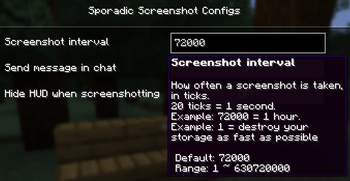
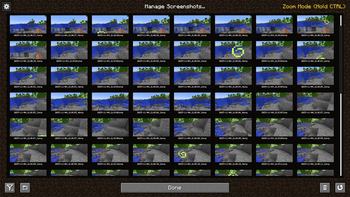
About this Mod
Screenshot the world in configurable intervals, with basic options to notify in chat, or to disable HUD. Visualize the progression of your world!
This mod is heavily inspired by AutomaticMemories, but seeing as there's no dedicated Neoforge version unless with Sinytra Connector, I decided to make a small first mod for myself in my own forever world.


This mod does not conflict with vanilla screenshotting (i.e. with F2), as it runs on its on independent gametick timer. This also likely means it should not conflict with other screenshot mods.
I also highly recommend these mods since they are user media related that leads to a more visually wonderful and modern world/experience.
- Immersive Paintings, as it pairs well to even show all these screenshots physically in your world.
- Screenshot Viewer, collectively show all screenshots in a nice interface
- Exposure, take literal images in the world
- Vista, actual video interfaces displayed in real time
- WATERFrAMES: Multimedia Displays, display videos and images from external soures
Available Versions
How to Install Sporadic Screenshot on Your Server
Order Server
Order a Minecraft Java server with at least 3 GB RAM (4 GB recommended).
Set neoforge Loader
In the panel under "Egg", select the neoforge loader and matching Minecraft version (1.21.1).
Install Mod
Open the mod browser in the dashboard and search for "Sporadic Screenshot". Click "Install" – done! Alternatively, upload the .jar via SFTP to the /mods folder.
Compatibility
Mod Loaders
Minecraft Versions
1.21.1
Server-side
✗ UnsupportedRecommended RAM
4 GB(min. 3 GB)Frequently Asked Questions
Sporadic Screenshot server crashes on startup – what to do?
Most common cause: wrong neoforge version or insufficient RAM. Check the server log (latest.log) for "OutOfMemoryError" or "Mixin" errors. With Mado Hosting: ensure at least 3 GB RAM is allocated and the loader matches the mod version (1.21.1). You can switch loaders with one click in the panel.
Is Sporadic Screenshot compatible with neoforge?
Sporadic Screenshot officially supports neoforge for Minecraft 1.21.1. The Mado dashboard automatically detects incompatible loader combinations.
Server lagging with Sporadic Screenshot – how to optimize performance?
Recommended RAM: 4 GB (per 8 players). Use /spark profiler to check if Sporadic Screenshot consumes the most tick time. Common fixes: reduce server view-distance to 8-10, install "performant" or "starlight" as supplementary mods on Forge. With Mado Hosting, your server runs on NVMe SSDs with dedicated CPU cores for minimal latency.
Similar Mods




![[ETF] Entity Texture Features](https://cdn.modrinth.com/data/BVzZfTc1/af683d206d50b05258d865b0d6e4aa2f2cee12f2_96.webp)

Rent Modded Server
Install Sporadic Screenshot with just one click on your server.