
SpotiCraft - A new way of listening to music
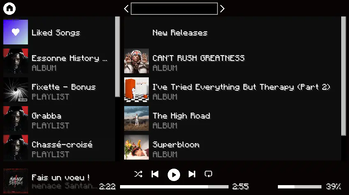
Use Spotify directly in Minecraft, change music, volume, preferences directly in Minecraft without leaving your game
Screenshots
About this Mod
This project will no longer be maintained
Due to Spotify’s recent investment and price changes, I decided to completely stop the development of this mod.
NEW USER PLEASE READ
If you're planning to use the mod, and you didn't use it before, you may not be able to do so, if the Spotify app hits the 30 daily user limit, the mod may crash when trying to load data from your account, for news about this you can go see this issue on GitHub
A workaround for this is to make your own Spotify app and build the mod yourself, you'll need to update it every new release and build it again, see the How to build the mod
Description
SpotiCraft allow you to connect into your Spotify account and play your favorite music, playlist, artist or even search for new song all in Minecraft :3 (Spotify Premium is required to use this mod!)
TODO List
- Login - Finished
- Play music (play, pause, next, previous, shuffle, repeat, volume) - Finished
- Search for music, artist or playlist - Finished
- Artist page (show music of artist, playable music) - Finished
- Album and Playlist - Finished
- Home page (recommendation and featured category can't be used now due to spotify removing api endpoint) - Finished
- Go back, forward and home button - Finished
- Like music and unlike it - Finished
- Add and remove from playlist - Finished
- UI in general - Finished
- Improvement - WIP
FAQ
Minecraft keep crashing after updating the mod
If that happen to you, before making an issue, try to delete the "spoticraft" folder in the Minecraft folder (where the mods folder is)
If Minecraft keep crashing, try to only have this mod in your mods' folder
If Minecraft still crash, make an issue and don't forget your log file
Changelog
Release 0.0.1
- Fixed refresh token not being updated after being used to refresh the access token
- Fixed resize text in the ui, now using text width and not text length
- Added repeat one and repeat enable icons to the ui
- Added shuffle enable icons to the ui
Beta 0.0.7
- Fixed Like Button position
- Fixed bugs
Beta 0.0.6
- Updated auth system because of Spotify new security policies
- Other fixes
Beta 0.0.5
- Added Turk and French
- Fixed pixel bleeding on 1.20.1
- Fixed crash when searching for an artist, playlist or album without an image
Beta 0.0.4
- Fixed crash when image isn't downloaded successfully
- Fixed crash when user doesn't have an active device
- Fixed UI not refreshing correctly when closing
Beta 0.0.3
- Added NeoForge support for 1.21.4
- Fixed crash when searching (doesn't occur all the time, but sometimes it does)
Beta 0.0.2
- Fixed crash when searching from the last version
- Added home button
- Added a home page (somewhat)
- Added go forward button
- Added play button in playlist
- Removed the text of Play button in albums and playlist, same for Liked Songs
- Fixed scroll not being reset when content change
- Made some general improvement
Beta 0.0.1 - Removed due to crash when searching
- Made ui smaller
- Added Search with artist, songs, playlist and albums
- Added Artist page with top songs and albums
- Added Playlist page with playable music
- Added Albums, same as playlist
- Added music name and artist(s)
- Added Liked songs, same as playlist and albums
- Added back button
- Added a play button in albums (will be reworked on future version)
Alpha 0.0.2
- Fixed crashes
- Bump forge version to 1.21.4-54.0.16
Alpha 0.0.1 - Removed due to issues
- User can log in with their Spotify account
- Base version of the UI to play music, pause music, go to the next music, go to the previous music, shuffle, repeat, change volume of the music and show the Image of the music currently playing
Available Versions
How to Install SpotiCraft - A new way of listening to music on Your Server
Order Server
Order a Minecraft Java server with at least 3 GB RAM (4 GB recommended).
Set fabric Loader
In the panel under "Egg", select the fabric loader and matching Minecraft version (1.21.5).
Install Mod
Open the mod browser in the dashboard and search for "SpotiCraft - A new way of listening to music". Click "Install" – done! Alternatively, upload the .jar via SFTP to the /mods folder.
Compatibility
Mod Loaders
Minecraft Versions
1.21.5, 1.21.4, 1.21.3 (+10 more)
Server-side
✗ UnsupportedRecommended RAM
4 GB(min. 3 GB)Frequently Asked Questions
SpotiCraft - A new way of listening to music server crashes on startup – what to do?
Most common cause: wrong fabric version or insufficient RAM. Check the server log (latest.log) for "OutOfMemoryError" or "Mixin" errors. With Mado Hosting: ensure at least 3 GB RAM is allocated and the loader matches the mod version (1.21.5). You can switch loaders with one click in the panel.
Is SpotiCraft - A new way of listening to music compatible with fabric and forge and neoforge?
SpotiCraft - A new way of listening to music officially supports fabric, forge, neoforge for Minecraft 1.21.5, 1.21.4, 1.21.3. Note: Forge and Fabric mods are NOT cross-compatible – pick one loader and stick with it. The Mado dashboard automatically detects incompatible loader combinations.
Server lagging with SpotiCraft - A new way of listening to music – how to optimize performance?
Recommended RAM: 4 GB (per 8 players). Use /spark profiler to check if SpotiCraft - A new way of listening to music consumes the most tick time. Common fixes: reduce server view-distance to 8-10, install "performant" or "starlight" as supplementary mods on Forge. With Mado Hosting, your server runs on NVMe SSDs with dedicated CPU cores for minimal latency.
Similar Mods




![[ETF] Entity Texture Features](https://cdn.modrinth.com/data/BVzZfTc1/af683d206d50b05258d865b0d6e4aa2f2cee12f2_96.webp)
![[EMF] Entity Model Features](https://cdn.modrinth.com/data/4I1XuqiY/6e5bbd0d06b1741bfdab6c0cfab6de8fdaf0064c_96.webp)
Rent Modded Server
Install SpotiCraft - A new way of listening to music with just one click on your server.