
squaremap-banner
A mod that is an extension for the SquareMap mod. It adds additional functionality related to banners within the game: using banner to create markers that visible on the world map. Inspired by squaremap-banners plugin.
Screenshots
About this Mod
SquareMap Banner Mod
A mod that is an extension for the SquareMap mod.
It adds
additional functionality related to banners within the game: use banner to create markers visible in the worldmap. Inspired
by squaremap-banners plugins
✨Features
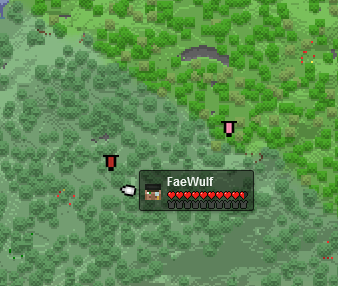
- Banner marker: Sneaking right-click with a named banner while holding a filled map will add that banner to the
world map. - Banner Removal: Sneaking left-click with a named banner while holding a filled map, or breaking the banner, will
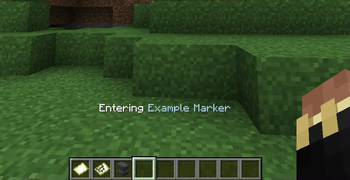
remove it from the world map. - Area Notification: Displays a message when entering an area marked by a banner.
⚙️Configuration
The mod provides a JSON configuration file with the following options:
radius: Specifies the size of the area declared by the banner.announce_when_near_banner: Enable/disable the message when entering the banner's area.blacklist: Contains a list of words to prevent from being registered to the world map.
⚠️Mod dependents
- Squaremap mod itself
- Fabric API
🪧Permissions
- squaremap.banner.use: Permission required for players to use the features provided by the mod.
- If non permission manager mod installed, then only players with permission level 1 and above can use the mod.
👍Support and Feedback
If you encounter any issues or have suggestions for improvement, please feel free to submit an issue on the GitHub
repository.
Available Versions
How to Install squaremap-banner on Your Server
Order Server
Order a Minecraft Java server with at least 3 GB RAM (4 GB recommended).
Set fabric Loader
In the panel under "Egg", select the fabric loader and matching Minecraft version (1.21.10).
Install Mod
Open the mod browser in the dashboard and search for "squaremap-banner". Click "Install" – done! Alternatively, upload the .jar via SFTP to the /mods folder.
Compatibility
Mod Loaders
Minecraft Versions
1.21.10, 1.21.5, 1.21.4 (+4 more)
Server-side
✓ RequiredRecommended RAM
4 GB(min. 3 GB)Frequently Asked Questions
squaremap-banner server crashes on startup – what to do?
Most common cause: wrong fabric version or insufficient RAM. Check the server log (latest.log) for "OutOfMemoryError" or "Mixin" errors. With Mado Hosting: ensure at least 3 GB RAM is allocated and the loader matches the mod version (1.21.10). You can switch loaders with one click in the panel.
Is squaremap-banner compatible with fabric and quilt?
squaremap-banner officially supports fabric, quilt for Minecraft 1.21.10, 1.21.5, 1.21.4. The Mado dashboard automatically detects incompatible loader combinations.
Server lagging with squaremap-banner – how to optimize performance?
Recommended RAM: 4 GB (per 8 players). Use /spark profiler to check if squaremap-banner consumes the most tick time. Common fixes: reduce server view-distance to 8-10, install "performant" or "starlight" as supplementary mods on Forge. With Mado Hosting, your server runs on NVMe SSDs with dedicated CPU cores for minimal latency.
Similar Mods

![[ETF] Entity Texture Features](https://cdn.modrinth.com/data/BVzZfTc1/af683d206d50b05258d865b0d6e4aa2f2cee12f2_96.webp)
![[EMF] Entity Model Features](https://cdn.modrinth.com/data/4I1XuqiY/6e5bbd0d06b1741bfdab6c0cfab6de8fdaf0064c_96.webp)



Rent Modded Server
Install squaremap-banner with just one click on your server.
Details
- License
- Creative Commons Attribution Non Commercial Share Alike 4.0 International
- Server-side
- Required