
SScript
Fabric mod that adds a Python/Lua-like scripting language to your Minecraft server. Write game logic with events, built-in functions, HTTP requests and file I/O — no Java required.
Screenshots
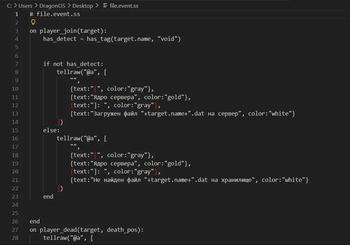
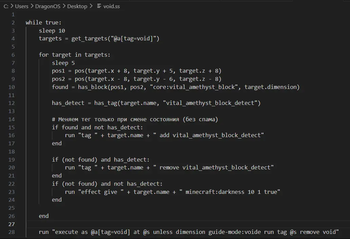
About this Mod
SScript — Server Scripting Language for Minecraft
SScript is a lightweight programming language for Minecraft server automation. Write scripts in Python/Lua-like syntax to execute commands, automate tasks, and control server behavior without touching Java code.
What It Does
Core Purpose: Execute automated commands and logic on your Minecraft server.
- 🎯 Command Execution — Run commands programmatically (
/say,/give,/setblock, etc.) - ⚙️ Task Automation — Run initialization scripts, scheduled tasks, bulk operations
- 🔧 Server Logic — React to player actions (join/leave, chat, block breaks, deaths, sleep)
- 📝 Simple Syntax — Python-like language anyone can learn
- ⚡ Non-blocking — Tasks run without freezing the server
Quick Start
1. Create a script in sscripts/boom.ss:
log "BOOM SPAWN!"

func boom():
    run "fill 10 50 10 -10 90 -10 air destroy"
    # boom! >:3
end

boom()
2. Create event handler in sscripts/handlers.event.ss:
on player_join(player):
    run "say " + player.name + " joined"
    run "execute at " + player.name + " run fill ~10 50 ~10 ~-10 90 ~-10 air"
end

on player_chat(player, message):
    log player.name + ": " + message
end
3. Load and run:
/sscript run boom.ss
/sscript debug on
/sscript debug off - no spam [Server]: ...
Done! Scripts execute without restart.
Language Features
- Variables & Types: Strings, numbers, booleans, lists, objects
- Control Flow:
if/elif/else,for,while,try/catch - Functions: Define with
funcordef, call sync or async - Events: React to player actions, server events
- Built-ins: 60+ functions for players, blocks, math, strings, files
- Async Support: Background tasks with
waitkeyword
Commands
Execute scripts and control execution:
/sscript run <file>                    # Execute script
/sscript run <file> function <name>    # Call specific function
/sscript monitor [all|<id>| ]            # View running tasks
/sscript stop [all|<id>|<file>]               # Stop running task
/sscript reload [all|<id>|<file>]             # Restart task
/sscript debug [on|off]                # Toggle debug output server
Documentation
📖 Full documentation with examples and API reference:
What Else?
Beyond command execution, SScript can:
- 📊 Store Data — Global variables persist across restarts (
globals.json) - 📡 HTTP Requests — Fetch data from APIs or send webhooks
- 💾 File I/O — Read/write files and JSON
- 🎮 Player Data — Access health, gamemode, coordinates, NBT data
- 🏷️ Tag System — Organize players with custom tags
- 🔍 Selectors — Query players dynamically (
@a[tag=admin],@a[distance=..100])
Performance
- ⚡ Tick-safe — Tasks automatically spread across server ticks to prevent lag
- 🔄 Non-blocking — Event handlers run asynchronously (don't freeze gameplay)
- 💪 Limits — 500 max processes, 20 spawn/tick, 50 statements/tick
Requirements
- Java 21+
- Fabric Loader 0.14+
- Minecraft 1.21.11
Installation
- Download the mod JAR
- Put in
mods/folder - Start server
- Place scripts in
sscripts/
Example: Chat Logger
# sscripts/chat_logger.event.ss

func log_chat(player_name, message):
    file_mkdirs("sscripts/logs")
    line = "[" + player_name + "] " + message
    file_append("sscripts/logs/chat.log", line + "\n")
end

on player_chat(player, message):
    log_chat(player.name, message)
end
Links
AI generation Description D:
Available Versions
How to Install SScript on Your Server
Order Server
Order a Minecraft Java server with at least 3 GB RAM (4 GB recommended).
Set fabric Loader
In the panel under "Egg", select the fabric loader and matching Minecraft version (1.21.11).
Install Mod
Open the mod browser in the dashboard and search for "SScript". Click "Install" – done! Alternatively, upload the .jar via SFTP to the /mods folder.
Compatibility
Mod Loaders
Minecraft Versions
1.21.11
Server-side
✓ RequiredRecommended RAM
4 GB(min. 3 GB)Frequently Asked Questions
SScript server crashes on startup – what to do?
Most common cause: wrong fabric version or insufficient RAM. Check the server log (latest.log) for "OutOfMemoryError" or "Mixin" errors. With Mado Hosting: ensure at least 3 GB RAM is allocated and the loader matches the mod version (1.21.11). You can switch loaders with one click in the panel.
Is SScript compatible with fabric?
SScript officially supports fabric for Minecraft 1.21.11. The Mado dashboard automatically detects incompatible loader combinations.
Server lagging with SScript – how to optimize performance?
Recommended RAM: 4 GB (per 8 players). Use /spark profiler to check if SScript consumes the most tick time. Common fixes: reduce server view-distance to 8-10, install "performant" or "starlight" as supplementary mods on Forge. With Mado Hosting, your server runs on NVMe SSDs with dedicated CPU cores for minimal latency.
Similar Mods




Rent Modded Server
Install SScript with just one click on your server.