
SSoggySouls for Hardcore
Plugin that improves Hardcore experience in various ways (cross server, lives, reviving)
Screenshots
About this Mod
SSoggySouls
Spigot/Paper/Purpur plugin for Minecraft 1.21.1 that adds a lives system to a Velocity proxy network. When players lose all their lives, they get sent to a Limbo server until teammates revive them.
Visit wiki for more detailed information: wiki (wiki is most up to date)
How It Works
The plugin runs on two backend servers behind a Velocity (might work on BungeeCord/Waterfall, not tetsted yet, if you manage to test it out, please make a issue in GitHub) proxy: Main (survival) and Limbo (purgatory). Both share a MySQL database.
- Players start with configurable lives (default: 2)
- Each death costs one life; optional grace period for new players
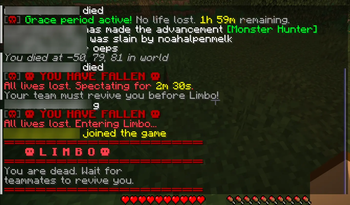
- At 0 lives, dead players enter spectator briefly, then get sent to Limbo
- Teammates revive dead players via the ritual structure,
/revive, or the Revive Skull - Revived players get sent back to Main automatically
- Alive players can visit Limbo with
/limboand return with/leavelimbo
Death Modes
| Mode | Behavior |
|---|---|
hybrid (default) |
Spectator for a time window, then transferred to Limbo. Teammates can revive during the window. Reconnecting while dead skips the spectator window and sends straight to Limbo. |
spectator |
Dead players stay on Main as spectators permanently until revived. |
limbo |
Dead players are immediately transferred to Limbo. |
All modes support reviving via the Hardcore Revive Mode, Revive Skull, and /revive.
Built-in HRM Features
(credits to https://modrinth.com/plugin/hardcore-revive-mod)
Player Head Drops
On final death, the player's head drops at their death location. They also get a message with their death coords.
Revival Ritual Structure
3x3x3 structure to revive dead players:
Bottom layer (3x3): 4 Soul Sand corners, 4 Stair edges, 1 ore block center
Middle layer: 4 Wither Roses on the soul sand, 1 Fence on the ore
Top: Place the dead player's head on the fence
Check the original page for more details https://modrinth.com/plugin/hardcore-revive-mod
Craftable Items
Revive Skull Right-click to open a menu of dead players and receive their head for the ritual.
| Obsidian | Ghast Tear | Obsidian |
| Totem of Undying | Any Skull | Totem of Undying |
| Obsidian | Ghast Tear | Obsidian |
Check the original page for more details https://modrinth.com/plugin/hardcore-revive-mod
Extra Life Right-click to gain +1 life. Recipe is fully configurable in config.yml (only on main).
"Limbo" Visiting
Alive players can visit Limbo using /limbo to interact with dead players. Use /leavelimbo to return. Dead players cannot leave until revived.
Requirements
- Minecraft 1.21.X (Spigot or Paper)
- Velocity proxy
- MySQL database (you can share one with another plugin like CoreProtect)
- Java 21+
- Two backend servers: Main + "Limbo" (Limbo optional in
spectatormode)
Proxy / Backend installation
- Do NOT install PolarSouls on your proxy (Velocity/BungeeCord/Waterfall). Install the plugin only on your backend Spigot/Paper/Purpur servers (Main and Limbo).
- Ensure the proxy forwards player information to the backends so UUIDs and addresses remain consistent:
- Velocity: set
player-info-forwarding-mode: MODERNinvelocity.toml. - BungeeCord/Waterfall: enable IP forwarding and set the appropriate
bungeecord/proxy options inspigot.yml/paper.yml.
- Velocity: set
- Make sure both backend servers can reach the shared MySQL database and any messaging channels you use.
- After configuring forwarding, test a full flow: death on Main → transfer to Limbo → revive and return to Main.
(might work on BungeeCord/Waterfall, not tetsted yet, if you manage to test it out, please make a issue in GitHub)
Installation
- Place
SSoggySouls-X.X.X.jarin theplugins/folder of both servers - Start both servers to generate
config.yml - Configure the MySQL database connection (same credentials on both)
- On the Limbo server, set
is-limbo-server: true - Set the spawn in-game with
/setlimbospawn - Configure the rest in the config.yml, the guide in the config is pretty simple, so just follow it. If you need help, feel free to reach out in GitHub.
- Restart both servers
Configuration
See the generated config.yml for all options. Key settings:
is-limbo-server: false           # true on Limbo server only

database:
  host: localhost
  port: 3306
  name: polarsouls
  username: root
  password: password

lives:
  default: 2
  max-lives: 5
  on-revive: 1
  grace-period-hours: 24
  revive-cooldown-seconds: 30

main:
  death-mode: "hybrid"           # hybrid | spectator | limbo
  hybrid-timeout-seconds: 300

hrm:
  enabled: true
  drop-heads: true
  structure-revive: true
  head-wearing-effects: true
  revive-skull-recipe: true

extra-life:
  enabled: true
    recipe:
    row1: "DED"
    row2: "INI"
    row3: "GEG"
    # Letter-to-material mapping
    ingredients:
      G: "GOLD_BLOCK"
      E: "EMERALD_BLOCK"
      N: "NETHER_STAR"
      D: "DIAMOND_BLOCK"
      I: "NETHERITE_INGOT"
(to edit this, change one of the letters in the rows to another one, and set the block for that letter under ingredients. A customized example is shown above)
main-server-name: "main"
limbo-server-name: "limbo"
(change this to the names that are in velocity.toml)
Commands
| Command | Description | Permission |
|---|---|---|
/psadmin <sub> [args] |
Admin commands (lives, grace, kill, revive, reset, info, reload) | polarsouls.admin |
/revive <player> |
Revive a dead player | polarsouls.revive |
/pstatus [player] |
Check lives and status | polarsouls.status |
/psetlives <player> <n> |
Set a player's lives | polarsouls.admin |
/setlimbospawn |
Set the Limbo spawn point | polarsouls.admin |
/limbo |
Visit the Limbo server | polarsouls.visit |
/leavelimbo |
Return from Limbo to Main | polarsouls.visit |
Permissions
| Permission | Description | Default |
|---|---|---|
polarsouls.admin |
Full admin access | op |
polarsouls.revive |
Can revive dead players | op |
polarsouls.status |
Can check player status | true |
polarsouls.visit |
Can visit Limbo as a living player | true |
polarsouls.bypass |
Bypass all death mechanics | false |
License
GPL3
Available Versions
How to Install SSoggySouls for Hardcore on Your Server
Order Server
Order a Minecraft Java server with at least 3 GB RAM (4 GB recommended).
Set bukkit Loader
In the panel under "Egg", select the bukkit loader and matching Minecraft version (1.21.11).
Install Mod
Open the mod browser in the dashboard and search for "SSoggySouls for Hardcore". Click "Install" – done! Alternatively, upload the .jar via SFTP to the /mods folder.
Compatibility
Mod Loaders
Minecraft Versions
1.21.11, 1.21.10, 1.21.9 (+9 more)
Server-side
✗ UnsupportedRecommended RAM
4 GB(min. 3 GB)Frequently Asked Questions
SSoggySouls for Hardcore server crashes on startup – what to do?
Most common cause: wrong bukkit version or insufficient RAM. Check the server log (latest.log) for "OutOfMemoryError" or "Mixin" errors. With Mado Hosting: ensure at least 3 GB RAM is allocated and the loader matches the mod version (1.21.11). You can switch loaders with one click in the panel.
Is SSoggySouls for Hardcore compatible with bukkit and fabric and forge and neoforge and paper and purpur and quilt and spigot?
SSoggySouls for Hardcore officially supports bukkit, fabric, forge, neoforge, paper, purpur, quilt, spigot for Minecraft 1.21.11, 1.21.10, 1.21.9. Note: Forge and Fabric mods are NOT cross-compatible – pick one loader and stick with it. The Mado dashboard automatically detects incompatible loader combinations.
Server lagging with SSoggySouls for Hardcore – how to optimize performance?
Recommended RAM: 4 GB (per 8 players). Use /spark profiler to check if SSoggySouls for Hardcore consumes the most tick time. Common fixes: reduce server view-distance to 8-10, install "performant" or "starlight" as supplementary mods on Forge. With Mado Hosting, your server runs on NVMe SSDs with dedicated CPU cores for minimal latency.
Similar Mods




Rent Modded Server
Install SSoggySouls for Hardcore with just one click on your server.