
Stack Size 1024
Choose the maximum stack size for normal items, from vanilla up to 8192, with Mod Menu support
Screenshots
About this Mod
Stack Size 1024
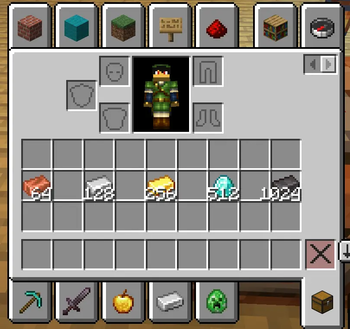
Choose the maximum stack size for normal Minecraft items on Fabric 1.21.11, from the vanilla value up to 8192.
This mod is made for players who want larger, cleaner storage without changing every special-case item in the game.
Features
- Lets you choose the maximum stack size for items that normally stack to
64or16 - Available options:
Vanilla1282565121024204840968192
- Adds a settings screen in
Mod Menu - Keeps items with special limits like
1unchanged - Raises inventory slot limits together with the selected stack size
- Syncs the active value from server to player in multiplayer
- Fixes the save/load validation problem that can cause large stacks to be skipped during save
How It Works
If Mod Menu is installed, you can change the stack size from the mod settings screen.
In singleplayer, your selected value is used for your world.
In multiplayer, the server's value becomes the active one while you are connected, so everyone uses the same limit.
Compatibility
- Minecraft:
1.21.11 - Loader:
Fabric - Requires:
Fabric API - Optional:
Mod Menu
Important Notes
- This mod only changes normal stackable items.
- Items that are normally non-stackable are left alone.
- Very large stack counts can still look a bit cramped in some vanilla screens because Minecraft was originally designed around smaller numbers.
- If you lower the selected stack size later, already existing large stacks are kept, but new merging follows the currently selected value.
Why This Mod Exists
Most stack size mods only raise the visible limit and stop there. This mod also handles the save/load side more carefully, so larger stacks are much safer to use in real worlds.
Available Versions
How to Install Stack Size 1024 on Your Server
Order Server
Order a Minecraft Java server with at least 3 GB RAM (4 GB recommended).
Set fabric Loader
In the panel under "Egg", select the fabric loader and matching Minecraft version (1.21.11).
Install Mod
Open the mod browser in the dashboard and search for "Stack Size 1024". Click "Install" – done! Alternatively, upload the .jar via SFTP to the /mods folder.
Compatibility
Mod Loaders
Minecraft Versions
1.21.11, 1.21.10, 1.21.9 (+9 more)
Server-side
✓ RequiredRecommended RAM
4 GB(min. 3 GB)Frequently Asked Questions
Stack Size 1024 server crashes on startup – what to do?
Most common cause: wrong fabric version or insufficient RAM. Check the server log (latest.log) for "OutOfMemoryError" or "Mixin" errors. With Mado Hosting: ensure at least 3 GB RAM is allocated and the loader matches the mod version (1.21.11). You can switch loaders with one click in the panel.
Is Stack Size 1024 compatible with fabric?
Stack Size 1024 officially supports fabric for Minecraft 1.21.11, 1.21.10, 1.21.9. The Mado dashboard automatically detects incompatible loader combinations.
Server lagging with Stack Size 1024 – how to optimize performance?
Recommended RAM: 4 GB (per 8 players). Use /spark profiler to check if Stack Size 1024 consumes the most tick time. Common fixes: reduce server view-distance to 8-10, install "performant" or "starlight" as supplementary mods on Forge. With Mado Hosting, your server runs on NVMe SSDs with dedicated CPU cores for minimal latency.
Similar Mods




Rent Modded Server
Install Stack Size 1024 with just one click on your server.