Staff of The King Orange
Adds staff from Animation vs Minecraft shorts.
Screenshots
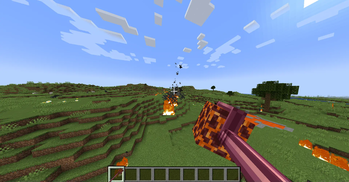
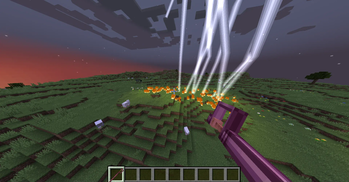
About this Mod

Staff of The King Orange
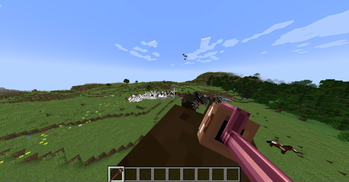
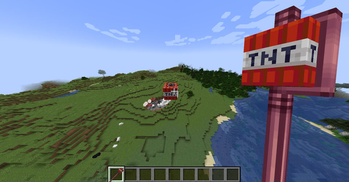
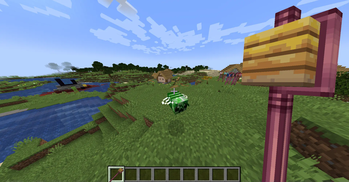
This mod adds the staff from Animation vs Minecraft shorts. Now you can use these staff like the King Orange! Most of the functions are based on the AVM Shorts Episode 33 and relational wiki. Enjoy it!
⭕Obtaining
The staff can only be obtained from creative inventory (combat tab) or use command. Because I haven't figured out how to obtain it yet.
✅Some supported blocks
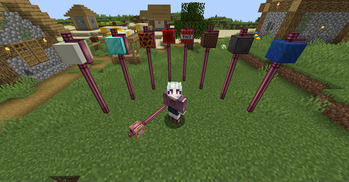
26 different staff functions have been added now.
This is a part of it. More staff you can enjoy in game!
Some content is copied from the AVA's Wiki.
- Diamond Block: Destroy 15x15x15 block in front of player with drops.
- Netherite Block: Destroy 15x15x15 block in front of player without drops.
- Magma Block: Possesses fire aspect properties and allows the wielder to shoot fire charges.
- Lightning Rod: Conjures lightning in the form of thunderbolts.
- TNT: Each swing can eject/launch lit TNT blocks at a distance. Notably, TNT thrown from this staff instantly explodes on contact with a surface or entity.
- Wither Skeleton Head: Fires the different types of Wither projectiles, which yield a powerful blast and likely give the Wither effect.
- Cobblestone: The cobblestone block is able to create and manipulate cobblestone blocks and decorative blocks that use cobblestone, such as slabs and stairs.
- Cobweb Block: Shoots web strings and cobwebs that can be used to impair their opponents in various ways or to swing around. The webs can also be fired at blocks of other staffs to disable the staff entirely. The staff is also capable of firing multiple webs at extremely high speeds as projectiles.
- Oak Log: Able to create and manipulate any kind of block that uses wood, including wooden planks.
- Wool Block: The wool block creates blocks of wool and rugs when used.
- Bone Block: Functions much like bone meal in that it instantly fertilizes crops and saplings in (potentially) an infinite amount.
🔘New command
Syntax:
- /ko_staff normal_block
【Add a normal block to the staff】 - /ko_staff player_head
【Add a custom player head to the staff】
⌨️Keybind
Add an item to the staff:
- Put the staff in one of your hands;
- Put an item in your other hand;
- Press R (default keybind).
Random change the block in the staff:
Change the block in the staff to random block with random block state. Default keybind is B
Toggle continuous mode:
If this mode is enable, firing rate of the staff will become like a machine gun. Default keybind is C
Place the staff in ground:
You can press shift and right click the ground to place it, and right click with empty hand to pick it up. You can also right click with a block to change the block in staff when placed.
⚙️For developer
The mod add 3 new events:
RegisterNormalStaffFunctionEvent:
Register a new staff function with normal block (non player head), it provide a register method. Parameter 'block' is the Block object, parameter 'function' is the function class of the staff (should implement the INormalStaffFunction interface)
RegisterPlayerHeadStaffFunctionEvent:
Due to the particularity of player head, you will use this event to register staff with custom player head. It provide a reigster method. Parameter 'name' is the player name, parameter 'function' is the function class of the staff (should implement the IPlayerHeadStaffFunction interface)
RegisterStaffCoreBlockRenderEvent:
Some block has it special render, it cannot render like normal block (like bell, end gateway, etc.). So you should use this event to add theirs render. Specific parameter can check in this class.
About this mod
Due to personal abilities and the artistic effects of the animation itself, the functions of these staff cannot achieve 100% consistency. Nevertheless, I will still try my best to complete it. Any interesting idea can be brought up to me at any time! Unfortunately, due to being busy with studies, updates may not be very timely.
If you find any bugs, you can provide feedback in Github's Issues. You can also fix it if you have enough ability.
Available Versions
How to Install Staff of The King Orange on Your Server
Order Server
Order a Minecraft Java server with at least 3 GB RAM (4 GB recommended).
Set forge Loader
In the panel under "Egg", select the forge loader and matching Minecraft version (1.20.6).
Install Mod
Open the mod browser in the dashboard and search for "Staff of The King Orange". Click "Install" – done! Alternatively, upload the .jar via SFTP to the /mods folder.
Compatibility
Mod Loaders
Minecraft Versions
1.20.6, 1.20.1
Server-side
✓ RequiredRecommended RAM
4 GB(min. 3 GB)Frequently Asked Questions
Staff of The King Orange server crashes on startup – what to do?
Most common cause: wrong forge version or insufficient RAM. Check the server log (latest.log) for "OutOfMemoryError" or "Mixin" errors. With Mado Hosting: ensure at least 3 GB RAM is allocated and the loader matches the mod version (1.20.6). You can switch loaders with one click in the panel.
Is Staff of The King Orange compatible with forge?
Staff of The King Orange officially supports forge for Minecraft 1.20.6, 1.20.1. The Mado dashboard automatically detects incompatible loader combinations.
Server lagging with Staff of The King Orange – how to optimize performance?
Recommended RAM: 4 GB (per 8 players). Use /spark profiler to check if Staff of The King Orange consumes the most tick time. Common fixes: reduce server view-distance to 8-10, install "performant" or "starlight" as supplementary mods on Forge. With Mado Hosting, your server runs on NVMe SSDs with dedicated CPU cores for minimal latency.
Similar Mods

![[ETF] Entity Texture Features](https://cdn.modrinth.com/data/BVzZfTc1/af683d206d50b05258d865b0d6e4aa2f2cee12f2_96.webp)
![[EMF] Entity Model Features](https://cdn.modrinth.com/data/4I1XuqiY/6e5bbd0d06b1741bfdab6c0cfab6de8fdaf0064c_96.webp)



Rent Modded Server
Install Staff of The King Orange with just one click on your server.