
Stage Equipment Furnitures
Professionals Music Speakers, Custom Songs, Roleplay
Screenshots



About this Mod


- Stage Equipment
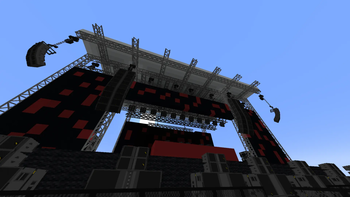
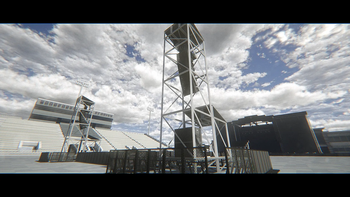
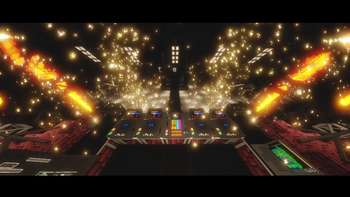
Bring your events to life inside Minecraft with Stage Equipment, a mod designed to expand your building possibilities with realistic stage structures and audio-themed decorations.
Whether you're creating a massive music festival, a small live concert, or a detailed roleplay event, this mod provides a variety of blocks and props that allow you to build immersive and believable stage setups.
Make Sure to use FFmpeg converted Audio Files (MP3, OGG, WAV), otherwise the audio track may crash or may not start.
Features:
- Modular Stage Construction
Build fully customizable stages using scaffolding systems and structural elements. Combine different pieces to create anything from simple platforms to complex professional setups.
- Speakers & Audio Systems
Add realism to your builds with detailed speaker blocks and audio equipment. Perfect for simulating concert environments, DJ booths, or backstage technical areas.
- Stage Equipment
Decorate your builds with technical gear that enhances the overall look of your setup. These elements are designed to fit naturally into performance environments.
- Immersive Decorations
Every block is made to help you create believable scenes, whether it's a live performance, festival stage, or event area.
- Perfect For:
- Roleplay servers
- Creative builders
- Concert and festival recreations
- Showcase
Older Versions Are currently archived.
- Join the Community

- Mod Author
Mod by tizio_bello
Available Versions
How to Install Stage Equipment Furnitures on Your Server
Order Server
Order a Minecraft Java server with at least 3 GB RAM (4 GB recommended).
Set forge Loader
In the panel under "Egg", select the forge loader and matching Minecraft version (1.20.1).
Install Mod
Open the mod browser in the dashboard and search for "Stage Equipment Furnitures". Click "Install" – done! Alternatively, upload the .jar via SFTP to the /mods folder.
Compatibility
Mod Loaders
Minecraft Versions
1.20.1
Server-side
✓ RequiredRecommended RAM
4 GB(min. 3 GB)Frequently Asked Questions
Stage Equipment Furnitures server crashes on startup – what to do?
Most common cause: wrong forge version or insufficient RAM. Check the server log (latest.log) for "OutOfMemoryError" or "Mixin" errors. With Mado Hosting: ensure at least 3 GB RAM is allocated and the loader matches the mod version (1.20.1). You can switch loaders with one click in the panel.
Is Stage Equipment Furnitures compatible with forge?
Stage Equipment Furnitures officially supports forge for Minecraft 1.20.1. The Mado dashboard automatically detects incompatible loader combinations.
Server lagging with Stage Equipment Furnitures – how to optimize performance?
Recommended RAM: 4 GB (per 8 players). Use /spark profiler to check if Stage Equipment Furnitures consumes the most tick time. Common fixes: reduce server view-distance to 8-10, install "performant" or "starlight" as supplementary mods on Forge. With Mado Hosting, your server runs on NVMe SSDs with dedicated CPU cores for minimal latency.
Similar Mods

![[ETF] Entity Texture Features](https://cdn.modrinth.com/data/BVzZfTc1/af683d206d50b05258d865b0d6e4aa2f2cee12f2_96.webp)
![[EMF] Entity Model Features](https://cdn.modrinth.com/data/4I1XuqiY/6e5bbd0d06b1741bfdab6c0cfab6de8fdaf0064c_96.webp)



Rent Modded Server
Install Stage Equipment Furnitures with just one click on your server.