
Stagelight
Make Your Stage Shine - With Redstone!
Screenshots
About this Mod
Stagelight
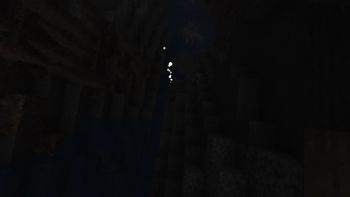
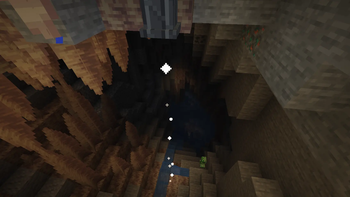
Stagelight adds directional spotlights that actually light what they point at. Stagelight casts a straight beam: it brightens the surfaces along its path and throws a widening cone of light onto the wall or floor where it lands. Great for stage and theater lighting, searchlights, vehicle headlights, or simply putting light exactly where you want it.
It's fully self-contained — pure vanilla + Fabric API, with no render libraries or other dependencies.
Placing & aiming
The spotlight mounts three ways and the beam points out from the face you place it on:
- Hang it under a block → beam shines down
- Stand it on the floor → beam shines up
- Bracket it to a wall → beam shines outward
The beam always travels along an axis — one of the six straight directions. Sneak + right-click re-aims it to the next direction.
Redstone control
Stagelight receives redstone like any other block, and the signal strength sets the beam:
- Stronger signal → a longer, brighter beam (analog, 0–15)
- No signal → off
- Wire it to levers, comparators, daylight sensors, or a redstone-dust line for per-lamp variation
Right-click toggles a full-power override, so a lamp works with no wiring at all. Turn the override off to hand full control to redstone — ideal for sequenced lighting cues and blackouts.
Headlights
Place several spotlights side by side facing the same way and their cones merge into one broad beam — a multi-block headlight or floodlight.
Crafting
[ ] [I] [ ]     I = Iron Ingot
[I] [G] [I]     G = Glowstone
[ ] [R] [ ]     R = Redstone Dust
Compatibility
- Minecraft 1.21.11, Fabric (requires Fabric API).
- No other dependencies — no render or library mods needed.
Modpacks are welcome and you do not need to ask permission. Please do not re-upload or redistribute the mod outside its official pages.
Available Versions
How to Install Stagelight on Your Server
Order Server
Order a Minecraft Java server with at least 3 GB RAM (4 GB recommended).
Set fabric Loader
In the panel under "Egg", select the fabric loader and matching Minecraft version (26.2).
Install Mod
Open the mod browser in the dashboard and search for "Stagelight". Click "Install" – done! Alternatively, upload the .jar via SFTP to the /mods folder.
Compatibility
Mod Loaders
Minecraft Versions
26.2, 1.21.11
Server-side
✓ RequiredRecommended RAM
4 GB(min. 3 GB)Frequently Asked Questions
Stagelight server crashes on startup – what to do?
Most common cause: wrong fabric version or insufficient RAM. Check the server log (latest.log) for "OutOfMemoryError" or "Mixin" errors. With Mado Hosting: ensure at least 3 GB RAM is allocated and the loader matches the mod version (26.2). You can switch loaders with one click in the panel.
Is Stagelight compatible with fabric?
Stagelight officially supports fabric for Minecraft 26.2, 1.21.11. The Mado dashboard automatically detects incompatible loader combinations.
Server lagging with Stagelight – how to optimize performance?
Recommended RAM: 4 GB (per 8 players). Use /spark profiler to check if Stagelight consumes the most tick time. Common fixes: reduce server view-distance to 8-10, install "performant" or "starlight" as supplementary mods on Forge. With Mado Hosting, your server runs on NVMe SSDs with dedicated CPU cores for minimal latency.
Similar Mods

![[ETF] Entity Texture Features](https://cdn.modrinth.com/data/BVzZfTc1/af683d206d50b05258d865b0d6e4aa2f2cee12f2_96.webp)
![[EMF] Entity Model Features](https://cdn.modrinth.com/data/4I1XuqiY/6e5bbd0d06b1741bfdab6c0cfab6de8fdaf0064c_96.webp)



Rent Modded Server
Install Stagelight with just one click on your server.