
StashFinder
StashFinder automatically indexes every chest you open and lets you instantly search for any item across all your chests — with distance, direction, and a full slot preview.
Screenshots
About this Mod
📦 StashFinder
Never forget where you stored it.
StashFinder automatically indexes every chest you open and lets you instantly search for any item across all your chests — with distance, direction, and a full slot preview.
🔍 How It Works
Open a chest → it gets silently recorded. That's it. No setup, no commands, no manual tagging.
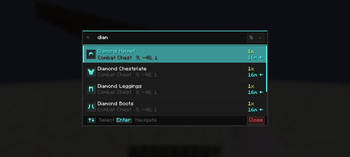
When you need something, press F, type the item name, and StashFinder tells you exactly which chest has it and how far away it is. Press Enter and a 3D waypoint appears directly above the chest, guiding you straight there.
✨ Features
- 🔍 Instant Search — Press
F, type any item name, get results immediately - 📦 Auto Indexing — Every chest you open is recorded silently in the background
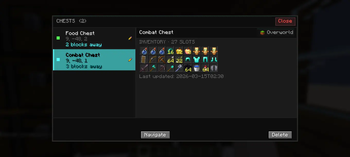
- 🗂️ Chest Records — Press
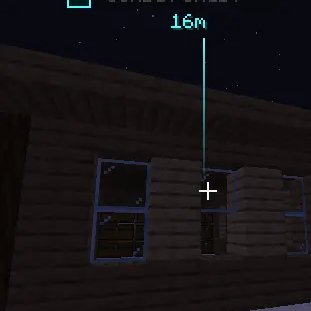
Gto browse all indexed chests with full slot-by-slot preview - 🧭 3D Waypoint — A floating label appears above the target chest in the world, scales with distance and fades on arrival. When off-screen, a directional arrow appears at the screen edge.
- 🔃 Sort Results — Sort by nearest, recently indexed, most items or alphabetical. Saved per world.
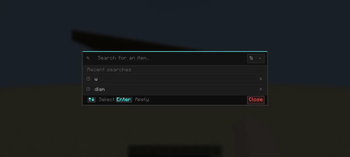
- 🕐 Search History — Recent searches shown when overlay is empty, re-apply with one click
- ✏️ Custom Names — Rename chests like "Weapons" or "Food Storage"
- 🌍 Dimension Aware — Overworld, Nether and End chests tracked separately
- 💾 Per-World Storage — Each world has its own index, nothing gets mixed up
- ⚙️ Settings Screen — Full in-game settings via Mod Menu — toggle indexing, adjust limits, configure notifications
- ⚡ Lightweight — Client-side only, no server required
🖼️ Screenshots


⌨️ Keybinds
| Key | Action |
|---|---|
F |
Open search overlay |
G |
Open chest records |
Keybinds can be changed in Options → Controls → Key Binds → StashFinder.
🌍 Languages
English · Turkish · and 7 more — applied automatically based on your Minecraft language setting.
🔧 Requirements
- Minecraft 1.21.11
- Fabric Loader
≥ 0.18.1 - Fabric API
❓ FAQ
Does this work on servers?
Yes — StashFinder is client-side only. It works on any server without any server-side installation.
Does it support Barrels or Shulker Boxes?
Not yet. Barrel, Shulker Box and Ender Chest support is planned for a future update.
Will it affect performance?
No. Indexing happens only when you open a chest, and search runs entirely on cached local data.
🔮 Planned
- Barrel, Shulker Box and Ender Chest support
- Xaero's Minimap integration
- Chest categories and color tags
Available Versions
How to Install StashFinder on Your Server
Order Server
Order a Minecraft Java server with at least 3 GB RAM (4 GB recommended).
Set fabric Loader
In the panel under "Egg", select the fabric loader and matching Minecraft version (1.21.11).
Install Mod
Open the mod browser in the dashboard and search for "StashFinder". Click "Install" – done! Alternatively, upload the .jar via SFTP to the /mods folder.
Compatibility
Mod Loaders
Minecraft Versions
1.21.11
Server-side
✗ UnsupportedRecommended RAM
4 GB(min. 3 GB)Frequently Asked Questions
StashFinder server crashes on startup – what to do?
Most common cause: wrong fabric version or insufficient RAM. Check the server log (latest.log) for "OutOfMemoryError" or "Mixin" errors. With Mado Hosting: ensure at least 3 GB RAM is allocated and the loader matches the mod version (1.21.11). You can switch loaders with one click in the panel.
Is StashFinder compatible with fabric?
StashFinder officially supports fabric for Minecraft 1.21.11. The Mado dashboard automatically detects incompatible loader combinations.
Server lagging with StashFinder – how to optimize performance?
Recommended RAM: 4 GB (per 8 players). Use /spark profiler to check if StashFinder consumes the most tick time. Common fixes: reduce server view-distance to 8-10, install "performant" or "starlight" as supplementary mods on Forge. With Mado Hosting, your server runs on NVMe SSDs with dedicated CPU cores for minimal latency.
Similar Mods




Rent Modded Server
Install StashFinder with just one click on your server.