Mellow
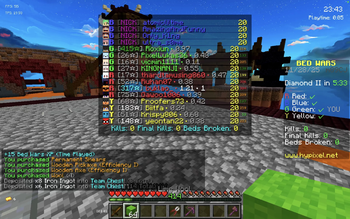
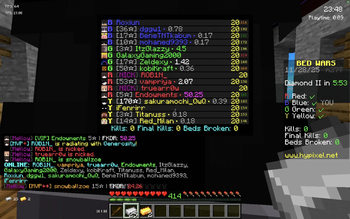
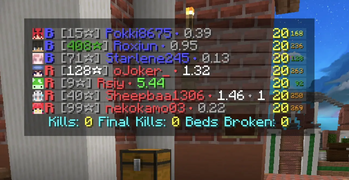
BedWars Utility mod, check Hypixel Stats and Tags Directly in Tab, no API Key required!
Screenshots
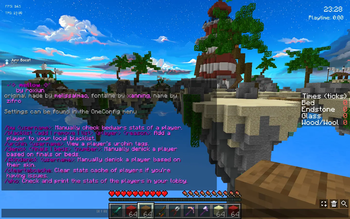

About this Mod
Mellow

Features

No API key required for core features
View Bedwars stats in the tablist, similar to Lilith.
See other players' ping. Recommended to use with VanillaHUD
to view ping numerically instead of as bars.Supports Urchin API Tags
Check any player's BedWars stats with
/bwSupports skin denicking and finals/beds denicking.
Check Classic Duels stats of your opponent when you queue a Classic duels match
Pretty & Aesthetic
Usage
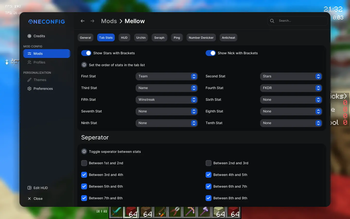
All settings can be configured through OneConfig (press Right Shift).
Commands
To display help command type /mellow
To check the stats of players in your game, type /who in-game, or enable Auto Who in settings
To check an individual player’s BedWars stats, type /bw <username>
To add a player to your blacklist, type /blacklist add <username>
To skin denick type /skindenick <username>
To use the number denicker add your Aurora API key
- You can obtain one here
- After setup, denicking happens automatically during games, but you can also manually run:
/denick <finals | beds> <number>
Known issues
- Occasionally stats fail to fetch due to rate limits. You can either try switching the stats provider in settings or try running
/whoagain after a while. - Does not work on some VPNs
If any other issues or bugs are found please report them here
Credits
Original Creator: melissalmao - Melissa (fwrina)
Fontaine: xanning
Mellow (Fork): Roxiun
Available Versions
How to Install Mellow on Your Server
Order Server
Order a Minecraft Java server with at least 3 GB RAM (4 GB recommended).
Set forge Loader
In the panel under "Egg", select the forge loader and matching Minecraft version (1.8.9).
Install Mod
Open the mod browser in the dashboard and search for "Mellow". Click "Install" – done! Alternatively, upload the .jar via SFTP to the /mods folder.
Compatibility
Mod Loaders
Minecraft Versions
1.8.9
Server-side
✗ UnsupportedRecommended RAM
4 GB(min. 3 GB)Frequently Asked Questions
Mellow server crashes on startup – what to do?
Most common cause: wrong forge version or insufficient RAM. Check the server log (latest.log) for "OutOfMemoryError" or "Mixin" errors. With Mado Hosting: ensure at least 3 GB RAM is allocated and the loader matches the mod version (1.8.9). You can switch loaders with one click in the panel.
Is Mellow compatible with forge?
Mellow officially supports forge for Minecraft 1.8.9. The Mado dashboard automatically detects incompatible loader combinations.
Server lagging with Mellow – how to optimize performance?
Recommended RAM: 4 GB (per 8 players). Use /spark profiler to check if Mellow consumes the most tick time. Common fixes: reduce server view-distance to 8-10, install "performant" or "starlight" as supplementary mods on Forge. With Mado Hosting, your server runs on NVMe SSDs with dedicated CPU cores for minimal latency.
Similar Mods




![[ETF] Entity Texture Features](https://cdn.modrinth.com/data/BVzZfTc1/af683d206d50b05258d865b0d6e4aa2f2cee12f2_96.webp)
![[EMF] Entity Model Features](https://cdn.modrinth.com/data/4I1XuqiY/6e5bbd0d06b1741bfdab6c0cfab6de8fdaf0064c_96.webp)
Rent Modded Server
Install Mellow with just one click on your server.