
StickerBomb!
Add an *explosive* splash of colour to your Minecraft world with stickers! decorate your builds or graffiti your friends' with these sticky crowd favorites!
Screenshots
About this Mod

A mod that adds stickers! (but no bombs)
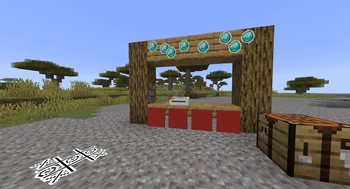
Stickers are small textures that you can place in the world to add more life, decor, and character to your builds. You can also play games like tic-tac-toe with stickers!
Content
Stickers! (obviously)
Stickers can be crafted at the Sticker Printer. When holding a sticker, you'll get a preview of how the sticker will look in-world before you place it.
For server admins, you can use the /give command with the component sticker_data={isAdmin=true} to make admin stickers, which can't be removed unless you're in creative mode.
There's also temporary stickers, which only last for 30 seconds, and do not drop as items when removed (either by a scraper or by timing out)
Sticker Scraper
This item simply alows you to remove stickers. Right-clicking the face of a block with the scraper will remove all stickers attached to that face of the block.
The sticker scraper currently has no recipe.
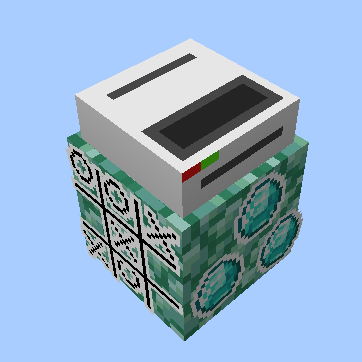
Sticker Printer
Lets you turn blank stickers into printed stickers. Place any dye into the top slot, and a blank sticker (crafted with paper and a slime ball) into the bottom slot. Then, type the ID of the sticker in the middle, and congratz! You have yourself a brand new sticker.
For server admins, you can make a Temporary Sticker Printer, which only prints temporary stickers. Using the /give command, add the component custom_data={"temp"=true} to the sticker printer, and then place it. Any stickers made from that printer will be temporary.
Sticker printers currently have no recipe.
Available Versions
How to Install StickerBomb! on Your Server
Order Server
Order a Minecraft Java server with at least 3 GB RAM (4 GB recommended).
Set fabric Loader
In the panel under "Egg", select the fabric loader and matching Minecraft version (1.21.8).
Install Mod
Open the mod browser in the dashboard and search for "StickerBomb!". Click "Install" – done! Alternatively, upload the .jar via SFTP to the /mods folder.
Compatibility
Mod Loaders
Minecraft Versions
1.21.8
Server-side
✓ RequiredRecommended RAM
4 GB(min. 3 GB)Frequently Asked Questions
StickerBomb! server crashes on startup – what to do?
Most common cause: wrong fabric version or insufficient RAM. Check the server log (latest.log) for "OutOfMemoryError" or "Mixin" errors. With Mado Hosting: ensure at least 3 GB RAM is allocated and the loader matches the mod version (1.21.8). You can switch loaders with one click in the panel.
Is StickerBomb! compatible with fabric?
StickerBomb! officially supports fabric for Minecraft 1.21.8. The Mado dashboard automatically detects incompatible loader combinations.
Server lagging with StickerBomb! – how to optimize performance?
Recommended RAM: 4 GB (per 8 players). Use /spark profiler to check if StickerBomb! consumes the most tick time. Common fixes: reduce server view-distance to 8-10, install "performant" or "starlight" as supplementary mods on Forge. With Mado Hosting, your server runs on NVMe SSDs with dedicated CPU cores for minimal latency.
Similar Mods

![[ETF] Entity Texture Features](https://cdn.modrinth.com/data/BVzZfTc1/af683d206d50b05258d865b0d6e4aa2f2cee12f2_96.webp)
![[EMF] Entity Model Features](https://cdn.modrinth.com/data/4I1XuqiY/6e5bbd0d06b1741bfdab6c0cfab6de8fdaf0064c_96.webp)



Rent Modded Server
Install StickerBomb! with just one click on your server.