![Stop Unloading My Resourcepacks [SUMR]](https://cdn.modrinth.com/data/awyrq9la/3f8a568c81c4a60457989ec7387158cbc392783c.png)
Stop Unloading My Resourcepacks [SUMR]
Prevents the game from disabling all resourcepacks if a shader related error occurs. Also adds a hot-reload key (F3 + R)
Screenshots
About this Mod
Stop Unloading My Resourcepacks
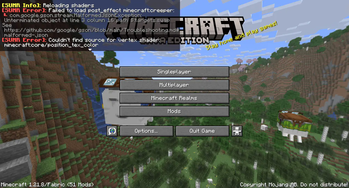
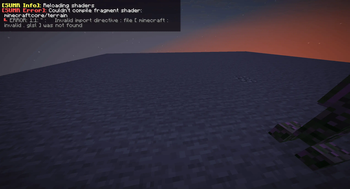
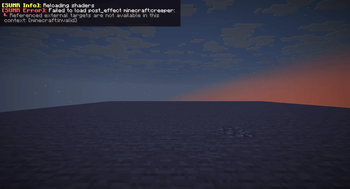
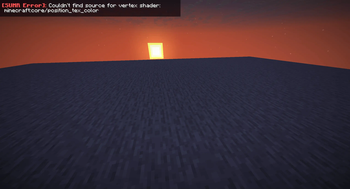
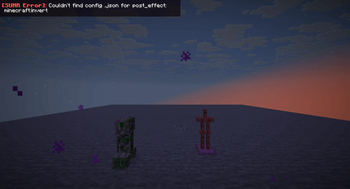
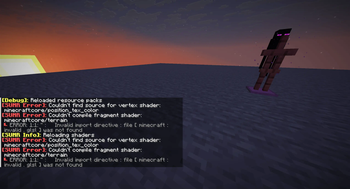
Prevents the game from disabling all resourcepacks if a shader-related error occurs. Instead, errors will be displayed in-game, can be configured to show errors in chat, a box in the top left, or both
This mod also adds a few QOL features for developing shaders, read more below
Things this mod prevents from disabling resourcepacks
The following things in vanilla will forcibly disable all resourcepacks, with this mod installed these will use a fallback and show any errors in-game and the output log:
- Shader program compilation errors
- Missing shader programs
- Shader linking errors
- Invalid or missing post_effect jsons
- post_effects that reference invalid targets
For minecrafts builtin shaders, the mod will attempt to load the default ones as a fallback if an error occurs. For modded shaders, a dummy shader will be used as a fallback which will make any objects using that shader invisible
Additional features
- Shader hot-reload keybind (F3 + R) which just reloads shaders, much quicker than a full resource reload
- Works in the title screen, not just when in a world!
- Adds better errors for some things. For example, when importing a non-existent include shader the gane will produce a proper error rather than throwing a null pointer exception
- Added an option to disable shader linker info logs
- Off by default but can be enabled if it causes a ton of log spam (like it does on my machine)
License
Stop Unloading My Resourcepacks by ioblackshaw (a.k.a. Enchanted_Games) is licensed under CC BY-NC 4.0


Available Versions
How to Install Stop Unloading My Resourcepacks [SUMR] on Your Server
Order Server
Order a Minecraft Java server with at least 3 GB RAM (4 GB recommended).
Set fabric Loader
In the panel under "Egg", select the fabric loader and matching Minecraft version (26.1.2).
Install Mod
Open the mod browser in the dashboard and search for "Stop Unloading My Resourcepacks [SUMR]". Click "Install" – done! Alternatively, upload the .jar via SFTP to the /mods folder.
Compatibility
Mod Loaders
Minecraft Versions
26.1.2, 26.2-snapshot-1, 26.1.1 (+25 more)
Server-side
✗ UnsupportedRecommended RAM
4 GB(min. 3 GB)Frequently Asked Questions
Stop Unloading My Resourcepacks [SUMR] server crashes on startup – what to do?
Most common cause: wrong fabric version or insufficient RAM. Check the server log (latest.log) for "OutOfMemoryError" or "Mixin" errors. With Mado Hosting: ensure at least 3 GB RAM is allocated and the loader matches the mod version (26.1.2). You can switch loaders with one click in the panel.
Is Stop Unloading My Resourcepacks [SUMR] compatible with fabric and neoforge?
Stop Unloading My Resourcepacks [SUMR] officially supports fabric, neoforge for Minecraft 26.1.2, 26.2-snapshot-1, 26.1.1. The Mado dashboard automatically detects incompatible loader combinations.
Server lagging with Stop Unloading My Resourcepacks [SUMR] – how to optimize performance?
Recommended RAM: 4 GB (per 8 players). Use /spark profiler to check if Stop Unloading My Resourcepacks [SUMR] consumes the most tick time. Common fixes: reduce server view-distance to 8-10, install "performant" or "starlight" as supplementary mods on Forge. With Mado Hosting, your server runs on NVMe SSDs with dedicated CPU cores for minimal latency.
Similar Mods




![[ETF] Entity Texture Features](https://cdn.modrinth.com/data/BVzZfTc1/af683d206d50b05258d865b0d6e4aa2f2cee12f2_96.webp)
![[EMF] Entity Model Features](https://cdn.modrinth.com/data/4I1XuqiY/6e5bbd0d06b1741bfdab6c0cfab6de8fdaf0064c_96.webp)
Rent Modded Server
Install Stop Unloading My Resourcepacks [SUMR] with just one click on your server.
Details
- License
- Creative Commons Attribution Non Commercial 4.0 International
- Server-side
- Unsupported