
Story Chat
A mod that modifies the chat, offering an interesting look and useful features with customizable settings. Perfect for creators of story-driven (and other) maps.
Screenshots
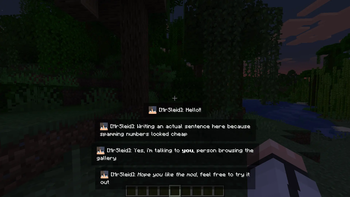
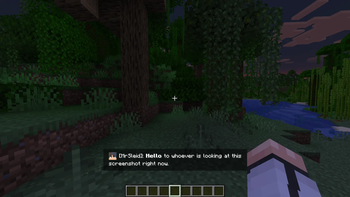
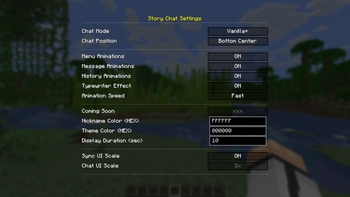
About this Mod
Story Chat
En
Story Chat is a lightweight and functional interface mod for NeoForge 1.21.1 that completely overhauls the vanilla Minecraft chat. It modernizes the default text display, improves readability, and adds deep visual customization, making it an excellent addition to any custom modpack, roleplay (RP) server, or everyday gameplay.
What the Mod Changes
- Smooth Animations: Messages fade in smoothly instead of abruptly snapping into existence.
- HEX Color Integration: Support for direct HEX code input, allowing precise color configuration for UI elements and nicknames without being locked into predefined templates.
- Config & History Screens: Built-in settings menu and a dedicated, scrollable message history window bound to custom hotkeys.
- Independent Scale: A standalone scaling engine that perfectly resizes text, backgrounds, and skin heads with zero FPS drops.
- Sleek Input Interface: A completely overhauled, modern, and clean text input box that stays out of the way.
Compatibility
- Warning: This mod changes core chat rendering elements. It will likely conflict with other modifications that significantly alter or overhaul the in-game chat.
Permissions
- Modpacks: You are very welcome to include this mod in your modpacks. Linking back to this page is appreciated so users can always find the latest updates and help the project grow!
- Videos/Content: You are free to use this mod in your videos, streams, or screenshots.
- Redistribution: Please do not re-upload this mod to other websites. Always link to this official page.
- Modifications: Do not modify, decompile, or create "forks" of this mod without my permission.
- Disclaimer: I am not responsible for any issues or conflicts that may arise from using this mod in third-party modpacks or custom maps.
RU
Story Chat — это легкий и функциональный интерфейсный мод для NeoForge 1.21.1, который полностью перерабатывает стандартный чат Minecraft. Он модернизирует отображение текста, повышает общую читаемость диалогов и добавляет визуальную настройку, благодаря чему отлично подходит как для повседневной игры в любых сборках, так и для ролевых (RP) серверов.
Что меняет мод
- Плавные анимации: Текст появляется со сглаженным затуханием вместо резкого ванильного вывода.
- Интеграция HEX-кодов: Поддержка прямого ввода HEX-значений для точной настройки цвета элементов интерфейса и никнеймов без привязки к жестким шаблонам.
- Настройки и Экран истории: Внутриигровое меню конфигурации и выделенное окно истории сообщений, открываемое по горячей клавише.
- Кастомный масштаб: Независимый движок изменения размера текста, фонов и голов скинов без просадок FPS и конфликтов с ванильным HUD.
- Современная строка ввода: Полностью переработанное, аккуратное поле ввода текста, которое не загромождает экран.
Совместимость
- Внимание: Мод изменяет базовые элементы рендеринга чата. Он будет конфликтовать с другими модификациями, которые значительно меняют или перерабатывают внутриигровой чат.
Разрешения
- Сборки (Модпаки): Вы можете свободно включать этот мод в любые сборки. Буду благодарен за ссылку на эту страницу, чтобы игроки могли легко найти последние обновления и поддержать проект!
- Контент: Вы можете свободно использовать мод в своих видео, стримах или скриншотах.
- Распространение: Пожалуйста, не перезаливайте мод на сторонние сайты. Всегда используйте только официальную ссылку.
- Модификация: Запрещается изменять, декомпилировать или создавать «форки» этого мода без моего разрешения.
- Отказ от ответственности: Я не несу ответственности за любые проблемы или конфликты, возникающие при использовании мода в сторонних сборках или пользовательских картах.
Available Versions
How to Install Story Chat on Your Server
Order Server
Order a Minecraft Java server with at least 3 GB RAM (4 GB recommended).
Set neoforge Loader
In the panel under "Egg", select the neoforge loader and matching Minecraft version (1.21.1).
Install Mod
Open the mod browser in the dashboard and search for "Story Chat". Click "Install" – done! Alternatively, upload the .jar via SFTP to the /mods folder.
Compatibility
Mod Loaders
Minecraft Versions
1.21.1
Server-side
✗ UnsupportedRecommended RAM
4 GB(min. 3 GB)Frequently Asked Questions
Story Chat server crashes on startup – what to do?
Most common cause: wrong neoforge version or insufficient RAM. Check the server log (latest.log) for "OutOfMemoryError" or "Mixin" errors. With Mado Hosting: ensure at least 3 GB RAM is allocated and the loader matches the mod version (1.21.1). You can switch loaders with one click in the panel.
Is Story Chat compatible with neoforge?
Story Chat officially supports neoforge for Minecraft 1.21.1. The Mado dashboard automatically detects incompatible loader combinations.
Server lagging with Story Chat – how to optimize performance?
Recommended RAM: 4 GB (per 8 players). Use /spark profiler to check if Story Chat consumes the most tick time. Common fixes: reduce server view-distance to 8-10, install "performant" or "starlight" as supplementary mods on Forge. With Mado Hosting, your server runs on NVMe SSDs with dedicated CPU cores for minimal latency.
Similar Mods




Rent Modded Server
Install Story Chat with just one click on your server.