
Streamer.craft
Trigger Streamer.bot Actions from in-game!
Screenshots
About this Mod
Streamer.craft
Trigger Streamer.bot Actions from inside Minecraft! Streamer.bot is a powerful stream automation tool, and this mod allows you to trigger those automations using the in-game chat!
Some examples to provide inspiration:
- Change scenes in OBS when triggering a trap
- Send a message in chat when you hit a target block
- Start a poll when it gets dark at night.
Setup guide
Video setup guide:
https://www.youtube.com/watch?v=-GzuuOlfyGE
Step 1: Install the mod
There are versions of this mod available for NeoForge and Fabric. You can download the latest version of the mod from the versions page
Step 2: Set up Streamer.bot
This mod is designed to work with the stream automation tool Streamer.bot. Download the program and unzip it.
The settings needed to connect Streamer.bot to the mod are as follows:
- Under the "Servers/Clients" tab, click "HTTP Server" and check Start Server (I'd also recommend checking "Auto Start" so the server starts automatically with Streamer.bot)
Take note of the IP and port listed in that menu, if those are changed from the defaults you'll need to update the mod's config file.
To connect to a Twitch or YouTube chat, sign in to your account in the Platforms tab.
To connect to OBS, follow these steps to enable OBS's websocket server and add it to Streamer.bot
Step 3: Make sure it is all working
Once you have Streamer.bot set up, start the program and make sure the HTTP server is running. Then, start Minecraft with the mod installed.
You'll also want to create at least one Action in Streamer.bot.
Load a world and type /streamercraft list in the chat. If everything works, you should see a list of Streamer.bot Actions in the chat.
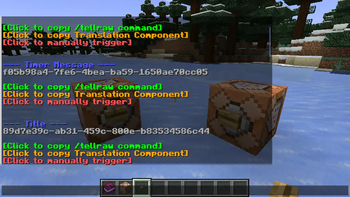
Try pressing the "Click to manually trigger" button to make sure you can trigger actions as well.
All Commands
/streamercraft list- List all available actions/streamercraft list <filter>- List all available actions that contain the filter/streamercraft do <action-id>- Trigger a specific action/streamercraft refresh- Refresh the list of actions
Available Versions
How to Install Streamer.craft on Your Server
Order Server
Order a Minecraft Java server with at least 3 GB RAM (4 GB recommended).
Set fabric Loader
In the panel under "Egg", select the fabric loader and matching Minecraft version (1.21.10).
Install Mod
Open the mod browser in the dashboard and search for "Streamer.craft". Click "Install" – done! Alternatively, upload the .jar via SFTP to the /mods folder.
Compatibility
Mod Loaders
Minecraft Versions
1.21.10, 1.21.9, 1.21.8 (+6 more)
Server-side
~ OptionalRecommended RAM
4 GB(min. 3 GB)Frequently Asked Questions
Streamer.craft server crashes on startup – what to do?
Most common cause: wrong fabric version or insufficient RAM. Check the server log (latest.log) for "OutOfMemoryError" or "Mixin" errors. With Mado Hosting: ensure at least 3 GB RAM is allocated and the loader matches the mod version (1.21.10). You can switch loaders with one click in the panel.
Is Streamer.craft compatible with fabric and neoforge and paper?
Streamer.craft officially supports fabric, neoforge, paper for Minecraft 1.21.10, 1.21.9, 1.21.8. The Mado dashboard automatically detects incompatible loader combinations.
Server lagging with Streamer.craft – how to optimize performance?
Recommended RAM: 4 GB (per 8 players). Use /spark profiler to check if Streamer.craft consumes the most tick time. Common fixes: reduce server view-distance to 8-10, install "performant" or "starlight" as supplementary mods on Forge. With Mado Hosting, your server runs on NVMe SSDs with dedicated CPU cores for minimal latency.
Similar Mods




![[ETF] Entity Texture Features](https://cdn.modrinth.com/data/BVzZfTc1/af683d206d50b05258d865b0d6e4aa2f2cee12f2_96.webp)
![[EMF] Entity Model Features](https://cdn.modrinth.com/data/4I1XuqiY/6e5bbd0d06b1741bfdab6c0cfab6de8fdaf0064c_96.webp)
Rent Modded Server
Install Streamer.craft with just one click on your server.