
Structure Block Unlimiter
A lightweight utility mod that uncaps the Structure Block's size and render distance, transforming it into a powerful tool for large-scale building.
Screenshots
About this Mod
A simple, quality-of-life mod that removes the vanilla restrictions on Minecraft's Structure Block, unlocking its true potential for builders, server admins, and creative minds. Save, load, and manage massive structures with ease and precision!
Features
Have you ever tried to save your megastructure, sprawling city, or complex redstone contraption, only to be stopped by the frustrating 48x48x48 block limit? This mod fixes that and adds powerful new tools for on-the-fly manipulation.
Fully Configurable Size Limit: The maximum size of a structure is increased from a tiny
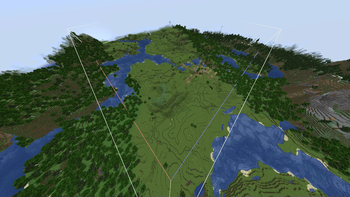
48x48x48to a massive512x512x512blocks by default. You can change this limit in the config file to whatever your machine can handle!Extended Render Distance: The structure's bounding box is now visible from much further away, increased from
96to256blocks by default (also configurable). No more running back and forth to see if your alignment is correct."Re-open Last" Keybind: A configurable keybind (default:
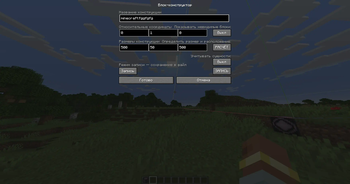
G) allows you to instantly re-open the GUI of the last Structure Block you interacted with, no matter where you are in the world. A huge time-saver!Dynamic Grid Resizing (New!): Intuitively resize the structure area without opening the GUI! Simply look at a face of the bounding box and use the new keybinds (default:
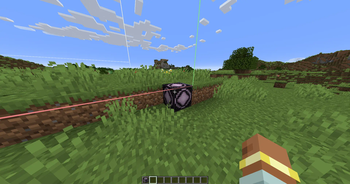
Up/Down Arrows) to push it away or pull it closer. It works from both inside and outside the box.Dynamic Grid Shifting (New!): Nudge the entire structure area one block at a time. A new keybind (default:
V) moves the bounding box in the direction you are looking, allowing for precise, quick positioning.Client + Server: This mod is required on both the client and the server to enable all features.
Lightweight & Vanilla-Friendly: No new blocks, no new items. Just powerful tweaks to a vanilla feature that make it infinitely more useful.
How It Looks
Increased Bounding Box Render Distance
See your entire project outline from afar.

<br>
New "Re-open Last" Keybind
Instantly access the Structure Block GUI from anywhere.


Configuration
This mod is fully configurable. After running the game once, a config file will be generated in config/structure_block_unlimiter-common.toml.
#The maximum size (per axis) that a Structure Block can save or load.
#Vanilla default is 48.
# Default: 512
# Range: > 1
max_structure_size = 512

#The distance in blocks from which the structure's bounding box is visible.
#Vanilla default is 96.
# Default: 256
# Range: > 16
render_distance = 256
The keybind can be changed in the standard Minecraft controls menu, under the category "Structure Block Unlimiter".
Available Versions
How to Install Structure Block Unlimiter on Your Server
Order Server
Order a Minecraft Java server with at least 3 GB RAM (4 GB recommended).
Set neoforge Loader
In the panel under "Egg", select the neoforge loader and matching Minecraft version (1.21.8).
Install Mod
Open the mod browser in the dashboard and search for "Structure Block Unlimiter". Click "Install" – done! Alternatively, upload the .jar via SFTP to the /mods folder.
Compatibility
Mod Loaders
Minecraft Versions
1.21.8, 1.21.7, 1.21.6 (+6 more)
Server-side
✗ UnsupportedRecommended RAM
4 GB(min. 3 GB)Frequently Asked Questions
Structure Block Unlimiter server crashes on startup – what to do?
Most common cause: wrong neoforge version or insufficient RAM. Check the server log (latest.log) for "OutOfMemoryError" or "Mixin" errors. With Mado Hosting: ensure at least 3 GB RAM is allocated and the loader matches the mod version (1.21.8). You can switch loaders with one click in the panel.
Is Structure Block Unlimiter compatible with neoforge?
Structure Block Unlimiter officially supports neoforge for Minecraft 1.21.8, 1.21.7, 1.21.6. The Mado dashboard automatically detects incompatible loader combinations.
Server lagging with Structure Block Unlimiter – how to optimize performance?
Recommended RAM: 4 GB (per 8 players). Use /spark profiler to check if Structure Block Unlimiter consumes the most tick time. Common fixes: reduce server view-distance to 8-10, install "performant" or "starlight" as supplementary mods on Forge. With Mado Hosting, your server runs on NVMe SSDs with dedicated CPU cores for minimal latency.
Similar Mods




Rent Modded Server
Install Structure Block Unlimiter with just one click on your server.