
Structure Item Mod
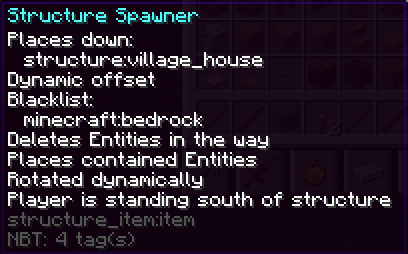
A NBT-tag driven item that places structures on right-click
Screenshots
About this Mod
This mod is intended for modpack creators that want to give their players a possibility to spawn (custom) structures at will.
The structure as well as the placement option are set via NBT-tags.
Usage:
This is an item capable of placing structures on right click:
structure_item:item{offset:{X:0,Y:5,Z:0},structure:"structure:mine",allowedOn:"minecraft:stone",blacklist:["minecraft:bedrock"],replaceEntities:0,placeEntities:0,rotate:"north"}
1.21:
structure_item:item[minecraft:custom_data={offset:{X:0,Y:5,Z:0},structure:"structure:mine",allowedOn:"minecraft:stone",blacklist:["minecraft:bedrock"],replaceEntities:0,placeEntities:0,rotate:"north"}]
If the clicked block is Stone, no Bedrock and no entity is in the way, it will place the structure "structure:mine" excluding (potentially) saved Entities moved up by 5 blocks, rotating it so that the southern side is directed towards the clicked on blockface. (The low coordinate corner will start 5 blocks above the block you would have placed if this item were a block).
If you leave out "structure", it won't work.
If you leave out "offset", it will place the structure at the block you clicked at, expanding in your view direction, up and to both sides. if you look up or down, it'll place the structure centred above or below the block you clicked at.
If you leave out "blacklist", it will replace anything.
If you leave out "allowedOn", it will allow "placement" on any block.
If you leave out "replaceEntities" or set it to 1, it will allow placement even if non player entities are in the way of blocks (non structure voids). Those will get deleted.
If you leave out "placeEntities" or set it to 1, entities saved in the structure will be placed.
If you leave out "rotate", the structure will not be rotated.
You can use whitelist instead of blacklist to whitelist the replacement of certain blocks instead of blacklisting it. If both are specified, blacklist takes precedence and whitelist is ignored.
offsetV2:
You can replace offset:{X:0,Y:5,Z:0} with e.g. offsetV2:{x:"~",y:"~-sizeY/2",z:"~"} to get the structure placed in front of the clicked on block, centred in up and down direction. Behaving like offset was left out, but moved down by halve the hight. For side-faceing blockfaces, that means it's centred in y direction as well.
offsetV2:{x:"~",y:"~dirSelect(dir,0,0,-sizeY/2,-sizeY/2,-sizeY/2,-sizeY/2)",z:"~"} will always place the structure centred behind (including) the blockface you clicked at.
offsetV2 allows arbitrary mathematical expressions using following operators:
- Addition: 2 + 2
- Subtraction: 2 - 2
- Multiplication: 2 * 2
- Division: 2 / 2
- Exponentation: 2 ^ 2
- Unary Minus,Plus (Sign Operators): +2 - (-2)
- Modulo: 2 % 2
And following functions:
- abs: absolute value
- acos: arc cosine
- asin: arc sine
- atan: arc tangent
- cbrt: cubic root
- ceil: nearest upper integer
- cos: cosine
- cosh: hyperbolic cosine
- exp: euler's number raised to the power (e^x)
- floor: nearest lower integer
- log: logarithmus naturalis (base e)
- log10: logarithm (base 10)
- log2: logarithm (base 2)
- sin: sine
- sinh: hyperbolic sine
- sqrt: square root
- tan: tangent
- tanh: hyperbolic tangent
- signum: signum function
- dirSelect: dirSelect(dir, down, up, north, south, west, east) with the directions being expressions to evaluate in case of a click on that block face.
And following variables:
- pi, π: π
- e: Euler constant
- φ: golden Ratio
- dir: variable indicating the clicked on blockface, for use in dirSelect
- sizeX: size of Structure in x direction
- sizeY: size of Structure in y direction
- sizeZ: size of Structure in z direction
Error handling:
Errors made by the items' creator will be displayed in Chat, any errors made by the user will produce a fat massage in the middle of the screen.
Model & Localization:
If you use this mod, you may want to change the model of the item (currently = stick) and edit the language file.
Available Versions
How to Install Structure Item Mod on Your Server
Order Server
Order a Minecraft Java server with at least 3 GB RAM (4 GB recommended).
Set fabric Loader
In the panel under "Egg", select the fabric loader and matching Minecraft version (1.21.4).
Install Mod
Open the mod browser in the dashboard and search for "Structure Item Mod". Click "Install" – done! Alternatively, upload the .jar via SFTP to the /mods folder.
Compatibility
Mod Loaders
Minecraft Versions
1.21.4, 1.21.1, 1.21 (+2 more)
Server-side
✓ RequiredRecommended RAM
4 GB(min. 3 GB)Frequently Asked Questions
Structure Item Mod server crashes on startup – what to do?
Most common cause: wrong fabric version or insufficient RAM. Check the server log (latest.log) for "OutOfMemoryError" or "Mixin" errors. With Mado Hosting: ensure at least 3 GB RAM is allocated and the loader matches the mod version (1.21.4). You can switch loaders with one click in the panel.
Is Structure Item Mod compatible with fabric?
Structure Item Mod officially supports fabric for Minecraft 1.21.4, 1.21.1, 1.21. The Mado dashboard automatically detects incompatible loader combinations.
Server lagging with Structure Item Mod – how to optimize performance?
Recommended RAM: 4 GB (per 8 players). Use /spark profiler to check if Structure Item Mod consumes the most tick time. Common fixes: reduce server view-distance to 8-10, install "performant" or "starlight" as supplementary mods on Forge. With Mado Hosting, your server runs on NVMe SSDs with dedicated CPU cores for minimal latency.
Similar Mods




![[ETF] Entity Texture Features](https://cdn.modrinth.com/data/BVzZfTc1/af683d206d50b05258d865b0d6e4aa2f2cee12f2_96.webp)
![[EMF] Entity Model Features](https://cdn.modrinth.com/data/4I1XuqiY/6e5bbd0d06b1741bfdab6c0cfab6de8fdaf0064c_96.webp)
Rent Modded Server
Install Structure Item Mod with just one click on your server.