
Stuff and Things
A compilation of new blocks and recipes for Minecraft. Layered Blocks, Slab Blocks, Light Blocks and Thatch / Mulch blocks to be used in custom Recipes.
Screenshots
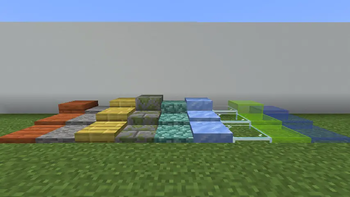
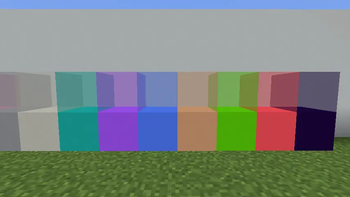
About this Mod
Stuff and Things
A Minecraft mod that adds Stuff and Things for NeoForge 1.21.1
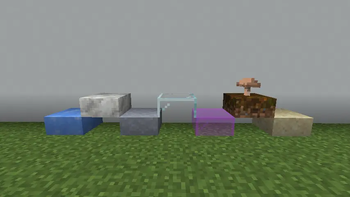
Layered Blocks
Imagine your favorite Minecraft block but it acts like Snow Layers and it can be water logged!
Glass and Ice like blocks drop with silk touch, ALL Layered blocks drop with a Create Wrench.
Shift while breaking a layered block and only the top layer will break, without shift, the entire stack will break.
That's right, Layered Blocks are here, and for 1.21.1 Minecraft. Missing a block, let us know and we'll add it!
Layers can be stacked up to 7, when you place the 8th layer, it converts to the full block variant of itself.
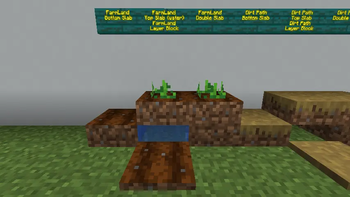
Slab Blocks
Vanilla Minecraft is missing slab variants of many blocks, so we've introduced our own. Grass, Dirt, Obsidian, Netherrack and more.
These work like normal slabs and even blocks like Grass and Dirt can have plants on them even if it's the top slab only!
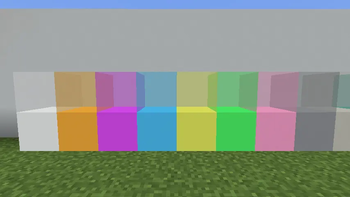
Light Blocks & Glass Light Blocks
All 16 colors of Light Blocks and Glass Light Blocks.
- Light Blocks are crafted from Glow Ink Sacs and Concrete
- Glass Light Blocks are crafted from Glow Ink Sacs and Stained Glass
Grate Blocks
Industrial Iron, Iron and Andesite Grate Blocks crafted on the stone cutter
Grate Blocks can be waterlogged, this allows them to function like Leaf blocks for soil irrigation and more.
Iron Plating
Like the Industrial Iron Block from Create, but with an Iron Texture (Lighter than Industrial Iron)
Netherite Dust (requires Create)
Create a Netherite factory by creating Netherite Dust from Obsidian Powder and Cinder flour
Other Recipes
- Calcite: Mix Diorite & Quartz Blocks with Lava
- Tuff: Mix Andesite and Diorite with Lava
- Lapis Lazuli: Mix Quartz and Blue Dye
- Cobblestone: Create lag friendly cobblestone by mixing Lava and Water
- Magma Blocks: Create Magma Blocks using a Create Mod Sequenced Assembly featuring Lava and Presses
Sequenced Assembly Recipes for Create
CREATE NOT REQUIRED!!!
Renewable Coal
Step 1: Create Thatch from 9 dead bushes
Step 2: Place Thatch in the world and wait for it to age into Aged Thatch, then into Old Thatch (or deploy Create Experience Nuggets to manually age them!)
Step 3: Create Mulch from Old Thatch and Mud
Step 4: Compact 4x Mulch to Compressed Mulch
Step 5: Deploy a Create Experience Nugget on the Compressed Mulch to age it to Aged Compressed Mulch
Step 6: Spout 500mb of Lava on the Aged Compressed Mulch and Press it 2x (repeat 5x)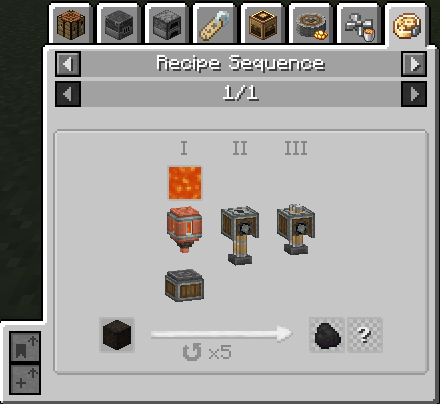
Renewable Diamond
Step 1: Create Compressed Coal blocks by super heating Compressed Coal
Step 2: Spout 500mb of Lava on the Compressed Coal Block and Press it 2x (repeat 5x)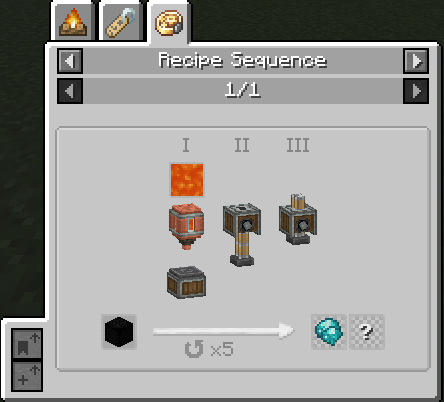
Renewable Netherite Scrap
Step 1: Create Netherite Dust from Powdered Obsidian and Cinder Flour
Step 2: Deploy a Nugget of Experience, 500mb of Lava and press (repat 5x)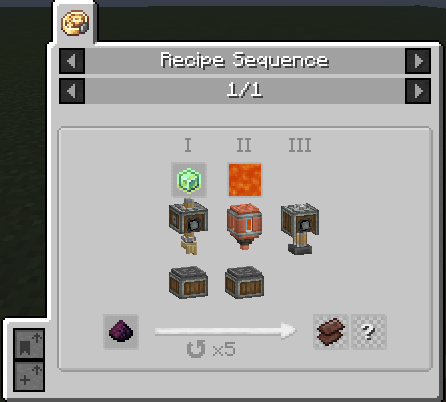
Intermediate Items
These items are the byproduct of sequenced assembly and not obtainable directly in-game.
- Hot Aged Compressed Mulch

- Hot Compressed Coal Block

- Unprocessed Netherite Dust

💬 Need Help?
If you have any questions, suggestions, or would like to share your creations,
join us on Discord — we'd love to see what you're building!
Available Versions
How to Install Stuff and Things on Your Server
Order Server
Order a Minecraft Java server with at least 3 GB RAM (4 GB recommended).
Set neoforge Loader
In the panel under "Egg", select the neoforge loader and matching Minecraft version (1.21.1).
Install Mod
Open the mod browser in the dashboard and search for "Stuff and Things". Click "Install" – done! Alternatively, upload the .jar via SFTP to the /mods folder.
Compatibility
Mod Loaders
Minecraft Versions
1.21.1
Server-side
✓ RequiredRecommended RAM
4 GB(min. 3 GB)Frequently Asked Questions
Stuff and Things server crashes on startup – what to do?
Most common cause: wrong neoforge version or insufficient RAM. Check the server log (latest.log) for "OutOfMemoryError" or "Mixin" errors. With Mado Hosting: ensure at least 3 GB RAM is allocated and the loader matches the mod version (1.21.1). You can switch loaders with one click in the panel.
Is Stuff and Things compatible with neoforge?
Stuff and Things officially supports neoforge for Minecraft 1.21.1. The Mado dashboard automatically detects incompatible loader combinations.
Server lagging with Stuff and Things – how to optimize performance?
Recommended RAM: 4 GB (per 8 players). Use /spark profiler to check if Stuff and Things consumes the most tick time. Common fixes: reduce server view-distance to 8-10, install "performant" or "starlight" as supplementary mods on Forge. With Mado Hosting, your server runs on NVMe SSDs with dedicated CPU cores for minimal latency.
Similar Mods

![[ETF] Entity Texture Features](https://cdn.modrinth.com/data/BVzZfTc1/af683d206d50b05258d865b0d6e4aa2f2cee12f2_96.webp)
![[EMF] Entity Model Features](https://cdn.modrinth.com/data/4I1XuqiY/6e5bbd0d06b1741bfdab6c0cfab6de8fdaf0064c_96.webp)



Rent Modded Server
Install Stuff and Things with just one click on your server.