Stun Slam Simulator
Provides feedback on in game stun slams in mace pvp to perfect them. This mod is an information mod and does not affect gameplay.
Screenshots
About this Mod
Stun Slam Simulator
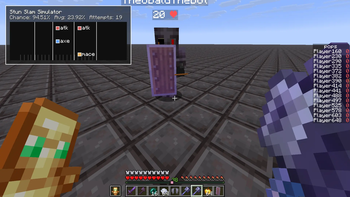
This mod tells you the exact sub tick timing of your stun slams inputs to help you perfect your timing.
This is an information mod and does not affect gameplay. That being said it is NOT allowed in tier tests.
Downloading
- Find the releases section on the right panel
- download the .jar file into your mods folder (for 1.21.11 only!!)
- make sure you have the mods fabric api and mod menu installed
Usage
Go in game, get an axe and mace and press your stun slam hotkeys, it will automatically register inputs based on your hotbar slot.
This mod is designed with attribute swapping in mind and only counts tick perfect stun slams (for now).
The hard white lines are the times a tick happens on the client. The soft white lines at the bottom are when every client frame is rendered.
Some options are togglable with mod menu eg size.
The /stunslam toggle command can toggle HUD visiblity quickly.
Support
Feature requests or bug reports are welcome on the github issues tab: github issues tab
or on the forum page for the mod on the mace discord: Mace Discord Forum
Available Versions
How to Install Stun Slam Simulator on Your Server
Order Server
Order a Minecraft Java server with at least 3 GB RAM (4 GB recommended).
Set fabric Loader
In the panel under "Egg", select the fabric loader and matching Minecraft version (1.21.11).
Install Mod
Open the mod browser in the dashboard and search for "Stun Slam Simulator". Click "Install" – done! Alternatively, upload the .jar via SFTP to the /mods folder.
Compatibility
Mod Loaders
Minecraft Versions
1.21.11
Server-side
✗ UnsupportedRecommended RAM
4 GB(min. 3 GB)Frequently Asked Questions
Stun Slam Simulator server crashes on startup – what to do?
Most common cause: wrong fabric version or insufficient RAM. Check the server log (latest.log) for "OutOfMemoryError" or "Mixin" errors. With Mado Hosting: ensure at least 3 GB RAM is allocated and the loader matches the mod version (1.21.11). You can switch loaders with one click in the panel.
Is Stun Slam Simulator compatible with fabric?
Stun Slam Simulator officially supports fabric for Minecraft 1.21.11. The Mado dashboard automatically detects incompatible loader combinations.
Server lagging with Stun Slam Simulator – how to optimize performance?
Recommended RAM: 4 GB (per 8 players). Use /spark profiler to check if Stun Slam Simulator consumes the most tick time. Common fixes: reduce server view-distance to 8-10, install "performant" or "starlight" as supplementary mods on Forge. With Mado Hosting, your server runs on NVMe SSDs with dedicated CPU cores for minimal latency.
Similar Mods




Rent Modded Server
Install Stun Slam Simulator with just one click on your server.