
Sublanguage
Sublanguage (首选语言) is a simple mod that provides additional language configuration options for clients. It includes features such as bilingual display of item names and support for a second language.
Screenshots
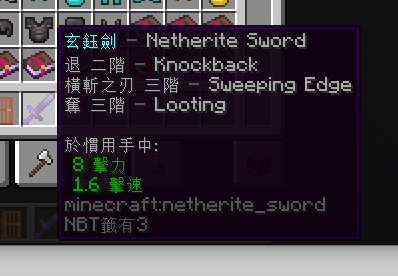
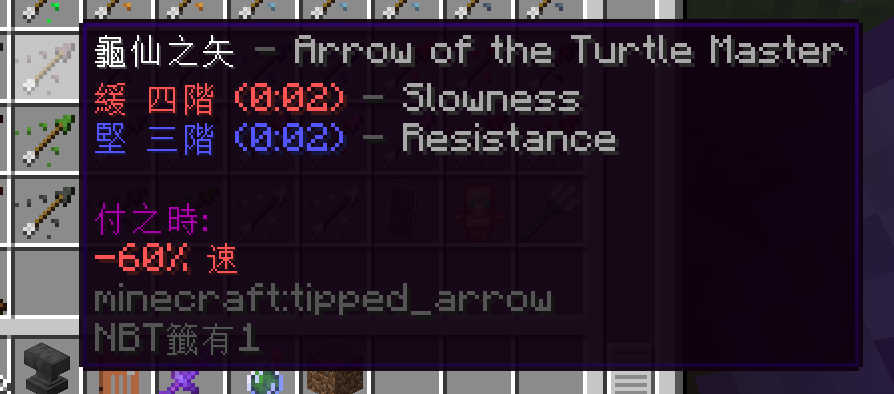
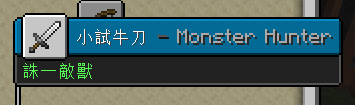
About this Mod
首选语言 Sublanguage
这是一款功能简单的模组,为客户端提供更多语言配置项,包括物品名双语显示、第二语言。十分适合模组缺少本地翻译或学习其他语言的玩家。当然用户还可以借助该功能对一些物品备注。双语显示效果如模组封面,会更改物品提示框中的标题和切换手中物品的小标题内容。
正常情况下游戏将会优先翻译为首选的语言,其次为第二语言、英语,开启双语显示后若物品没有自定义名称,且首选语言和第二语言的翻译都存在,将在提示框中以[首选][分隔符][第二]的格式显示物品名。
- v1.2 新增成就标题、旗帜图案的双语显示,背包里状态效果图标也可支持双语。
- v1.1 支持附魔属性、药水效果等双语显示。

配置教程
本模组的默认第二语言为台湾繁体(zh_tw),且双语显示功能默认关闭,两种语言间的连接符默认为-。
要更改这些配置,请打开游戏目录下的config\sublanguage.txt文件修改,若无该配置项请手动写入或启动一次。
对于模组版本 <1.2 的,请在
options.txt文件修改。
sublanguage:第二语言代码bilingualDisplay:是否开启物品名双语显示(true/false)bilingualSeparator:物品名双语分隔符bilingualItemTooltips:是否开特殊物品属性双语显示(true/false)v1.1 新增
若需要启动前请手动加入:
sublanguage:en_us
bilingualDisplay:true
bilingualSeparator: -
bilingualItemTooltips:true
Available Versions
How to Install Sublanguage on Your Server
Order Server
Order a Minecraft Java server with at least 3 GB RAM (4 GB recommended).
Set fabric Loader
In the panel under "Egg", select the fabric loader and matching Minecraft version (1.20.1).
Install Mod
Open the mod browser in the dashboard and search for "Sublanguage". Click "Install" – done! Alternatively, upload the .jar via SFTP to the /mods folder.
Compatibility
Mod Loaders
Minecraft Versions
1.20.1, 1.20, 1.19.4 (+10 more)
Server-side
✗ UnsupportedRecommended RAM
4 GB(min. 3 GB)Frequently Asked Questions
Sublanguage server crashes on startup – what to do?
Most common cause: wrong fabric version or insufficient RAM. Check the server log (latest.log) for "OutOfMemoryError" or "Mixin" errors. With Mado Hosting: ensure at least 3 GB RAM is allocated and the loader matches the mod version (1.20.1). You can switch loaders with one click in the panel.
Is Sublanguage compatible with fabric?
Sublanguage officially supports fabric for Minecraft 1.20.1, 1.20, 1.19.4. The Mado dashboard automatically detects incompatible loader combinations.
Server lagging with Sublanguage – how to optimize performance?
Recommended RAM: 4 GB (per 8 players). Use /spark profiler to check if Sublanguage consumes the most tick time. Common fixes: reduce server view-distance to 8-10, install "performant" or "starlight" as supplementary mods on Forge. With Mado Hosting, your server runs on NVMe SSDs with dedicated CPU cores for minimal latency.
Similar Mods




![[ETF] Entity Texture Features](https://cdn.modrinth.com/data/BVzZfTc1/af683d206d50b05258d865b0d6e4aa2f2cee12f2_96.webp)
![[EMF] Entity Model Features](https://cdn.modrinth.com/data/4I1XuqiY/6e5bbd0d06b1741bfdab6c0cfab6de8fdaf0064c_96.webp)
Rent Modded Server
Install Sublanguage with just one click on your server.