SulfiDish Radio
A beautiful Touhou-inspired Minecraft radio HUD mod for Gensokyo Radio with live track info, adaptive album art, visualizer, customizable layout, and full English / Russian support. ♪
Screenshots
About this Mod
SulfiDish Radio 🎵
SulfiDish Radio — A fan-made Minecraft mod dedicated to the beloved Gensokyo Radio, the finest Touhou music station.
This mod brings the magic of Gensokyo Radio directly into your Minecraft experience with a beautiful anime-styled HUD overlay that dances to the rhythm of Touhou music.
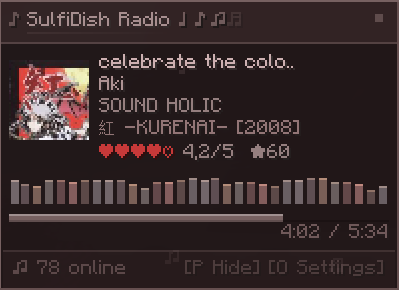
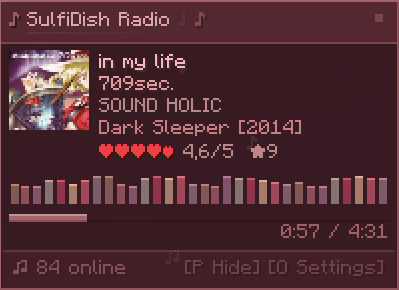
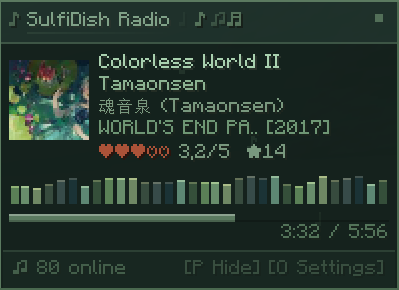
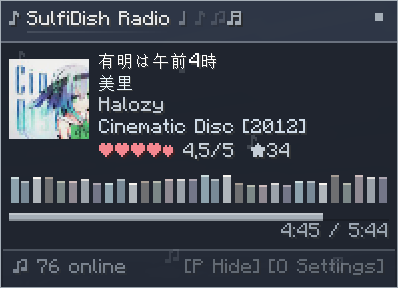
And they dynamically change their interface to match the album cover.
Features:
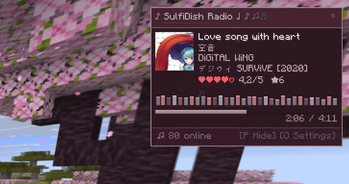
Real-time track info — song title, artist, album, circle, and year displayed live
Adaptive album art — cover art is fetched and rendered with smooth levitation animation, and the entire HUD color scheme dynamically adapts to the album's palette
Audio visualizer — a colorful bar visualizer that pulses with the music, themed to match the current album art
Smooth jelly-like notifications — track changes, connection events, pause/resume — all delivered with gentle floating and soft blink animations
Pause & resume controls — stop and start the radio stream at any time with instant feedbackProgress bar — see how far into the current song you are, with elapsed/remaining time
Listener count — see how many others are tuned in
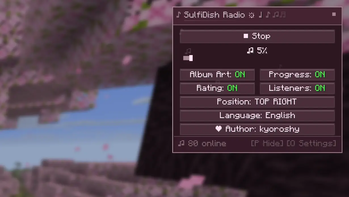
Customizable layout — 4 position options (top-left, top-right, bottom-left, bottom-right)
Toggleable elements — album art, progress bar, listeners count, and rating can each be turned on/off
Bilingual interface — full Russian and English support, switchable in-game 💗


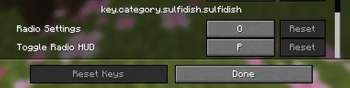
Toggle HUD visibility (default: H)
Toggle settings menu (default: J)
All keybinds are configurable in Minecraft's controls settings.
IMPORTANT 💡
This is an unofficial fan project and is not affiliated with Gensokyo Radio.
Personally, I absolutely love this radio stream—I’ve been listening to it for a couple of years now. I was originally inspired by CraftGR, and I’ll include a link to them here because I really respect them; they deserve all the credit, and I’ve simply followed in the footsteps of this wonderful mod, so be sure to check out their mod.
Spoiler
New streams (radio) will be added in the future - or perhaps they have already been added.
Available Versions
How to Install SulfiDish Radio on Your Server
Order Server
Order a Minecraft Java server with at least 3 GB RAM (4 GB recommended).
Set fabric Loader
In the panel under "Egg", select the fabric loader and matching Minecraft version (26.1.2).
Install Mod
Open the mod browser in the dashboard and search for "SulfiDish Radio". Click "Install" – done! Alternatively, upload the .jar via SFTP to the /mods folder.
Compatibility
Mod Loaders
Minecraft Versions
26.1.2, 26.1.1, 26.1 (+12 more)
Server-side
✗ UnsupportedRecommended RAM
4 GB(min. 3 GB)Frequently Asked Questions
SulfiDish Radio server crashes on startup – what to do?
Most common cause: wrong fabric version or insufficient RAM. Check the server log (latest.log) for "OutOfMemoryError" or "Mixin" errors. With Mado Hosting: ensure at least 3 GB RAM is allocated and the loader matches the mod version (26.1.2). You can switch loaders with one click in the panel.
Is SulfiDish Radio compatible with fabric and forge and neoforge and quilt?
SulfiDish Radio officially supports fabric, forge, neoforge, quilt for Minecraft 26.1.2, 26.1.1, 26.1. Note: Forge and Fabric mods are NOT cross-compatible – pick one loader and stick with it. The Mado dashboard automatically detects incompatible loader combinations.
Server lagging with SulfiDish Radio – how to optimize performance?
Recommended RAM: 4 GB (per 8 players). Use /spark profiler to check if SulfiDish Radio consumes the most tick time. Common fixes: reduce server view-distance to 8-10, install "performant" or "starlight" as supplementary mods on Forge. With Mado Hosting, your server runs on NVMe SSDs with dedicated CPU cores for minimal latency.
Similar Mods




![[ETF] Entity Texture Features](https://cdn.modrinth.com/data/BVzZfTc1/af683d206d50b05258d865b0d6e4aa2f2cee12f2_96.webp)
![[EMF] Entity Model Features](https://cdn.modrinth.com/data/4I1XuqiY/6e5bbd0d06b1741bfdab6c0cfab6de8fdaf0064c_96.webp)
Rent Modded Server
Install SulfiDish Radio with just one click on your server.