
Sulkan
Vulkan shader support for minecraft 26.2+
Screenshots

About this Mod
Sulkan
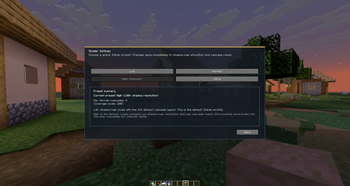
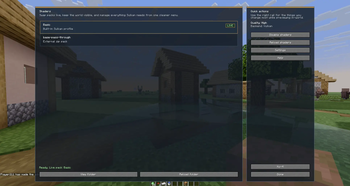
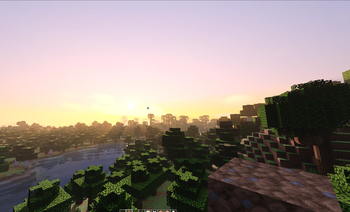
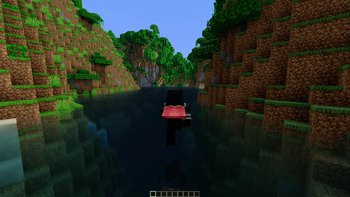
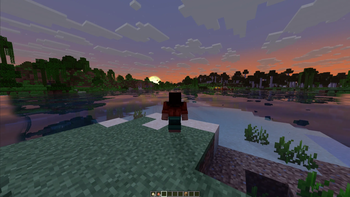
Sulkan is a Fabric mod that adds shader support to the Vulkan graphics API built into Minecraft.
Its goal is to enable modern shader-based rendering on top of Minecraft’s Vulkan backend, unlocking improved visuals and potential performance benefits on supported systems. Actual results may vary depending on hardware, drivers, installed mods, and game settings.
✨ Features
- Shader support for Minecraft’s Vulkan rendering pipeline
- Enables modern graphics effects using Vulkan
- Designed to work with the built-in Vulkan backend
- Potential performance improvements on compatible systems
- Built for the Fabric mod loader
📋 Requirements
- GPU and drivers with Vulkan 1.2 support or higher
- Minecraft version with Vulkan support enabled
- Fabric Loader
- Compatible mod environment
⚙️ Installation
- Install Fabric Loader
- Ensure your Minecraft setup supports the Vulkan renderer
- Place the
Sulkan.jarfile into your Minecraftmodsfolder - Launch the game
⚠️ Compatibility
Compatibility with other mods is not guaranteed.
Mods that rely on OpenGL behavior or make direct OpenGL calls may:
- Fail to function correctly
- Cause crashes
- Introduce rendering issues
Please review known incompatibilities before reporting issues.
Note:
Sulkan is a standalone mod and is not compatible with VulkanMod or Sodium.
💬 Community
For support, feedback, or development updates:
- Discord: https://discord.gg/9wXEBAmDNS
☕ Support Development
Developing Sulkan requires significant time and effort. If you'd like to support continued development:
- Ko-fi: https://ko-fi.com/mravatin
🐛 Issues
Before reporting an issue, please ensure:
- Your system supports Vulkan
- You are not using incompatible mods
- The issue has not already been reported
Providing detailed information (logs, system specs, and steps to reproduce) will help resolve issues faster.
Available Versions
How to Install Sulkan on Your Server
Order Server
Order a Minecraft Java server with at least 3 GB RAM (4 GB recommended).
Set fabric Loader
In the panel under "Egg", select the fabric loader and matching Minecraft version (26.2-pre-3).
Install Mod
Open the mod browser in the dashboard and search for "Sulkan". Click "Install" – done! Alternatively, upload the .jar via SFTP to the /mods folder.
Compatibility
Mod Loaders
Minecraft Versions
26.2-pre-3, 26.2-snapshot-5, 26.2-snapshot-4 (+2 more)
Server-side
✗ UnsupportedRecommended RAM
4 GB(min. 3 GB)Frequently Asked Questions
Sulkan server crashes on startup – what to do?
Most common cause: wrong fabric version or insufficient RAM. Check the server log (latest.log) for "OutOfMemoryError" or "Mixin" errors. With Mado Hosting: ensure at least 3 GB RAM is allocated and the loader matches the mod version (26.2-pre-3). You can switch loaders with one click in the panel.
Is Sulkan compatible with fabric?
Sulkan officially supports fabric for Minecraft 26.2-pre-3, 26.2-snapshot-5, 26.2-snapshot-4. The Mado dashboard automatically detects incompatible loader combinations.
Server lagging with Sulkan – how to optimize performance?
Recommended RAM: 4 GB (per 8 players). Use /spark profiler to check if Sulkan consumes the most tick time. Common fixes: reduce server view-distance to 8-10, install "performant" or "starlight" as supplementary mods on Forge. With Mado Hosting, your server runs on NVMe SSDs with dedicated CPU cores for minimal latency.
Similar Mods


Rent Modded Server
Install Sulkan with just one click on your server.