
Super Duper Grabber
This Minecraft mod adds a handy grabber tool that lets you pick up and place any chest, including its contents, with ease. You can carry up to two chests at once, making inventory management and gameplay smoother.
Screenshots
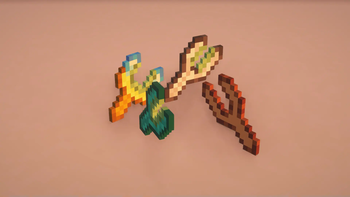
About this Mod
🫳 Super Duper Grabber allows players to pick up and place chests using special grabber tools.
It supports both vanilla chests and custom chests from the Iron Chests: Restocked, with configurable slowness effects to balance gameplay. The mod integrates with Cloth Config API for customizable settings and Mod Menu for a user-friendly configuration interface.
You'll say it's useless, I'll say partially yes 🙃, but actually at the beginning of the development phase I thought of presenting this as a vanilla tool that doesn't break the atmosphere of the game.
The idea itself I borrowed from the mod Chest Transporter (versions up to 1.12.2), consider it a transfer to new versions
✨ Features
- Grabber Tools: Craft special tools (Wooden, Iron, Diamond, and Double Grabbers) to pick up and place chests without breaking them.
- Chest Support:
- Vanilla chests (
minecraft:chest,minecraft:trapped_chest). - Barrels (
minecraft:barrel). - Chests from mod Iron Chests: Restocked.
- Vanilla chests (
- Slowness Effect: Configurable slowness effect when carrying chests, with different settings for each grabber type.
- Configuration:
- Customize slowness effect intensity and maximum amplifier via Cloth Config API.
- Settings saved in
config/sdgrabber.json.
- ModMenu Integration: Access configuration through a GUI with ModMenu (optional).
- Multilingual Support: Descriptions and settings available in English (
en_us) and Russian (ru_ru), with support for additional languages via community contributions.
⚙️ Usage
Single Grabbers (Wooden, Iron, Diamond):
- Shift + Right-Click on a chest to pick it up.
- Shift + Right-Click on a block to place the grabbed chest.
Double Grabbers:
The mechanics of picking up and placing chests are slightly altered here, as this grabber can grab multiple chests at once.
- Shift + Right-Click on a chest to pick it up (can hold multiple chests).
- Shift + Right-Click on a double chest's second half while holding a chest to pick it up, or place all held chests if grabber inventory is full.
- Right-Click without Shift on a chest or adjacent block to place a held chest, connecting it to form a double chest if possible.
- Shift + Right-Click on a block next to a chest to place a held chest without connecting it (like placing a chest with Shift).
- Right-Click without Shift on the top of a chest to place a held chest without connecting.
📚 Crafting / Parameters
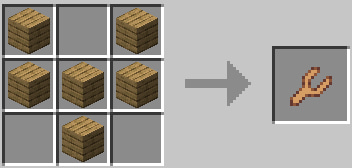
Wooden Grabber
- Damage per chest: 10
- Slowness amplifier per chest: 3
- Max slowness amplifier: 3
- Max chests can be grabbed: 1
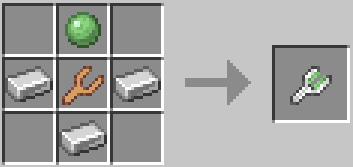
Iron Grabber
- Damage per chest: 5
- Slowness amplifier per chest: 2
- Max slowness amplifier: 3
- Max chests can be grabbed: 1
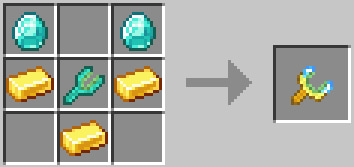
Diamond Grabber
- Damage per chest: 5
- Slowness amplifier per chest: 1
- Max slowness amplifier: 2
- Max chests can be grabbed: 1
Double Grabber
- Damage per chest: 1
- Slowness amplifier per chest: 1
- Max slowness amplifier: 1
- Max chests can be grabbed: 2
🔗 Some video
Available Versions
How to Install Super Duper Grabber on Your Server
Order Server
Order a Minecraft Java server with at least 3 GB RAM (4 GB recommended).
Set fabric Loader
In the panel under "Egg", select the fabric loader and matching Minecraft version (1.20.1).
Install Mod
Open the mod browser in the dashboard and search for "Super Duper Grabber". Click "Install" – done! Alternatively, upload the .jar via SFTP to the /mods folder.
Compatibility
Mod Loaders
Minecraft Versions
1.20.1
Server-side
✓ RequiredRecommended RAM
4 GB(min. 3 GB)Frequently Asked Questions
Super Duper Grabber server crashes on startup – what to do?
Most common cause: wrong fabric version or insufficient RAM. Check the server log (latest.log) for "OutOfMemoryError" or "Mixin" errors. With Mado Hosting: ensure at least 3 GB RAM is allocated and the loader matches the mod version (1.20.1). You can switch loaders with one click in the panel.
Is Super Duper Grabber compatible with fabric?
Super Duper Grabber officially supports fabric for Minecraft 1.20.1. The Mado dashboard automatically detects incompatible loader combinations.
Server lagging with Super Duper Grabber – how to optimize performance?
Recommended RAM: 4 GB (per 8 players). Use /spark profiler to check if Super Duper Grabber consumes the most tick time. Common fixes: reduce server view-distance to 8-10, install "performant" or "starlight" as supplementary mods on Forge. With Mado Hosting, your server runs on NVMe SSDs with dedicated CPU cores for minimal latency.
Similar Mods




Rent Modded Server
Install Super Duper Grabber with just one click on your server.
Details
- License
- Creative Commons Attribution Non Commercial 4.0 International
- Server-side
- Required