
Suspicious Shapes
Use glTF models in resource packs and mods!
Screenshots
About this Mod
glTF models for everything
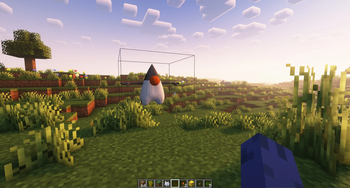
Using frapi (the fabric-rendering API), this mod intercepts requests for block models, and if they refer to glTF files, provides them as static models that get baked into the chunk geometry as normal. Entirely clientside, this mod can be used to power "cursed" resource packs that replace existing blocks with non-cuboid shapes that vanilla can't make.
It can also be used as an "included" mod to power non-cuboid blocks in your mods.
The Details
The easiest way to create a compatible model is in Blockbench.
- From the app, select "New -> Low Poly / Generic Model" and hit the "Create new model" button.
- Any identifier, UV mode, or other settings are fine.
- When you're satisfied with your model, hit "File -> Export -> Export glTF Model".
- Blockbench ignores most of these settings, and the defaults are perfectly fine.
- Find the file you exported and put it where you would normally put a json blockmodel (e.g.
assets/minecraft/models/block) - make a child model which refers to the gltf model as a parent, with a root key-value pair of
"loader": "suspicious_shapes:gltf". You can fill-in texture references and set color indices here too. - Edit the text of the glTF model to replace the texture's data URL with a texture reference.
The last part there is the hard part. In the file you'll see something like,
"images":[{"mimeType":"image/png","uri":"data-blocked:image/png;base64,iVBORw0KGgoAAAANSUhEUgAAABAAAAAQCAYAAAAf8/9hAAAAr0lEQVQ4y6WTMQrCQBBFt0xtk0YQL+QR0mpnYyk5QbDObTc84YVB0NnFgSGTyf7/5w+bUpJ4LMdaeuI6jzWC5/Vcm0kAAyAleE6Hd00vkn8Fq0oCJv32up9yEg6REPGEQDLemyYR6DS3y7ATp3tQTTCEWqH3U50DcQccRl0b9lKSuAvV0wXG+AQyRTOYiDughkB76bXVgiDr5gkEeYEAu8iuf0L/WiD/Iii94diZ+gZo3N9oOnqLFAAAAABJRU5ErkJggg=="}]
This is a base-64 encoded image of the texture you used. Since block models can't use random textures that aren't in the atlas, we'll have to fix that. Replace each of the unreadable strings marked "uri" with a minecraft texture reference, like this
"images":[{"mimeType":"image/png","uri":"minecraft:blocks/stone"}]
Or, if you're making several models with this shape, you can use it as a parent with a texture up-reference like normal:
"images":[{"mimeType":"image/png","uri":"#all"}]
Your child model can look something like this:
{
  "parent": "minecraft:block/sphere_all.gltf",
  "loader": "suspicious_shapes:gltf",
  "textures": {
    "all": "minecraft:block/acacia_leaves"
  },
  "colorIndexes": [ 0 ]
}
And that's it! Load up minecraft or reload resource packs and you should see your model!
Available Versions
How to Install Suspicious Shapes on Your Server
Order Server
Order a Minecraft Java server with at least 3 GB RAM (4 GB recommended).
Set fabric Loader
In the panel under "Egg", select the fabric loader and matching Minecraft version (1.21.4).
Install Mod
Open the mod browser in the dashboard and search for "Suspicious Shapes". Click "Install" – done! Alternatively, upload the .jar via SFTP to the /mods folder.
Compatibility
Mod Loaders
Minecraft Versions
1.21.4, 1.21.3, 1.21.2 (+4 more)
Server-side
✗ UnsupportedRecommended RAM
4 GB(min. 3 GB)Frequently Asked Questions
Suspicious Shapes server crashes on startup – what to do?
Most common cause: wrong fabric version or insufficient RAM. Check the server log (latest.log) for "OutOfMemoryError" or "Mixin" errors. With Mado Hosting: ensure at least 3 GB RAM is allocated and the loader matches the mod version (1.21.4). You can switch loaders with one click in the panel.
Is Suspicious Shapes compatible with fabric and quilt?
Suspicious Shapes officially supports fabric, quilt for Minecraft 1.21.4, 1.21.3, 1.21.2. The Mado dashboard automatically detects incompatible loader combinations.
Server lagging with Suspicious Shapes – how to optimize performance?
Recommended RAM: 4 GB (per 8 players). Use /spark profiler to check if Suspicious Shapes consumes the most tick time. Common fixes: reduce server view-distance to 8-10, install "performant" or "starlight" as supplementary mods on Forge. With Mado Hosting, your server runs on NVMe SSDs with dedicated CPU cores for minimal latency.
Similar Mods

![[ETF] Entity Texture Features](https://cdn.modrinth.com/data/BVzZfTc1/af683d206d50b05258d865b0d6e4aa2f2cee12f2_96.webp)
![[EMF] Entity Model Features](https://cdn.modrinth.com/data/4I1XuqiY/6e5bbd0d06b1741bfdab6c0cfab6de8fdaf0064c_96.webp)



Rent Modded Server
Install Suspicious Shapes with just one click on your server.