
Crates
A mod that adds data-driven fishing crates to Minecraft.
Screenshots
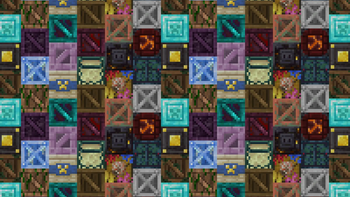
About this Mod
What is Crates about?
Crates is a mod that adds fishing crates, a new loot type that can be obtained occasionally while fishing which can be opened to obtain a variety of items and blocks making them more easily accessible and renewable.
Features
Crates
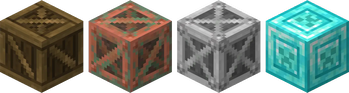
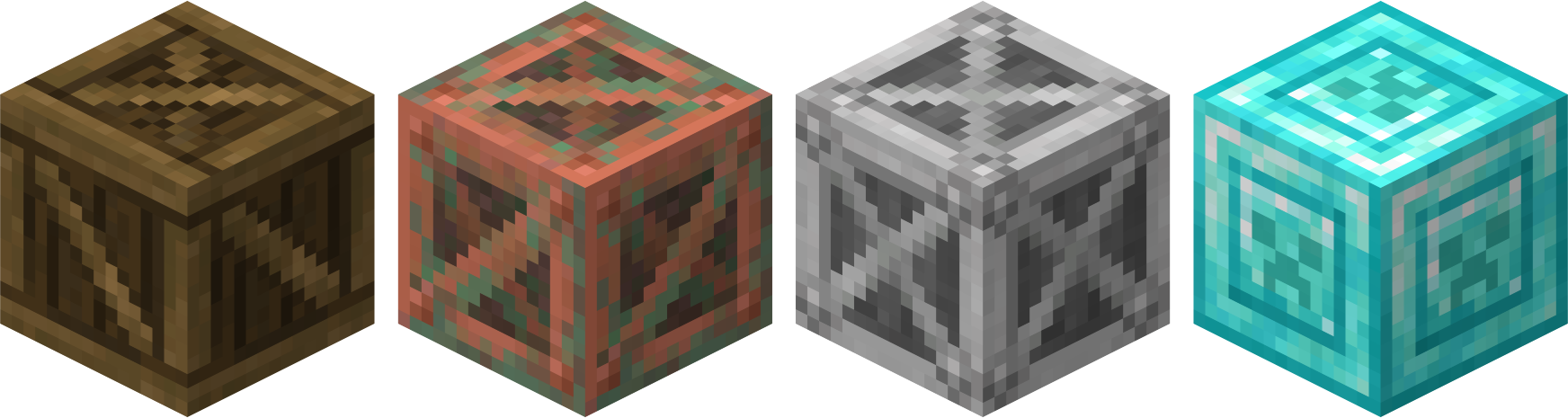
Depending on where you fish, you will find different crates with unique loot. The main tiers you will find are Wooden, Copper, Iron and Diamond crates, with each tier being rarer than the other and having better loot. Biome exclusive ones are fairly uncommon and have loot tied to their respective biome groups.
New Enchantment
Unboxing is a new fishing rod enchantment that you can get sometimes when opening crates. It increases the odds of fishing up a crate, and goes up to Unboxing III.Data-driven
You can add your own crates with a simple data pack and resource pack. There is documentation here. Templates will be provided.
Future plans
The mod will receive a handful of updates focused on improving fishing even more, fishing crates being the main focus but plans can always change.
Currently Available Crates
Wooden (Common, only in the overworld)
Copper (Uncommon, only in the overworld)
Iron (Rare, only in the overworld)
Diamond (Super Rare, only in the overworld)
Desert (Rare, only found in desert-like biomes)
Jungle (Rare, only found in jungle-like biomes)
Frozen (Rare, only found in frozen/snowy biomes)
Taiga (Rare, only found in taiga biomes)
Ocean (Rare, only found in ocean biomes)
Chorus (Common, only in the end)
Purpur (Rare, only in the end)
Terms of Use
Addons are allowed to be made and uploaded as long as they are made available for free.
This mod should not be used for any sort of system that requires real money on servers, sites and such.
The code is available to the public but reuploading the mod, making variants, ports and backports of it without permission is not allowed. Contact @scarlettgem on Discord if you want to discuss this.
Notes
This mod works with Sinytra Connector, it has been tested on a big modpack on Neoforge and works as intended. You should still be careful though, just in case.
Right now the mod does not implement other mod loot tables into it but we plan on having built in compatibility with various mods, mainly fabric ones.
Available Versions
How to Install Crates on Your Server
Order Server
Order a Minecraft Java server with at least 3 GB RAM (4 GB recommended).
Set fabric Loader
In the panel under "Egg", select the fabric loader and matching Minecraft version (1.21.1).
Install Mod
Open the mod browser in the dashboard and search for "Crates". Click "Install" – done! Alternatively, upload the .jar via SFTP to the /mods folder.
Compatibility
Mod Loaders
Minecraft Versions
1.21.1
Server-side
✓ RequiredRecommended RAM
4 GB(min. 3 GB)Frequently Asked Questions
Crates server crashes on startup – what to do?
Most common cause: wrong fabric version or insufficient RAM. Check the server log (latest.log) for "OutOfMemoryError" or "Mixin" errors. With Mado Hosting: ensure at least 3 GB RAM is allocated and the loader matches the mod version (1.21.1). You can switch loaders with one click in the panel.
Is Crates compatible with fabric?
Crates officially supports fabric for Minecraft 1.21.1. The Mado dashboard automatically detects incompatible loader combinations.
Server lagging with Crates – how to optimize performance?
Recommended RAM: 4 GB (per 8 players). Use /spark profiler to check if Crates consumes the most tick time. Common fixes: reduce server view-distance to 8-10, install "performant" or "starlight" as supplementary mods on Forge. With Mado Hosting, your server runs on NVMe SSDs with dedicated CPU cores for minimal latency.
Similar Mods

![[ETF] Entity Texture Features](https://cdn.modrinth.com/data/BVzZfTc1/af683d206d50b05258d865b0d6e4aa2f2cee12f2_96.webp)
![[EMF] Entity Model Features](https://cdn.modrinth.com/data/4I1XuqiY/6e5bbd0d06b1741bfdab6c0cfab6de8fdaf0064c_96.webp)



Rent Modded Server
Install Crates with just one click on your server.