
SwanSong Shaders
A shaders mod for 1.7.10 designed for maximum compatibility with other mods and modpacks.
Screenshots
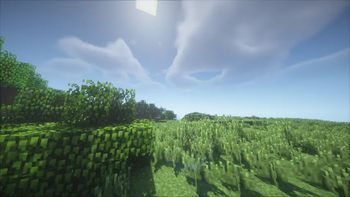
About this Mod
There's a swan song coming for you...
A breath of fresh air, a Right Proper shaders mod built from the ground up for Minecraft 1.7.10!
Designed with compatibility-first, around supporting modpacks old and new, tested against era-appropriate shaderpacks.
Compatibility
Compatible with most other popular client-side optimization and graphics mods, including but not limited to:
- FalseTweaks
- Beddium
- Right Proper Lighting Engine
- Right Proper MCPatcher
- HodgePodge
- FastCraft
- CoreTweaks
- ArchaicFix
- BugTorch
- NotFine
With expected incompatibilities with:
- OptiFine (any)
- Original ShadersMod
- MCPatcher: Forge (use Right Proper MCPatcher)
- Neodymium (use Beddium)
- Angelica (May work with certain modules)
- OptimizationsAndTweaks (O&T has very aggressive patches that break with most other graphics mods. Do not use it.)
Technical
SwanSong is a standalone replacement for ShadersMod, with initial support focused on shaders that already work with OptiFine 1.7.10_HD_U_E7.
It is not a backport of Iris, nor a direct descendant of ShadersMod or the GLSL Shaders mod. Outside of acting as an implementation of the specification pioneered by said mods.
A few other goodies such as threaded screenshots, OptiFine-like zooming, and a faster font rendering module are included as a bonus!
Licence
The mod was developed by Ven and FalsePattern, Copyright 2025, licensed under the Open Software License, version 3.0.
The mod logo was designed by Houstonruss, with some touchups by FalsePattern, Copyright 2025, All Rights Reserved.
For more information, see the LICENSE file. This readme section is not a replacement for the full license text.
Credits
Designed by Ven, written by FalsePattern
Initial testing done by, (alphabetic order):
- Bot
- Brandyn
- DarkShadow44
- Houstonruss
- Jss
- matt-159
- Rally
- UnicornBlood
Based on the work of:
- OG ShaderMod devs: (daxnitro, id_miner and karyonix)
Available Versions
How to Install SwanSong Shaders on Your Server
Order Server
Order a Minecraft Java server with at least 3 GB RAM (4 GB recommended).
Set forge Loader
In the panel under "Egg", select the forge loader and matching Minecraft version (1.7.10).
Install Mod
Open the mod browser in the dashboard and search for "SwanSong Shaders". Click "Install" – done! Alternatively, upload the .jar via SFTP to the /mods folder.
Compatibility
Mod Loaders
Minecraft Versions
1.7.10
Server-side
✗ UnsupportedRecommended RAM
4 GB(min. 3 GB)Frequently Asked Questions
SwanSong Shaders server crashes on startup – what to do?
Most common cause: wrong forge version or insufficient RAM. Check the server log (latest.log) for "OutOfMemoryError" or "Mixin" errors. With Mado Hosting: ensure at least 3 GB RAM is allocated and the loader matches the mod version (1.7.10). You can switch loaders with one click in the panel.
Is SwanSong Shaders compatible with forge?
SwanSong Shaders officially supports forge for Minecraft 1.7.10. The Mado dashboard automatically detects incompatible loader combinations.
Server lagging with SwanSong Shaders – how to optimize performance?
Recommended RAM: 4 GB (per 8 players). Use /spark profiler to check if SwanSong Shaders consumes the most tick time. Common fixes: reduce server view-distance to 8-10, install "performant" or "starlight" as supplementary mods on Forge. With Mado Hosting, your server runs on NVMe SSDs with dedicated CPU cores for minimal latency.
Similar Mods

![[ETF] Entity Texture Features](https://cdn.modrinth.com/data/BVzZfTc1/af683d206d50b05258d865b0d6e4aa2f2cee12f2_96.webp)
![[EMF] Entity Model Features](https://cdn.modrinth.com/data/4I1XuqiY/6e5bbd0d06b1741bfdab6c0cfab6de8fdaf0064c_96.webp)



Rent Modded Server
Install SwanSong Shaders with just one click on your server.