
SwapColumn
Quickly swap hotbar items with inventory items directly above them using number keys, a keybind, or hold-and-scroll.
Screenshots
About this Mod
SwapColumn
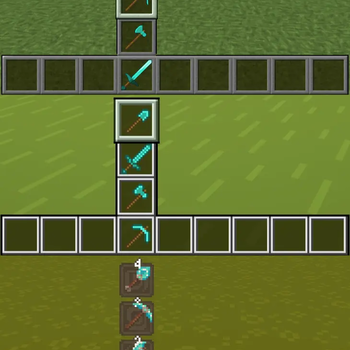
A Minecraft Fabric mod that lets you swap items between your hotbar and the inventory slots directly above it — without opening your inventory.
How It Works
SwapColumn adds a vertical swap column above any hotbar slot. When triggered, a small menu appears showing the items stacked above your selected slot. Choose one and it swaps instantly into your hotbar.
Opening the Menu
Mode 1 — Number Key:
Press the number key of the hotbar slot you are already on.
Example: you are on slot 3, press 3 — the SwapColumn opens above slot 3.
Mode 2 — Keybind:
Press your configured SwapColumn key (unbound by default).
Set it under Options → Controls → SwapColumn.

Selecting an Item
Click mode:
- Mode 1: press
1–4to select a row (1= current hotbar item, cancels the swap) - Mode 2: press
1–3to select a row, press the SwapColumn key again to cancel
Scroll mode:
Hold the opening key and scroll to highlight a row, then release to confirm.
Configuration
The config file is located at .minecraft/config/swapcolumn.json and is created automatically on first launch.
{
  "enableCycling": false,
  "enableSlotTexture": true
}
| Option | Default | Description |
|---|---|---|
enableCycling |
false |
When scrolling, wrap around from top to bottom and vice versa. Note: scrolling down on the first action always wraps regardless of this setting. |
enableSlotTexture |
true |
Render slot backgrounds using the vanilla hotbar texture. Disable if your texture pack causes visual issues. |
Note: Mod Menu support is planned. Until then, changes to the config file require a game restart to take effect.
Available Versions
How to Install SwapColumn on Your Server
Order Server
Order a Minecraft Java server with at least 3 GB RAM (4 GB recommended).
Set fabric Loader
In the panel under "Egg", select the fabric loader and matching Minecraft version (26.2-snapshot-2).
Install Mod
Open the mod browser in the dashboard and search for "SwapColumn". Click "Install" – done! Alternatively, upload the .jar via SFTP to the /mods folder.
Compatibility
Mod Loaders
Minecraft Versions
26.2-snapshot-2
Server-side
✗ UnsupportedRecommended RAM
4 GB(min. 3 GB)Frequently Asked Questions
SwapColumn server crashes on startup – what to do?
Most common cause: wrong fabric version or insufficient RAM. Check the server log (latest.log) for "OutOfMemoryError" or "Mixin" errors. With Mado Hosting: ensure at least 3 GB RAM is allocated and the loader matches the mod version (26.2-snapshot-2). You can switch loaders with one click in the panel.
Is SwapColumn compatible with fabric?
SwapColumn officially supports fabric for Minecraft 26.2-snapshot-2. The Mado dashboard automatically detects incompatible loader combinations.
Server lagging with SwapColumn – how to optimize performance?
Recommended RAM: 4 GB (per 8 players). Use /spark profiler to check if SwapColumn consumes the most tick time. Common fixes: reduce server view-distance to 8-10, install "performant" or "starlight" as supplementary mods on Forge. With Mado Hosting, your server runs on NVMe SSDs with dedicated CPU cores for minimal latency.
Similar Mods




Rent Modded Server
Install SwapColumn with just one click on your server.