
Sweeper Can
Sweeper Can is a 1.20.1 Fabric port inspired by the Sweeper Maid mod. It periodically clears dropped items to reduce lag and features a global trash can, allowing players to retrieve items that have been swept away.
Screenshots
About this Mod
Sweeper Can / 垃圾桶
Sweeper Can is a 1.20.1 Fabric port inspired by the Sweeper Maid mod. It periodically clears dropped items to reduce lag and features a global trash can, allowing players to retrieve items that have been swept away.
垃圾桶 (Sweeper Can) 参考了Sweeper Maid模组,进行了1.20.1的Fabric移植,可以定期清理掉落物,内置了一个全局垃圾桶,方便玩家拿取被清理的掉落物。
Features | 功能特性
English
- Periodic Item Sweeping: Automatically clears dropped items on the ground at customizable intervals.
- Cleanup Countdown Broadcasts: Sends chat warnings at 60s, 30s, and a final countdown before the sweep occurs.
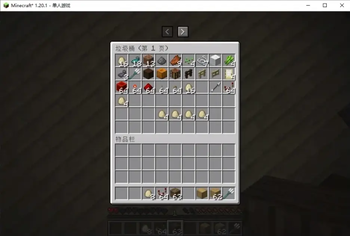
- Global Trash Can: A shared trash can (up to 10 pages) accessible via an inventory button or commands, allowing players to retrieve cleared items.
- Item Blacklist: Open the cleanup blacklist through the command or control interface to record items that you do not want to be automatically cleaned up.
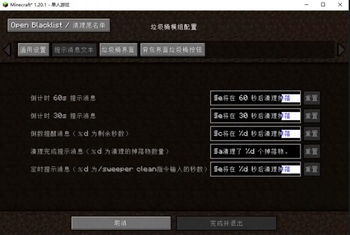
- In-Game Configuration: Full support for in-game configuration via Cloth Config and Mod Menu. Modify notification text, intervals, UI button positions, and more in real-time.
- Multiplayer Compatible: Runs on dedicated servers and automatically syncs configuration parameters with clients.
中文
- 定时清理掉落物:按自定义的时间间隔,自动清理地面上的掉落物。
- 清理倒计时播报:在清理前60秒、30秒以及最后倒计时进行提示。
- 全局垃圾桶:包含一个最高支持10页的垃圾桶,玩家可以通过背包上方的快捷按钮或指令打开,拾取被清理的物品。
- 物品黑名单:通过指令或控制界面打开清理黑名单,记录不希望被自动清理的物品。
- 游戏内配置菜单:通过对接 Cloth Config 与 Mod Menu 支持在游戏内直接进行模组全方位的配置,如:修改任何提示文本、清理间隔、UI按钮位置等,实时生效!
- 联机兼容:可独立运行在服务端上,并会自动向客户端同步相关的清理配置参数。
Commands | 指令介绍
All commands start with /sweeper.
所有指令均以 /sweeper 开头。
| Command / 指令 | Permission / 权限需求 | Description / 说明 |
|---|---|---|
/sweeper open [page] |
None 所有人 (All Players) |
EN: Open the trash can GUI to discard or retrieve items. ZH: 打开垃圾桶界面丢弃或拾取物品。 |
/sweeper blacklist |
Configurable (Default: OP-Level 2) |
EN: Open the ghost blacklist inventory to register ignored items. ZH: 打开“清理黑名单”虚拟背包,登记不想被清理掉落物的物品。 |
/sweeper config |
Configurable (Default: OP-Level 2) |
EN: Open the mod settings GUI to change configurations. ZH: 呼出模组配置界面以更改模组设定。 |
/sweeper clean [seconds] |
Configurable (Default: OP-Level 2) |
EN: Schedule a clearing event after seconds (defaults to immediately). ZH: 安排在 seconds 秒后执行清理(不带参数则代表立刻清理)。 |
/sweeper amount <1-10> |
Configurable (Default: OP-Level 2) |
EN: Quickly set the maximum number of pages for the trash can (1-10). ZH: 快速调整并设定垃圾桶的最大可翻页数 (1到10页)。 |
- Configurable Permissions: Set the required OP level for administrative commands from the config file (
sweeper_can.json). - 可自定义权限等级:允许在配置文件(
sweeper_can.json)内设定执行管理指令所需的OP权限等级(0-4)。
Dependencies | 依赖与前置
- Fabric Loader & Fabric API (Required / 必须装载)
- Cloth Config API (Required / 必须,用于渲染配置界面)
- Mod Menu (Optional / 可选:安装后即可在模组列表直接点击配置本模组)
License
This mod is available under the CC0-1.0 license. Feel free to learn from it and incorporate it into your own projects.
Available Versions
How to Install Sweeper Can on Your Server
Order Server
Order a Minecraft Java server with at least 3 GB RAM (4 GB recommended).
Set fabric Loader
In the panel under "Egg", select the fabric loader and matching Minecraft version (1.20.1).
Install Mod
Open the mod browser in the dashboard and search for "Sweeper Can". Click "Install" – done! Alternatively, upload the .jar via SFTP to the /mods folder.
Compatibility
Mod Loaders
Minecraft Versions
1.20.1
Server-side
✓ RequiredRecommended RAM
4 GB(min. 3 GB)Frequently Asked Questions
Sweeper Can server crashes on startup – what to do?
Most common cause: wrong fabric version or insufficient RAM. Check the server log (latest.log) for "OutOfMemoryError" or "Mixin" errors. With Mado Hosting: ensure at least 3 GB RAM is allocated and the loader matches the mod version (1.20.1). You can switch loaders with one click in the panel.
Is Sweeper Can compatible with fabric?
Sweeper Can officially supports fabric for Minecraft 1.20.1. The Mado dashboard automatically detects incompatible loader combinations.
Server lagging with Sweeper Can – how to optimize performance?
Recommended RAM: 4 GB (per 8 players). Use /spark profiler to check if Sweeper Can consumes the most tick time. Common fixes: reduce server view-distance to 8-10, install "performant" or "starlight" as supplementary mods on Forge. With Mado Hosting, your server runs on NVMe SSDs with dedicated CPU cores for minimal latency.
Similar Mods




![[ETF] Entity Texture Features](https://cdn.modrinth.com/data/BVzZfTc1/af683d206d50b05258d865b0d6e4aa2f2cee12f2_96.webp)
![[EMF] Entity Model Features](https://cdn.modrinth.com/data/4I1XuqiY/6e5bbd0d06b1741bfdab6c0cfab6de8fdaf0064c_96.webp)
Rent Modded Server
Install Sweeper Can with just one click on your server.