
Sword Utils
Real-time Java sword PvP feedback - recalibrated cooldown overlay, combo tracker, kill counter, auto sprint, reach display, damage immunity timer, and jump reset grader. 1.21.11 | Client-side only.
Screenshots

About this Mod
⚔️ SwordUtils
The ultimate client-side Java sword PvP toolkit for Minecraft 1.21.11.
No bloat. No cheats. Pure information — works on any multiplayer server with zero server-side installation.
🕐 Attack Cooldown Overlay
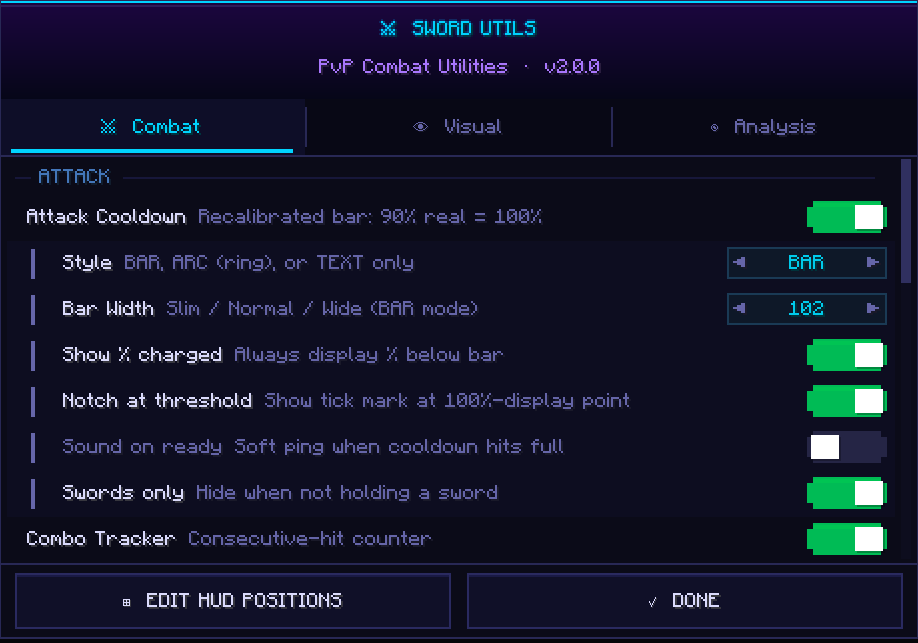
Forget the vanilla bar. SwordUtils recalibrates it so 90% real cooldown = 100% display — because 90% is the actual threshold for full damage, crits, sprint-KB, and sweeps. Choose between BAR, ARC, or TEXT style. Optional READY pulse and sound ping when you're good to go.
🔥 Combo Tracker
Counts every consecutive hit you land on a player. Configurable reset window, three display styles, three colour tiers, and independently toggleable resets on miss or on taking damage. Know your streak at a glance.
💀 Kill Counter
Tracks your session K / D / KD ratio with a +1 KILL flash on every credited kill. Four display styles to suit your HUD. Press K to reset between rounds.
🏃 Auto Sprint
Automatic forward sprint so you never drop it mid-fight. Optional cooldown-aware cancel for crit chains, sword-only mode, and a permanent sprint status badge on your HUD. Toggle on and off with V.
📏 Reach Display
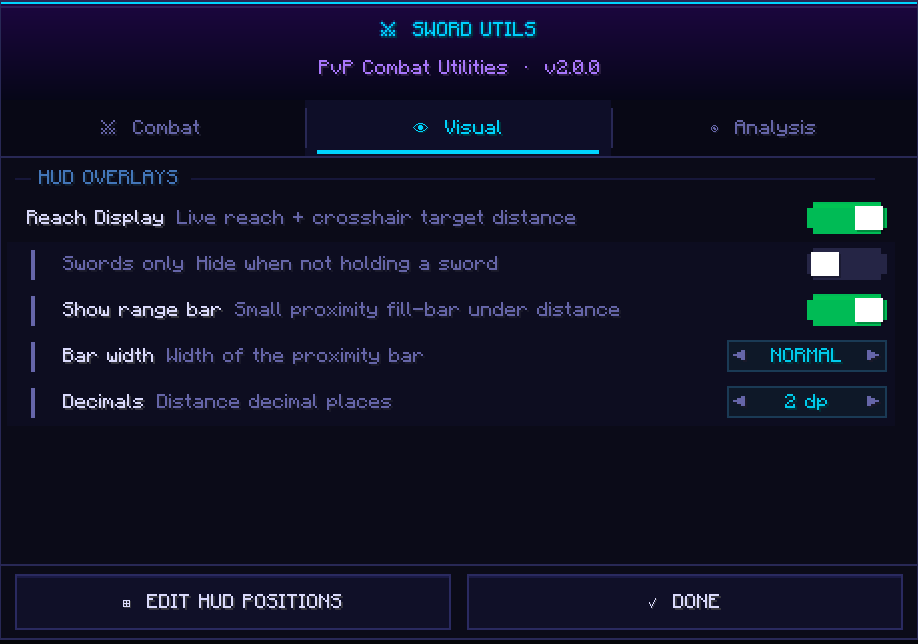
Shows your live reach attribute every tick and colour-codes your target distance — 🟢 green (in reach), 🟡 yellow (borderline), 🔴 red (out of reach). Optional proximity fill-bar. Can be set to only show while holding a sword.
⏱️ Damage Immunity Timer
After landing a hit, your target gets a 10-tick (0.5s) immunity window where follow-up hits deal zero damage. SwordUtils tracks this per target and shows draining HUD pips and optional world-space bars above nameplates — so you always know exactly when to swing again.
🎯 Jump Reset Accuracy Grader
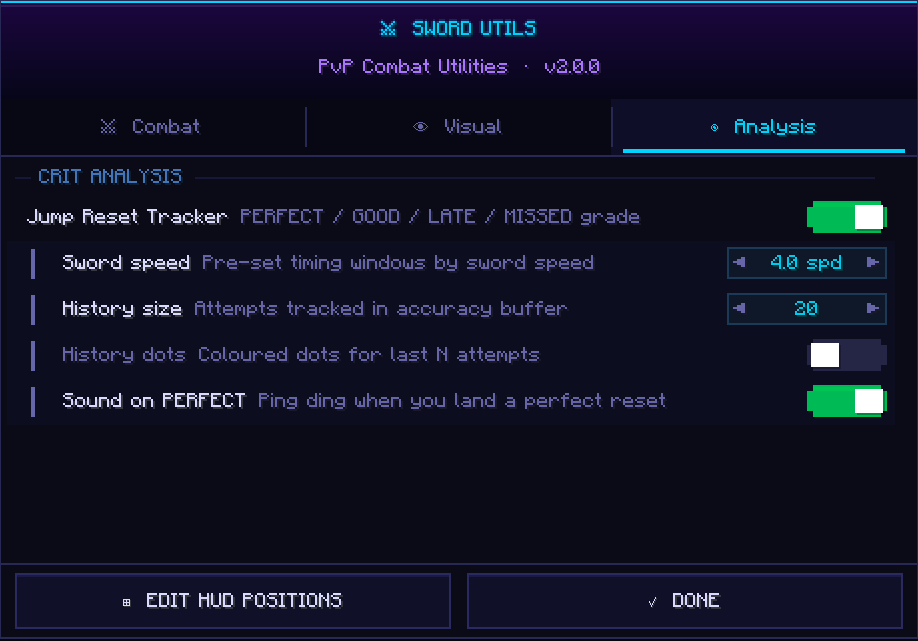
Grades the timing of every crit jump: PERFECT, GOOD, LATE, or MISSED. Pre-set windows for 4.0 and 3.6 speed swords, fully configurable otherwise. History dots show your last N attempts so you can see your consistency at a glance. Optional ping on PERFECT.
📦 Installation
Install Fabric Loader 0.18.1, drop in Fabric API 0.140.2+1.21.11 and the SwordUtils .jar into your mods/ folder, then launch Minecraft 1.21.11. That's it.
⚙️ Config
Press G in-game to open the full config screen — three tabs: Combat, Visual, Analysis. Every HUD element is drag-to-reposition. All settings auto-save to .minecraft/config/sword_utils.json.
Available Versions
How to Install Sword Utils on Your Server
Order Server
Order a Minecraft Java server with at least 3 GB RAM (4 GB recommended).
Set fabric Loader
In the panel under "Egg", select the fabric loader and matching Minecraft version (1.21.11).
Install Mod
Open the mod browser in the dashboard and search for "Sword Utils". Click "Install" – done! Alternatively, upload the .jar via SFTP to the /mods folder.
Compatibility
Mod Loaders
Minecraft Versions
1.21.11
Server-side
✗ UnsupportedRecommended RAM
4 GB(min. 3 GB)Frequently Asked Questions
Sword Utils server crashes on startup – what to do?
Most common cause: wrong fabric version or insufficient RAM. Check the server log (latest.log) for "OutOfMemoryError" or "Mixin" errors. With Mado Hosting: ensure at least 3 GB RAM is allocated and the loader matches the mod version (1.21.11). You can switch loaders with one click in the panel.
Is Sword Utils compatible with fabric?
Sword Utils officially supports fabric for Minecraft 1.21.11. The Mado dashboard automatically detects incompatible loader combinations.
Server lagging with Sword Utils – how to optimize performance?
Recommended RAM: 4 GB (per 8 players). Use /spark profiler to check if Sword Utils consumes the most tick time. Common fixes: reduce server view-distance to 8-10, install "performant" or "starlight" as supplementary mods on Forge. With Mado Hosting, your server runs on NVMe SSDs with dedicated CPU cores for minimal latency.
Similar Mods


Rent Modded Server
Install Sword Utils with just one click on your server.