
swrpgservauth
ShortWlfs RPG Framework, Custom Server Authentication Security Whitelist
Screenshots
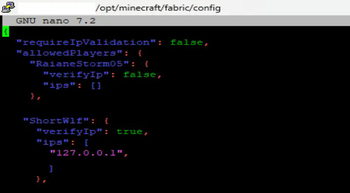
About this Mod
Swrpgservauth is a Minecraft server authentication mod that restricts player access based on a predefined username allowlist. The mod prevents unauthorized players from joining by checking their username against a configuration file (allowed_players.json). If a player is not listed, they are disconnected upon joining, ensuring tight control over server access.
Administrators can manage the allowlist through commands:
User Management Commands /addUser Adds a user to the allowed list with no IP restrictions. By default, their verifyIp flag is set to the current global setting.
/removeUser Removes a user entirely from the allowed list.
/listUsers Displays all allowed users along with their verifyIp status and registered IPs.
IP Management Commands /addIp Adds an IP address to an existing user’s allowed IP list.
/removeIp Removes an IP address from a user’s allowed IP list.
/addIPUser Adds an IP to a user and refreshes the configuration immediately.
IP Verification Settings /toggleUserIp Toggles a user’s individual verifyIp flag (true/false). When enabled, their IP must match a registered IP.
/toggleGlobalIp Toggles the global IP validation flag (requireIpValidation). When enabled, all users who have verifyIp=true must pass an IP check.
Configuration Management /refreshConfig Reloads the JSON configuration file, applying any changes made externally.
The mod features automated logging for connection attempts, notifying administrators when unauthorized players try to join. It also ensures players are fully removed from the server if they are disconnected due to authentication failure, preventing ghosting issues.
Single-Sentence Summary: Swrpgservauth enhances Minecraft server security by enforcing username-based authentication, disconnecting unauthorized players, and providing admin commands for managing access.
Added optional IP verification. - global / or per user.
Available Versions
How to Install swrpgservauth on Your Server
Order Server
Order a Minecraft Java server with at least 3 GB RAM (4 GB recommended).
Set fabric Loader
In the panel under "Egg", select the fabric loader and matching Minecraft version (1.21.5).
Install Mod
Open the mod browser in the dashboard and search for "swrpgservauth". Click "Install" – done! Alternatively, upload the .jar via SFTP to the /mods folder.
Compatibility
Mod Loaders
Minecraft Versions
1.21.5
Server-side
✓ RequiredRecommended RAM
4 GB(min. 3 GB)Frequently Asked Questions
swrpgservauth server crashes on startup – what to do?
Most common cause: wrong fabric version or insufficient RAM. Check the server log (latest.log) for "OutOfMemoryError" or "Mixin" errors. With Mado Hosting: ensure at least 3 GB RAM is allocated and the loader matches the mod version (1.21.5). You can switch loaders with one click in the panel.
Is swrpgservauth compatible with fabric?
swrpgservauth officially supports fabric for Minecraft 1.21.5. The Mado dashboard automatically detects incompatible loader combinations.
Server lagging with swrpgservauth – how to optimize performance?
Recommended RAM: 4 GB (per 8 players). Use /spark profiler to check if swrpgservauth consumes the most tick time. Common fixes: reduce server view-distance to 8-10, install "performant" or "starlight" as supplementary mods on Forge. With Mado Hosting, your server runs on NVMe SSDs with dedicated CPU cores for minimal latency.
Similar Mods


Rent Modded Server
Install swrpgservauth with just one click on your server.