Symbiosis
[ECModjam] Merge alchemical plants together and see what happens!
Screenshots
About this Mod
Participant in EC’s ModJam 2025.
Symbiosis! Mutate your plants!
Created for the 'Synergy' themed ECModjam, hosted through Discord by ECarrascon, Symbiosis is quite simple - find Bulb Shrubs in varying biomes that can provide you with different status effects!
Currently, as of the initial release, there are 2 naturally occurring Bulb Shrubs and 2 Bulb Shrubs obtained through Bulb Mutation.
Naturally Occurring
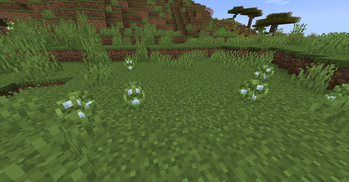
Regeneration Bulb Shrubs in Cherry Groves and Speed bulb Shrubs in Flower Forests.
Through Bulb Mutation
Strength Bulb Shrubs can be made through placing Blazethorn Bushes next to Regeneration Bulb Shrubs. After some time, they will transform. Blazethorn Bushes generate naturally all throughout the Nether dimension.
Slow Falling Bulb Shrubs can be made through placing Chorus Flowers (not plants) next to Speed Bulb Shrubs. Again, after some time, they will transform.
To actually get the status effects, you'll need to craft an Empty Flask, which is made by make an L shape with 3 glass and a piece of leather in the corner. Right-clicking an Empty Flask on a given Bulb Shrub will provide you with the respective status effect. You can also use a regular Bulb Shrub - which you can only obtain after right-clicking on the natural or mutated Bulb Shrubs - inside of a brewing stand to make a regular potion into a Filled Flask. Doing this does result in halving the potion's duration, but the duration of consumption is also halved.
I would like to introduce more Bulb Shrub variants over time, but 4 seemed like a good starting point for the time being.
Available Versions
How to Install Symbiosis on Your Server
Order Server
Order a Minecraft Java server with at least 4 GB RAM (6 GB recommended).
Set neoforge Loader
In the panel under "Egg", select the neoforge loader and matching Minecraft version (1.21.1).
Install Mod
Open the mod browser in the dashboard and search for "Symbiosis". Click "Install" – done! Alternatively, upload the .jar via SFTP to the /mods folder.
Compatibility
Mod Loaders
Minecraft Versions
1.21.1, 1.21
Server-side
✓ RequiredRecommended RAM
6 GB(min. 4 GB)Frequently Asked Questions
Symbiosis server crashes on startup – what to do?
Most common cause: wrong neoforge version or insufficient RAM. Check the server log (latest.log) for "OutOfMemoryError" or "Mixin" errors. With Mado Hosting: ensure at least 4 GB RAM is allocated and the loader matches the mod version (1.21.1). You can switch loaders with one click in the panel.
Is Symbiosis compatible with neoforge?
Symbiosis officially supports neoforge for Minecraft 1.21.1, 1.21. The Mado dashboard automatically detects incompatible loader combinations.
Server lagging with Symbiosis – how to optimize performance?
Recommended RAM: 6 GB (per 5 players). Use /spark profiler to check if Symbiosis consumes the most tick time. Common fixes: reduce server view-distance to 8-10, install "performant" or "starlight" as supplementary mods on Forge. With Mado Hosting, your server runs on NVMe SSDs with dedicated CPU cores for minimal latency.
Similar Mods




Rent Modded Server
Install Symbiosis with just one click on your server.