
SyncCraft
Link your server with your mobile device to have players experience things based on the physical and internal detections from the device.
Screenshots
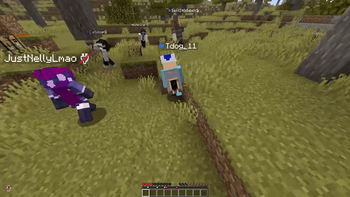
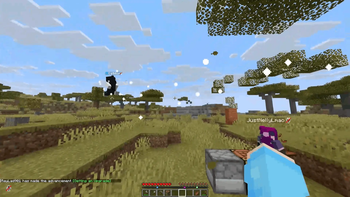
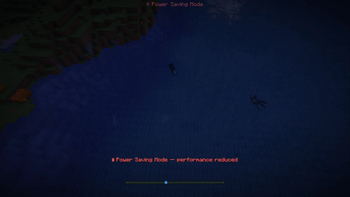
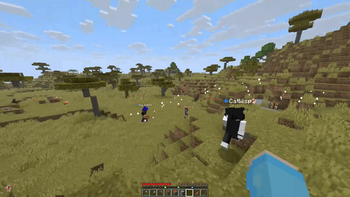
About this Mod
SyncCraft
SyncCraft turns your phone into a Minecraft world controller. Every sensor on your phone maps to something in the game — tilt to shift gravity, point your camera at the sky, shake to cause earthquakes. One person with a phone controls the experience for everyone on the server.
The mod comes with an Android companion app and a built-in web control panel. Everything connects over a single port.
Download the Android Companion App
Features
Sensors
| Phone Sensor | In-Game Effect |
|---|---|
| Tilt / Gyroscope | Shifts gravity for players and entities (independently toggleable). Tilt sideways to push, face-down for low gravity. Camera lean and player model tilt to match. Fall damage reduced in low-g. Decoration entities (item frames, paintings, leads, armor stands) are protected from gravity effects. |
| Camera | Streams to the skybox ceiling. Look up and see the real world. Smooth fade-in/out with vignette blending. |
| Shake | Earthquake — camera shakes, entities pushed, optionally shatters nearby glass and ice. |
| Flashlight | On = Night Vision for all players. Off = removed. |
| Battery Level | Above 20% = clear. Below 20% = rain. Below 5% = thunderstorm. |
| Ambient Light | Room brightness maps to time of day. Dark room = midnight, bright room = noon. |
| Proximity | Phone face-down or in pocket = all players go invisible and sneak. |
| Barometer | Walking with phone causes subtle altitude bobbing on entities. |
| Charging | Plugged in = Regeneration I for all players. |
| Microphone | Voice plays from the sky with echo and spatial audio. Muffled underground. |
| Do Not Disturb | Mutes all player chat server-wide. |
| Notifications | Spawns a temporary glowing silverfish near each player. |
| Screenshot | Flashbang effect on all clients + auto-saves an in-game screenshot. |
| Power Save | Caps all clients to 15 FPS with an on-screen indicator. |
Grab Hand — Drag players around the world from the map view. Picked-up players float above terrain and receive Slow Falling on release.
World View — A live minimap streams to your phone or browser showing terrain, player positions, health, food, XP, weather, and time.
Requirements
- Minecraft 1.21.6 through 1.21.11 (Fabric) WIP
- Fabric Loader 0.18.5+
- Fabric API (matching your MC version)
- Java 21+
- All players need the mod installed (server + client)
Setup
Installation
Place the SyncCraft .jar and Fabric API into the mods/ folder on the server and all clients.
Server
The mod automatically starts a WebSocket + HTTP server on port 25566. No extra setup needed.
Connection
Android App
- Download the companion app from synccraft.lukecgg.com
- Install the APK on your Android device (8.0+)
- Enter your server IP and port (default 25566)
- Run
/synccraft pairon the server to get a 6-digit code - Enter the code in the app
- Future connections auto-pair without a code
Web Panel
- Open
https://YOUR_SERVER_IP:25566/in a browser - Accept the self-signed certificate warning
- Run
/synccraft pairand enter the code - HTTPS is required for gyro, camera, and mic access on mobile browsers
Usage
Toggle sensors, camera, and mic from the app dashboard or web panel. The Android app runs as a foreground service and keeps streaming with the screen locked.
Commands
All commands require operator permissions (level 2).
| Command | Description |
|---|---|
/synccraft pair |
Generate a 6-digit pairing code (60 second expiry) |
/synccraft disconnect |
Disconnect the paired device |
/synccraft status |
Show connection and feature status |
/synccraft reload |
Reload config from disk |
/synccraft config <feature> <true/false> |
Toggle a feature |
Toggleable features: gravity, gravity_players, gravity_entities, skybox, darkness, flashlight, shake, battery, ambient, proximity
Configuration
All settings live in config/synccraft.json on the server.
| Setting | Default | Description |
|---|---|---|
websocketPort |
25566 | Connection port |
gravityEnabled |
true | Master gravity toggle |
gravityPlayersEnabled |
true | Gravity effects on players (camera tilt, push, low-g) |
gravityEntitiesEnabled |
true | Gravity effects on non-player entities (mobs, items, etc.) |
gravitySensitivity |
1.0 | Tilt force multiplier |
shakeThreshold |
1.5 | Minimum shake intensity |
shakeBreaksBlocks |
false | Earthquakes break glass/ice |
batteryDuskThreshold |
20 | Battery % that triggers rain |
pairCodeExpirySeconds |
60 | Pairing code lifetime |
Every sensor feature can be toggled individually through the config or /synccraft config.
Networking
- Single port handles HTTP, HTTPS, and WebSocket connections
- Self-signed SSL certificate generated automatically
- Device trust system — pair once with a code, auto-reconnect after that
- One controller at a time with device takeover support
- Rate limiting and idle timeouts built in
- All effects revert cleanly when the phone disconnects
Platform Comparison
| Feature | Android App | Web Browser |
|---|---|---|
| Tilt / Gyroscope | Yes | Yes (HTTPS required) |
| Camera | Yes | Yes (HTTPS required) |
| Shake | Yes | Yes |
| Flashlight | Yes | Yes |
| Battery Level | Yes | No |
| Ambient Light | Yes | Yes |
| Proximity | Yes | No |
| Barometer | Yes | No |
| Charging | Yes | No |
| Microphone | Yes | Yes (HTTPS required) |
| Do Not Disturb | Yes | No |
| Notifications | Yes | No |
| Screenshot | Yes | No |
| Power Save | Yes | No |
| Grab Hand | Yes | Yes |
| World View | Yes | Yes |
| Background Streaming | Yes (foreground service) | No (tab must stay open) |
The Android app provides the fullest experience. The web panel works well for gyroscope, camera, mic, and map controls but cannot access system-level features like battery, flashlight, notifications, DND, or power save mode.
Notes
- Port 25566 must be reachable from your phone or browser. Forward it if you're on a remote server.
- The mod is built for one controller affecting all players — best suited for party games, streams, or playing with friends.
Available Versions
How to Install SyncCraft on Your Server
Order Server
Order a Minecraft Java server with at least 3 GB RAM (4 GB recommended).
Set fabric Loader
In the panel under "Egg", select the fabric loader and matching Minecraft version (1.21.10).
Install Mod
Open the mod browser in the dashboard and search for "SyncCraft". Click "Install" – done! Alternatively, upload the .jar via SFTP to the /mods folder.
Compatibility
Mod Loaders
Minecraft Versions
1.21.10
Server-side
✓ RequiredRecommended RAM
4 GB(min. 3 GB)Frequently Asked Questions
SyncCraft server crashes on startup – what to do?
Most common cause: wrong fabric version or insufficient RAM. Check the server log (latest.log) for "OutOfMemoryError" or "Mixin" errors. With Mado Hosting: ensure at least 3 GB RAM is allocated and the loader matches the mod version (1.21.10). You can switch loaders with one click in the panel.
Is SyncCraft compatible with fabric?
SyncCraft officially supports fabric for Minecraft 1.21.10. The Mado dashboard automatically detects incompatible loader combinations.
Server lagging with SyncCraft – how to optimize performance?
Recommended RAM: 4 GB (per 8 players). Use /spark profiler to check if SyncCraft consumes the most tick time. Common fixes: reduce server view-distance to 8-10, install "performant" or "starlight" as supplementary mods on Forge. With Mado Hosting, your server runs on NVMe SSDs with dedicated CPU cores for minimal latency.
Similar Mods




Rent Modded Server
Install SyncCraft with just one click on your server.
Details
- License
- Creative Commons Attribution Non Commercial Share Alike 4.0 International
- Server-side
- Required