
Taglighting
Finally feature X is now a tag instead of being a random hardcoded thing. Yipeee!
Screenshots
About this Mod

Finally feature X is now a tag instead of being a random hardcoded thing. Yipeee!
What does the mod do?
The mod changes a lot of hard coded behaviours in the game to be based of tags instead. For example, Nether sprouts can
only be placed on a hard coded list of nether blocks. So if you wanted to plan them on soul sand you would have to write
a mixin. Well this mod just adds a lot of sensible tags like that.
The mod is made with the approach to not change the vanilla behaviours by default. But to allow modification with
datapacks.
The contents
Block Tags
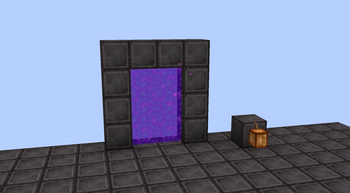
SUGAR_CANE_HYDRATION- Blocks that sugarcane can be placed next to and act as hydration [Default: Ice, Frosted ICE]ENDERMAN_PLACEABLE- Endermen can only place blocks in this tag [Default: "#minecraft:enderman_holdable"]NETHER_PORTAL_FRAME- What block portal frames can be made out of [Default: Obsidian]PISTON_IMMOVABLE- Blocks pistons cant
move [Default: Obsidian, Crying Obsidian, Respawn Anchor, Reinforced Deepslate]UNIQUE_STICKY_BLOCK- Block that behave like slime / honey blocks when moving with
piston [Default: Slime Block, "#taglighting:mob_moving_sticky_block"]MOB_MOVING_STICKY_BLOCK- Blocks that move mobs with them when moved by a piston (aka Honey
Block) [Default: Honey Block]SNOW_GOLEM_BASE- Blocks that can be used to make a snow golem base [Default: Snow Block]IRON_GOLEM_BASE- Blocks that can be used to make an iron golem base [Default: Iron Block]CANNOT_CONNECT_TO- Blocks that connecting blocks, like fences and walls, won't connect
to [Default: "#minecraft:leaves", "#minecraft:shulker_boxes", Barrier, Carved Pumpkin, Jack o' Lantern, Melon, Pumpkin]- All of these blocks are in the supports category. This means that you can place then block / item on this tag:
SUPPORTS_SUGAR_CANE- [Default: "#minecraft:dirt", "#minecraft:sand" ]SUPPORTS_WITHER_ROSE- [Default: "#minecraft:dirt", Farmland, Netherrack, Soul Sand, Soul Soil]SUPPORTS_CACTUS- [Default: "#minecraft:sand" ]SUPPORTS_NYLIUM_PLANTS- [Default: "#minecraft:nylium", "#minecraft:dirt", Farmland, Soul Soil]SUPPORTS_COCOA- [Default: "#minecraft:jungle_logs" ]SUPPORTS_END_CRYSTAL- [Default: Obsidian, Bedrock ]
Item Tags
IRON_GOLEM_REPAIR_MATERIALS- Items that can be used to repair iron golems [Default: Iron Ingot ]
Potion Tags
MAKES_MUD- Potions that when used on dirt will turn it in to mud [Default: Water ]
Fluid Tags
SUGAR_CANE_HYDRATION- Fluids that sugarcane can be placed next to and act as hydration [Default: "#minecraft:water" ]
Entity Tags
UNTARGETABLE- Entities other aggressive entities cant target [Default: Empty ]WARDEN_UNTARGETABLE- Entities the Warden won't target [Default: "#taglighting:untargetable", Armor Stand, Warden ]ZOGLIN_UNTARGETABLE- Entities the Zoglin won't target [Default: "#taglighting:untargetable", Zoglin, Creeper ]JOHNNY_UNTARGETABLE- Entities a "Johnny" Vindicator won't target [Default: "#taglighting:untargetable" ]
1.21.10 only:IS_NOT_ATTACKABLE- Used in LivingEntity.attackable() [Default: "#taglighting:untargetable", Armor Stand ]
How do version work in this mod?
- Major (1.x.x) are changed when a tag is deleted.
- Minor (x.1.x) are changed when a tag is added.
- Patch (x.x.1) are changed when I fix something I broke.

Available Versions
How to Install Taglighting on Your Server
Order Server
Order a Minecraft Java server with at least 3 GB RAM (4 GB recommended).
Set fabric Loader
In the panel under "Egg", select the fabric loader and matching Minecraft version (1.21.10).
Install Mod
Open the mod browser in the dashboard and search for "Taglighting". Click "Install" – done! Alternatively, upload the .jar via SFTP to the /mods folder.
Compatibility
Mod Loaders
Minecraft Versions
1.21.10, 1.21.1, 1.21
Server-side
✓ RequiredRecommended RAM
4 GB(min. 3 GB)Frequently Asked Questions
Taglighting server crashes on startup – what to do?
Most common cause: wrong fabric version or insufficient RAM. Check the server log (latest.log) for "OutOfMemoryError" or "Mixin" errors. With Mado Hosting: ensure at least 3 GB RAM is allocated and the loader matches the mod version (1.21.10). You can switch loaders with one click in the panel.
Is Taglighting compatible with fabric?
Taglighting officially supports fabric for Minecraft 1.21.10, 1.21.1, 1.21. The Mado dashboard automatically detects incompatible loader combinations.
Server lagging with Taglighting – how to optimize performance?
Recommended RAM: 4 GB (per 8 players). Use /spark profiler to check if Taglighting consumes the most tick time. Common fixes: reduce server view-distance to 8-10, install "performant" or "starlight" as supplementary mods on Forge. With Mado Hosting, your server runs on NVMe SSDs with dedicated CPU cores for minimal latency.
Similar Mods




Rent Modded Server
Install Taglighting with just one click on your server.