
Taigrys Utils
A simple utilities mod with various tweaks.
Screenshots

About this Mod
❓ About
Taigrys Utils adds many different client-side tweaks.
Ranging from some basic ones like FPS displays, to advanced built-in autoclickers! (But remember, you may even get banned if an AntiCheat detects something weird!)
🗒️ Features:
Currently, the mod does not have that much tweaks, of course many more will come in the future.
📋Open the Taigrys Utils Menu by pressing H📋
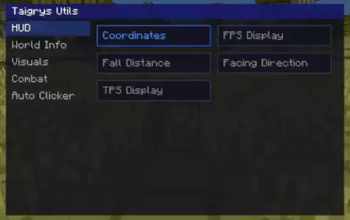
HUD
- Coordinates - Displays your current coordinates.
- FPS Display - Displays your current FPS.
- Facing Direction - Displays your current facing direction.
- TPS Display - Displays the server's current TPS.
- Fall Distance - When you are falling, displays the amount of blocks that you fell.
World Info
- Time Display - Cool clock.
- Biome Display - Displays the biome you are currently on.
Visuals
- Fullbright - fullbright.
- Glow Alert - Alerts you when you have the Glowing effect. I needed it, you may not.
Combat
- Enemy Research - Displays the armor, its durability and Protection Enchantment level, and main hand weapon and its Sharpness Enchantment level, and health of the player you are looking at.
When looking at a mob, just displays its health.
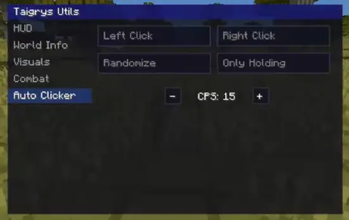
Auto Clicker
- Configure Left/Right Click.
- Randomize CPS - Makes the CPS vary a little, giving 2.67% less chance of getting detected.
- Only Holding - Makes the clicker spam only when you are holding a specific mouse button.
- Set CPS - 1-20.
- You can also toggle the left/right click with a keybind.
Available Versions
How to Install Taigrys Utils on Your Server
Order Server
Order a Minecraft Java server with at least 3 GB RAM (4 GB recommended).
Set fabric Loader
In the panel under "Egg", select the fabric loader and matching Minecraft version (1.21.4).
Install Mod
Open the mod browser in the dashboard and search for "Taigrys Utils". Click "Install" – done! Alternatively, upload the .jar via SFTP to the /mods folder.
Compatibility
Mod Loaders
Minecraft Versions
1.21.4
Server-side
✗ UnsupportedRecommended RAM
4 GB(min. 3 GB)Frequently Asked Questions
Taigrys Utils server crashes on startup – what to do?
Most common cause: wrong fabric version or insufficient RAM. Check the server log (latest.log) for "OutOfMemoryError" or "Mixin" errors. With Mado Hosting: ensure at least 3 GB RAM is allocated and the loader matches the mod version (1.21.4). You can switch loaders with one click in the panel.
Is Taigrys Utils compatible with fabric?
Taigrys Utils officially supports fabric for Minecraft 1.21.4. The Mado dashboard automatically detects incompatible loader combinations.
Server lagging with Taigrys Utils – how to optimize performance?
Recommended RAM: 4 GB (per 8 players). Use /spark profiler to check if Taigrys Utils consumes the most tick time. Common fixes: reduce server view-distance to 8-10, install "performant" or "starlight" as supplementary mods on Forge. With Mado Hosting, your server runs on NVMe SSDs with dedicated CPU cores for minimal latency.
Similar Mods




![[ETF] Entity Texture Features](https://cdn.modrinth.com/data/BVzZfTc1/af683d206d50b05258d865b0d6e4aa2f2cee12f2_96.webp)
![[EMF] Entity Model Features](https://cdn.modrinth.com/data/4I1XuqiY/6e5bbd0d06b1741bfdab6c0cfab6de8fdaf0064c_96.webp)
Rent Modded Server
Install Taigrys Utils with just one click on your server.