
Take Your MineStream
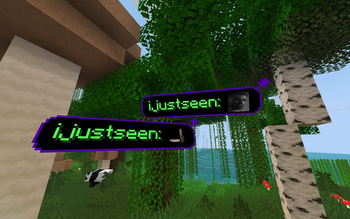
A minecraft modification for streamers, that allows messages from your Twitch chat to be displayed in your game.
Screenshots

About this Mod
Take Your MineStream
Bring your Twitch chat directly into Minecraft.
Turn viewer messages into in-game moments with clean visuals, smart moderation, and streamer-friendly controls.
✨ Highlights
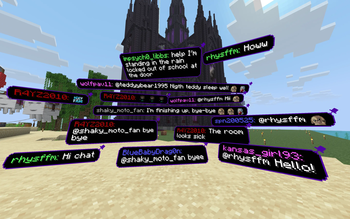
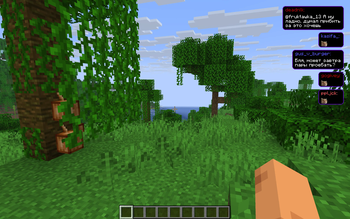
- 💬 Live chat in Minecraft — show messages in 3D space or HUD mode
- 🧠 Smart moderation — banwords, regex filters, and Twitch badge role filter
- 🎭 Emote support — Twitch and 7TV emotes in message rendering
- 📌 Pinned messages — keep important chat visible in-world (saved per world/server)
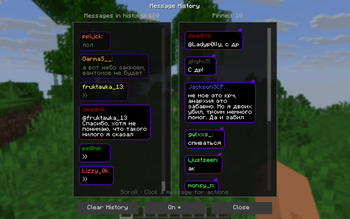
- 📜 Message history — browse chat, pin/unpin, replay, or block users from a two-column screen
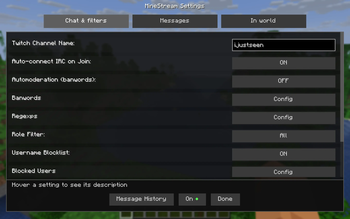
- ⚙️ In-game setup — configure channel and behavior without leaving Minecraft
- 🚀 Lightweight — built for smooth gameplay while streaming
🕹️ What you can do
- Display chat as floating world messages or as a HUD overlay
- Pause message lifetime while looking at messages (easy reading during action)
- Toggle Twitch connection in-game
- Tune timing, scale, visuals, and spawn behavior
- Click to remove messages; pin, drag, and unpin in-world
- Open message history: pin again, replay, or block a username
- Interaction safety: click/pin actions work only with an empty main hand
🚀 Quick start
- Install Fabric Loader and Fabric API for your Minecraft version
- Download the matching release jar (see Compatibility below)
- Put the
.jarinto yourmodsfolder - Launch the game and press
]to open settings - Enter your Twitch channel name and connect
Mod Menu is optional — if installed, the mod also appears in the mod list. Settings always work via
].
⌨️ Commands
/minestream test <message>— show a test message/minestream twitch start— connect to Twitch/minestream twitch stop— disconnect from Twitch/minestream banword add|remove|list— manage filter words/minestream blockuser add|remove|list— manage blocked usernames/minestream help— list all commands
🔧 Compatibility
Pick the jar that matches your game version:
| Minecraft | Release file | Java |
|---|---|---|
| 1.21.8 | tyms-1.4.1+1.21.8.jar |
21 |
| 1.21.10 | tyms-1.4.1+1.21.10.jar |
21 |
| 1.21.11 | tyms-1.4.1+1.21.11.jar |
21 |
| 26.1 / 26.1.1 / 26.1.2 | tyms-1.4.1+26.1.jar |
25 |
Required: Fabric Loader + Fabric API (no other mods required).
Optional: Mod Menu.
🎮 Keybinds
]— open mod settings[— quick IRC start/stop toggle
🛠️ Customize your stream look
- Message mode: world / HUD
- Message timing and fall behavior
- Scaling, sound, and particle settings
- Moderation: banwords, regex rules, blocked users, Twitch role filter
- Message history size and pinned-message persistence
Make chat part of the gameplay.
For support, issues, and contributions: GitHub
Available Versions
How to Install Take Your MineStream on Your Server
Order Server
Order a Minecraft Java server with at least 3 GB RAM (4 GB recommended).
Set fabric Loader
In the panel under "Egg", select the fabric loader and matching Minecraft version (26.1.2).
Install Mod
Open the mod browser in the dashboard and search for "Take Your MineStream". Click "Install" – done! Alternatively, upload the .jar via SFTP to the /mods folder.
Compatibility
Mod Loaders
Minecraft Versions
26.1.2, 26.1.1, 26.1 (+9 more)
Server-side
✗ UnsupportedRecommended RAM
4 GB(min. 3 GB)Frequently Asked Questions
Take Your MineStream server crashes on startup – what to do?
Most common cause: wrong fabric version or insufficient RAM. Check the server log (latest.log) for "OutOfMemoryError" or "Mixin" errors. With Mado Hosting: ensure at least 3 GB RAM is allocated and the loader matches the mod version (26.1.2). You can switch loaders with one click in the panel.
Is Take Your MineStream compatible with fabric?
Take Your MineStream officially supports fabric for Minecraft 26.1.2, 26.1.1, 26.1. The Mado dashboard automatically detects incompatible loader combinations.
Server lagging with Take Your MineStream – how to optimize performance?
Recommended RAM: 4 GB (per 8 players). Use /spark profiler to check if Take Your MineStream consumes the most tick time. Common fixes: reduce server view-distance to 8-10, install "performant" or "starlight" as supplementary mods on Forge. With Mado Hosting, your server runs on NVMe SSDs with dedicated CPU cores for minimal latency.
Similar Mods

![[ETF] Entity Texture Features](https://cdn.modrinth.com/data/BVzZfTc1/af683d206d50b05258d865b0d6e4aa2f2cee12f2_96.webp)
![[EMF] Entity Model Features](https://cdn.modrinth.com/data/4I1XuqiY/6e5bbd0d06b1741bfdab6c0cfab6de8fdaf0064c_96.webp)



Rent Modded Server
Install Take Your MineStream with just one click on your server.