
TakeASeat
Server-side sitting mod, with customizable block list and conditions for sitting
Screenshots
About this Mod
TakeASeat
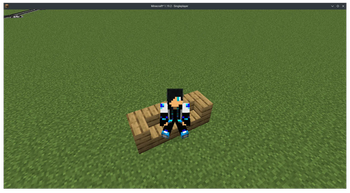
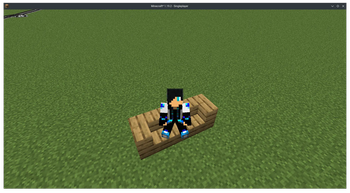
This is a Minecraft mod that allows you to sit on a (customizable list of) block by right-clicking, and it also allows you to set various restrictions as for whether the player can sit.
Supports Minecraft 1.19 - 1.20 with the Fabric/Quilt modloader, can work purely server-side.
Features
- Customizable list of blocks you can sit on, including modded blocks.
- You can prevent the player from sitting if:
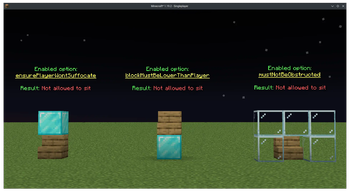
- The player would suffocate
- The player's hand is not empty
- The player is too far away (Configurable distance)
- The seat block is higher than the player (Yes, no more teleporting to the village house ceiling)
- A block is in the way between the player and the seat. (Useful for exhibition server to prevent people clipping into areas)
These can all be manually turned on/off or changed by editing the config file.
Config
The config file is located in config/takeaseat.json, editable value as follows:
Full config list (Click to Open)
| Key | Description | Default Value | Type |
|---|---|---|---|
| allowedBlockId | A list of block id that player can right click and sit on | [] (Empty) | String Array |
| allowedBlockTag | A list of block tags that player can right click and sit on, see here for list | ["minecraft:stairs", "minecraft:slabs"] | String Array |
| stairsOffset | Whether to put a offset to the player when sitting on a stairs so that they sits slightly more forward, does not work well with 90 degree turn stairs. | false | boolean |
| ensurePlayerWontSuffocate | Do not allow player to sit if there's a suffocatable block on top. Note that this only applies to suffocatable block, usually a full 1x1 block and not other non-suffocatable/solid block like stairs or light block. |
true | boolean |
| mustBeEmptyHandToSit | Whether the player must not be holding any item on both hand to sit. | true | boolean |
| blockMustBeLowerThanPlayer | This ensures the block (seat) the player clicked must not be higher than the player by at most 0.5 meter. Useful to prevent player from climbing to house ceiling made with stairs. |
true | boolean |
| mustNotBeObstructed | This further restricts player by ensuring no solid block exist between the player and the seat. (Solid block implies the block must not have a collidable area) This could create false positives, sometimes requiring player to get closer to the seat before being able to sit, but is useful on exhibition server that don't want visitors to sit on otherwise inaccessible areas. |
false | boolean |
| maxDistance | Distance in block/meter that the player must get closer to before being able to sit Value less than or equals to 0 means there's no max distance. |
0 | double |
Bugs/Suggestions
If you have any suggestions or bug report, don't hesitate to open an GitHub issue here!
License
This project is licensed under the MIT License.
You may also want to check out SvrUtil for some server commands and slight tweaks!
Available Versions
How to Install TakeASeat on Your Server
Order Server
Order a Minecraft Java server with at least 3 GB RAM (4 GB recommended).
Set fabric Loader
In the panel under "Egg", select the fabric loader and matching Minecraft version (26.1.2).
Install Mod
Open the mod browser in the dashboard and search for "TakeASeat". Click "Install" – done! Alternatively, upload the .jar via SFTP to the /mods folder.
Compatibility
Mod Loaders
Minecraft Versions
26.1.2, 26.1.1, 26.1 (+24 more)
Server-side
✓ RequiredRecommended RAM
4 GB(min. 3 GB)Frequently Asked Questions
TakeASeat server crashes on startup – what to do?
Most common cause: wrong fabric version or insufficient RAM. Check the server log (latest.log) for "OutOfMemoryError" or "Mixin" errors. With Mado Hosting: ensure at least 3 GB RAM is allocated and the loader matches the mod version (26.1.2). You can switch loaders with one click in the panel.
Is TakeASeat compatible with fabric and quilt?
TakeASeat officially supports fabric, quilt for Minecraft 26.1.2, 26.1.1, 26.1. The Mado dashboard automatically detects incompatible loader combinations.
Server lagging with TakeASeat – how to optimize performance?
Recommended RAM: 4 GB (per 8 players). Use /spark profiler to check if TakeASeat consumes the most tick time. Common fixes: reduce server view-distance to 8-10, install "performant" or "starlight" as supplementary mods on Forge. With Mado Hosting, your server runs on NVMe SSDs with dedicated CPU cores for minimal latency.
Similar Mods




Rent Modded Server
Install TakeASeat with just one click on your server.