
Take It Out — Minecraft Mod (Shulker Picking + Easy Place)
Minecraft mod that lets you pick blocks from shulker boxes using mouse wheel, Easy Place, or right-click — perfect for Litematica schematics and printers.
Screenshots
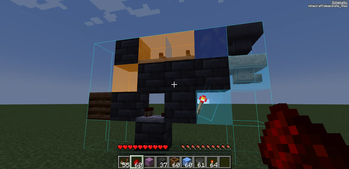

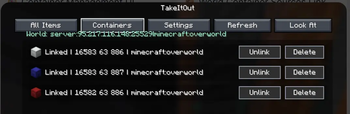
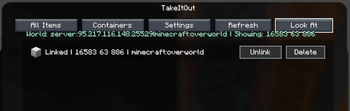


About this Mod
⚡ TakeItOut — Fast Shulker Block Picking + Easy Place
Pick blocks directly from shulker boxes — whether they’re in your inventory or placed in the world — using:
- the pick block key (mouse wheel)
- Litematica Easy Place (right-click in schematics)
- or regular right-click in schematics with Auto Take Out enabled
Build faster than ever — whether you use Easy Place or place blocks manually.
Works seamlessly with Litematica schematics and is especially useful with any Litematica printer.
🎥 Video Guide
✨ Key Features
📦 Pick blocks directly from:
- shulker boxes in your inventory
- linked containers placed in the world
🧱 Litematica Easy Place support
Right-click schematic blocks to auto-pick and place them exactly as defined by the schematic🖱️ Manual placement support (Auto Take Out)
Right-click in schematics to automatically take the required item while placing blocks normally⚡ Works with Litematica schematics
🖨️ Compatible with:
- original Litematica printer
- litematica-printer (BiliXWhite fork)
🔄 Support for Tweakeroo Restock
🖱️ Pick block support using the mouse wheel
🔄 Auto pick mode (toggle with R)
📦 Extraction Modes:
- SINGLE ITEM
- FULL STACK
(switch with B)
📁 Container Groups
Save, switch and share named container setups with other players on the server🌐 Server-side Shared Groups
Publish container groups to the server and let other players import them instantly📦 Box Selection Tool
Select a cuboid area to automatically link all containers inside it
📦 Linked World Containers
Link placed containers using the configurable Link Looked-at Container hotkey (H by default).
Supported:
- shulker boxes
- chests
- barrels
Features:
- 🌐 Cross-container item access
- 🌍 Cross-dimension support
- 📊 Litematica material list integration
- 🟢 Linked container outline rendering
- 🧭 Container management UI
You can also create:
- 📁 Container Groups — save, switch and share named container setups
- 🌐 Shared Server Groups — publish groups for all players on the server
- 🗑️ Dump Containers — automatically store displaced inventory items during swaps
- 📦 Box Selection — bulk-link containers inside a selected area
🧭 UI & Item Management
All Items Tab
- View all available items
- 🔍 Search/filter items
- 🖱️ Left-click → request full stack
- 🖱️ Right-click → request single item
Containers Tab
Manage:
- linked containers
- dump containers
- container groups
Includes:
- linked container counters
- Delete All actions
- improved item pulling UX
⌨️ Keybindings
| Action | Default |
|---|---|
| Toggle Auto Pick | R |
| Switch Extraction Mode | B |
| Link Looked-at Container | H |
| Mark Dump Container | G |
🆕 Recent Updates
- Added server-side shared container groups with import/remove support
- Added Box Selection mode for bulk container linking
- Improved Easy Place reliability after reconnects
- Correct block placement in water
- Better redstone wire matching
- Fixed inventory overflow and item merge issues
- Tools no longer get moved into world containers accidentally
- Chat notifications for scan limits and server restrictions
- Server config option to disable item requests from All Items tab
⚠️ Compatibility Notice
Item Swapper
TakeItOut may conflict with Item Swapper because both modify item picking behavior.
Possible issues:
- incorrect item selection
- unexpected hotbar swaps
👉 If problems occur, try disabling Item Swapper or adjusting its settings.
🌐 Multiplayer Support
Install the mod on the server to use it on public servers
or use the companion plugin for:
- Paper
- Purpur
- Spigot
- Bukkit
⚠️ Client Compatibility
Older client versions are not compatible with current server versions.
This changed after introducing Single Item Mode.
👉 Please update the client to the latest version.
⚙️ Settings
Open the full settings screen with:
- X + T
- Controls menu
- Mod Menu
🔗 Links



☕ Support
Made by Max Bel — support the project:
https://ko-fi.com/maxbel


Available Versions
How to Install Take It Out — Minecraft Mod (Shulker Picking + Easy Place) on Your Server
Order Server
Order a Minecraft Java server with at least 3 GB RAM (4 GB recommended).
Set bukkit Loader
In the panel under "Egg", select the bukkit loader and matching Minecraft version (26.1.2).
Install Mod
Open the mod browser in the dashboard and search for "Take It Out — Minecraft Mod (Shulker Picking + Easy Place)". Click "Install" – done! Alternatively, upload the .jar via SFTP to the /mods folder.
Compatibility
Mod Loaders
Minecraft Versions
26.1.2, 26.1.1, 26.1 (+14 more)
Server-side
✓ RequiredRecommended RAM
4 GB(min. 3 GB)Frequently Asked Questions
Take It Out — Minecraft Mod (Shulker Picking + Easy Place) server crashes on startup – what to do?
Most common cause: wrong bukkit version or insufficient RAM. Check the server log (latest.log) for "OutOfMemoryError" or "Mixin" errors. With Mado Hosting: ensure at least 3 GB RAM is allocated and the loader matches the mod version (26.1.2). You can switch loaders with one click in the panel.
Is Take It Out — Minecraft Mod (Shulker Picking + Easy Place) compatible with bukkit and fabric and paper and purpur and spigot?
Take It Out — Minecraft Mod (Shulker Picking + Easy Place) officially supports bukkit, fabric, paper, purpur, spigot for Minecraft 26.1.2, 26.1.1, 26.1. The Mado dashboard automatically detects incompatible loader combinations.
Server lagging with Take It Out — Minecraft Mod (Shulker Picking + Easy Place) – how to optimize performance?
Recommended RAM: 4 GB (per 8 players). Use /spark profiler to check if Take It Out — Minecraft Mod (Shulker Picking + Easy Place) consumes the most tick time. Common fixes: reduce server view-distance to 8-10, install "performant" or "starlight" as supplementary mods on Forge. With Mado Hosting, your server runs on NVMe SSDs with dedicated CPU cores for minimal latency.
Similar Mods




Rent Modded Server
Install Take It Out — Minecraft Mod (Shulker Picking + Easy Place) with just one click on your server.