Task Manager
Adds feature to add tasks and create your own to-do lists and track their completion.
Screenshots
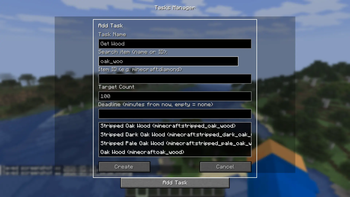
About this Mod
Subscribe on our Youtube channel, we will post announcement and release trailers there soon!
TasksManager is a lightweight, client-side Fabric mod that helps you track item-collection goals without leaving the game. Whether you're grinding resources for a mega-build, hunting rare drops, or just organising your survival checklist TasksManager keeps everything visible on your HUD.
Features
Task Tracking - Create tasks with or without items. Tasks with items track your inventory automatically and mark as complete when you hit the target.
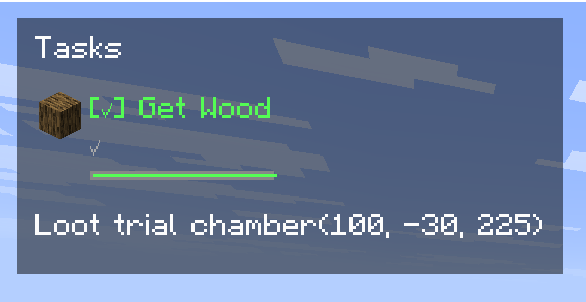
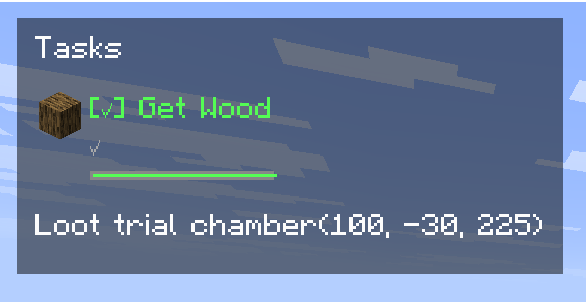
A live progress bar and countdown timer show exactly how much time remains.
Pause on Exit - Deadlines freeze when you leave the world and resume when you return. No penalty for taking a break.
Per-World / Per-Server - Every world and server has its own task list. Your single-player goals won't interfere with your server chores.
Deadlines - Set a time limit on any task.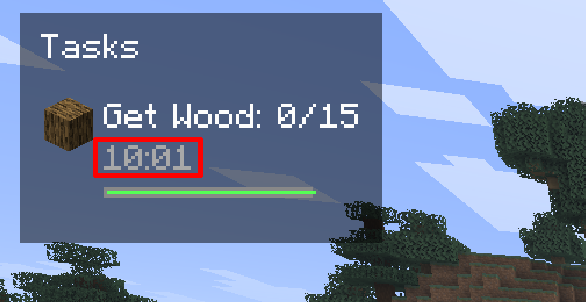
Auto-Complete - Item-based tasks finish automatically the moment you collect enough. Manual tasks can be checked off with a single click.
HUD Display - See your active tasks in the top-left corner with progress, status icons, deadline bars, and countdowns.
Responsive layout adapts to tasks with and without deadlines.
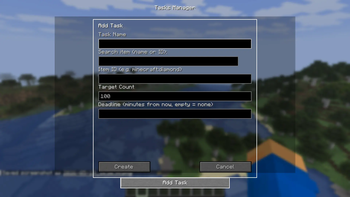
Full Task Management UI - Press U (configurable) to open the task screen.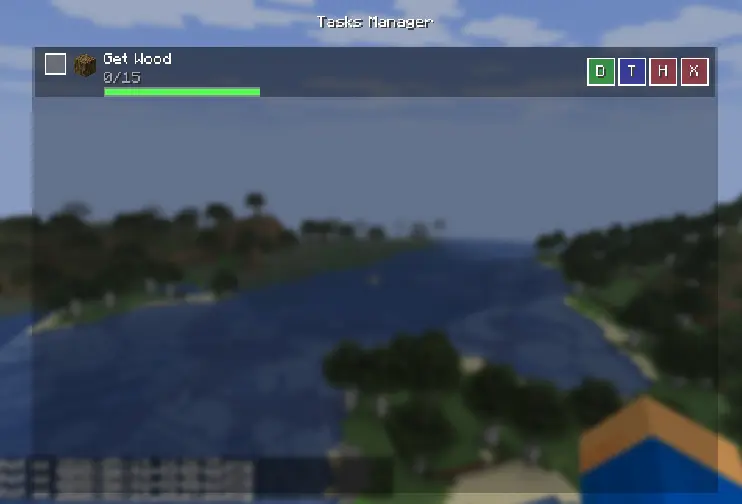
Add, edit targets, set deadlines, hide, or delete tasks.
Built-in item search helps you find the right item ID.
How to Use
Press U to open the task manager, Click "Add Task", give it a name, optionally link an item (search by name or ID), set a target count, and assign a deadline in minutes
Tasks appear on the HUD automatically. Item counts update in real time as you pick up or drop items.
Click the checkbox in the task list to manually mark a task complete, or let auto-complete handle it.
Use the H, T, D, X buttons to hide, edit target, set deadline, or delete a task
Available Versions
How to Install Task Manager on Your Server
Order Server
Order a Minecraft Java server with at least 3 GB RAM (4 GB recommended).
Set fabric Loader
In the panel under "Egg", select the fabric loader and matching Minecraft version (1.21.11).
Install Mod
Open the mod browser in the dashboard and search for "Task Manager". Click "Install" – done! Alternatively, upload the .jar via SFTP to the /mods folder.
Compatibility
Mod Loaders
Minecraft Versions
1.21.11
Server-side
✗ UnsupportedRecommended RAM
4 GB(min. 3 GB)Frequently Asked Questions
Task Manager server crashes on startup – what to do?
Most common cause: wrong fabric version or insufficient RAM. Check the server log (latest.log) for "OutOfMemoryError" or "Mixin" errors. With Mado Hosting: ensure at least 3 GB RAM is allocated and the loader matches the mod version (1.21.11). You can switch loaders with one click in the panel.
Is Task Manager compatible with fabric?
Task Manager officially supports fabric for Minecraft 1.21.11. The Mado dashboard automatically detects incompatible loader combinations.
Server lagging with Task Manager – how to optimize performance?
Recommended RAM: 4 GB (per 8 players). Use /spark profiler to check if Task Manager consumes the most tick time. Common fixes: reduce server view-distance to 8-10, install "performant" or "starlight" as supplementary mods on Forge. With Mado Hosting, your server runs on NVMe SSDs with dedicated CPU cores for minimal latency.
Similar Mods




Rent Modded Server
Install Task Manager with just one click on your server.