
TC VeinGlow PC
An advanced vein mining mod with radial menu, RGB-customizable block outline highlighter, custom mining shapes, and a skill system for harvesting, tree-felling, and liquid handling.
Screenshots
About this Mod
TC VeinGlow
TC VeinGlow is an advanced vein mining mod for Minecraft 1.21.1, supporting Fabric, Forge, and NeoForge. It goes far beyond a standard vein miner — featuring a radial menu, RGB-customizable block outline highlighter, preset and custom mining shapes, and a full skill system.
## Features
Smart Vein Mining
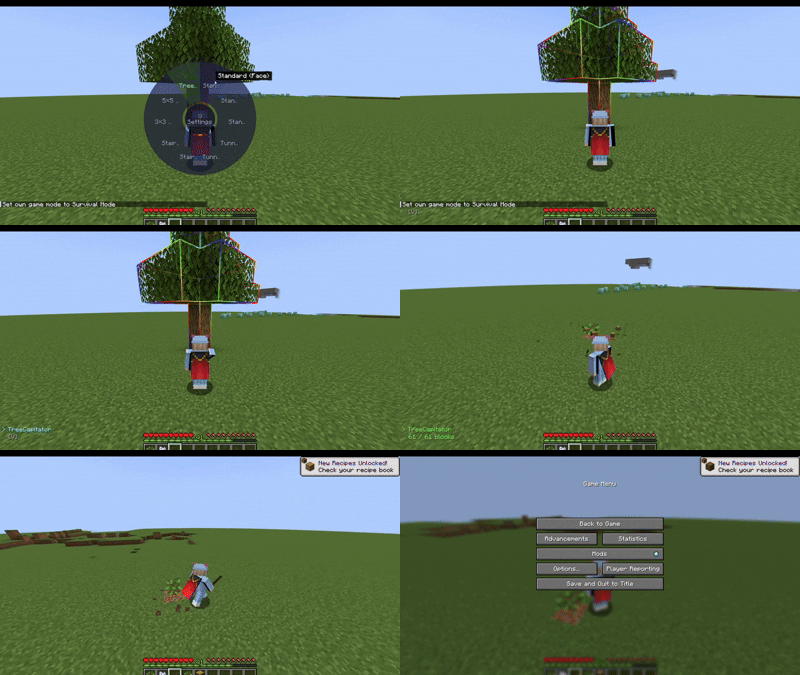
Break an entire ore vein, fell a whole tree, or harvest a full field in a single action. The mod uses a server-side Block Action Queue to process blocks smoothly without causing server lag.
Radial Menu
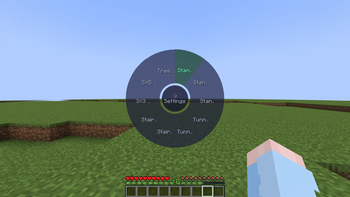
Hold G to open the radial menu and instantly switch between mining modes — no need to memorize multiple keybinds.
RGB Block Outline Highlighter
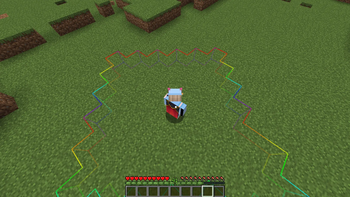
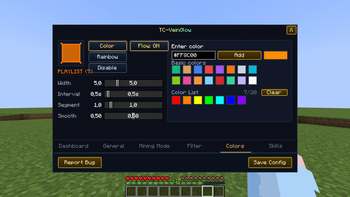
All blocks about to be mined are highlighted with a smooth outline. Fully customizable: pick any RGB color, adjust thickness, transition speed, or enable rainbow mode.
Mining Shapes
Choose from built-in shapes or create your own:
| Menu Name | Description |
|---|---|
| Standard (Face) | Expands through the 6 directly adjacent block faces. |
| Standard V2 (Edges) | Expands through faces and edge-adjacent blocks (18 directions). |
| Standard V3 (Corners) | Expands through faces, edges, and 3D corners (26 directions), providing the widest coverage. |
| TreeCapitator | Cuts down an entire tree using the #logs tag and automatically replants saplings. |
| Tunnel 1×2 | Mines a tunnel 1 block wide and 2 blocks high, extending in the direction you are looking. |
| Tunnel 3×3 | Mines a 3×3 tunnel extending in the direction you are looking. |
| Stair Up | Creates an upward staircase, moving up one block for each step forward. |
| Stair Down | Creates a downward staircase, moving down one block for each step forward. |
| 3×3 Area | Mines a 3×3 area perpendicular to the face you are targeting. |
| 5×5 Area | Mines a 5×5 area perpendicular to the face you are targeting. |
Skill System
- Break Skill — standard block breaking
- Crop Harvest Skill — harvest crops across a wide area and auto-replant
- Bucket Skill — collect or place liquids (water, lava) in bulk
- Interact Skill — strip logs, till soil, create paths, and more in bulk
HUD Overlay
A compact on-screen display shows the current mode, active tool, and block count. Includes smooth toast notifications when you switch modes. Position, color, opacity, and style are fully customizable.
In-Game Config GUI
All settings are accessible from inside the game — no need to edit config files manually. Includes tabs for General, Colors, Filters, Skills, Shapes, and Dashboard.
Block Filter System
Manage a per-world blacklist/whitelist directly from the in-game menu. Supports Minecraft tag notation (e.g. #minecraft:logs, #forge:ores) for broad compatibility with other mods.
Multiplayer Support
Fully supported. The mod must be installed on both server and client. All mining logic runs server-side to prevent cheating and reduce client load.
Default Keybinds
| Key | Action |
|---|---|
V |
Activate Vein Mine (hold while breaking) |
G |
Open Radial Menu |
N |
Quick-cycle through shapes |
← / → |
Previous / Next shape |
1–9 |
Quick-select shape slot |
All keybinds can be rebound in Options > Controls.
Requirements
| Component | Version |
|---|---|
| Minecraft | 1.21.1 |
| Java | 21 |
| Fabric Loader | >= 0.15.11 |
| Fabric API | 0.102.0+1.21.1 |
| NeoForge | 21.1.x |
| Forge | 52.1.x |
Optional: ModMenu (Fabric only) — opens the config screen from the main menu.
No other dependencies required.
Available Versions
How to Install TC VeinGlow PC on Your Server
Order Server
Order a Minecraft Java server with at least 3 GB RAM (4 GB recommended).
Set fabric Loader
In the panel under "Egg", select the fabric loader and matching Minecraft version (1.21.1).
Install Mod
Open the mod browser in the dashboard and search for "TC VeinGlow PC". Click "Install" – done! Alternatively, upload the .jar via SFTP to the /mods folder.
Compatibility
Mod Loaders
Minecraft Versions
1.21.1
Server-side
✓ RequiredRecommended RAM
4 GB(min. 3 GB)Frequently Asked Questions
TC VeinGlow PC server crashes on startup – what to do?
Most common cause: wrong fabric version or insufficient RAM. Check the server log (latest.log) for "OutOfMemoryError" or "Mixin" errors. With Mado Hosting: ensure at least 3 GB RAM is allocated and the loader matches the mod version (1.21.1). You can switch loaders with one click in the panel.
Is TC VeinGlow PC compatible with fabric and forge and neoforge?
TC VeinGlow PC officially supports fabric, forge, neoforge for Minecraft 1.21.1. Note: Forge and Fabric mods are NOT cross-compatible – pick one loader and stick with it. The Mado dashboard automatically detects incompatible loader combinations.
Server lagging with TC VeinGlow PC – how to optimize performance?
Recommended RAM: 4 GB (per 8 players). Use /spark profiler to check if TC VeinGlow PC consumes the most tick time. Common fixes: reduce server view-distance to 8-10, install "performant" or "starlight" as supplementary mods on Forge. With Mado Hosting, your server runs on NVMe SSDs with dedicated CPU cores for minimal latency.
Similar Mods




![[ETF] Entity Texture Features](https://cdn.modrinth.com/data/BVzZfTc1/af683d206d50b05258d865b0d6e4aa2f2cee12f2_96.webp)
![[EMF] Entity Model Features](https://cdn.modrinth.com/data/4I1XuqiY/6e5bbd0d06b1741bfdab6c0cfab6de8fdaf0064c_96.webp)
Rent Modded Server
Install TC VeinGlow PC with just one click on your server.