
TeamCommand
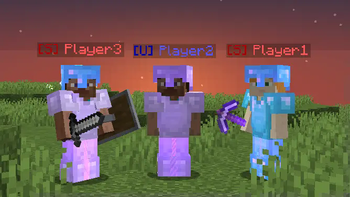
A command for players to create and manage teams. Similar to factions but based on Vanilla scoreboard teams.
Screenshots
About this Mod
TeamCommand
This mod adds a new command to Minecraft which allows players to create and manage their own teams. The command is
similar to factions which you might know from other mods but is based on the Vanilla /team command which only
operators can use.

Commands
/t create <name> <color>Create a new team and be its first member./t list [<team>]Lists all teams or the players in a specific team./t invite <player>Invite a new player to join your team./t acceptAccept the last invitation and join the team./t setdisplayName <name>Change the displayed name of your team.color <color>Change the color of your team.friendlyFire <allowed>Specify wether players in your team can inflict damage to each other or not.seeInvisibles <allowed>Specify wether members of your team can see invisible teammates.
/t leaveLeave your current team.
Additionally, players can use every vanilla or modded feature integrated with teams like /teammsg to send a chat
message to all teammates.
Configuration
The mods configuration file is located at teamcommand.toml in your servers config folder.
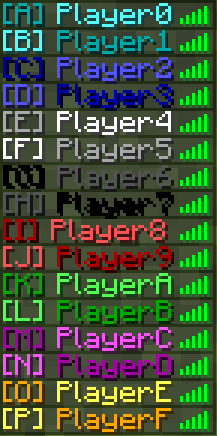
commandName: The name of the new team command (default:t).allowDuplicateColors: Specify wether there can be multiple teams with the same color (default:true).allowDuplicateDisplaynames: Specify wether there can be multiple teams with the same name (default:false).prefixFormat: A format string which will determine the team prefix based on the displayName (default:[%.1s]).prefixUseTeamColor: Wether the prefix will be in the teams color or a secondary color. (default:false)suffixFormat: A format string which will determine the team suffix based on the displayName (default: empty string)suffixUseTeamColor: Wether the suffix will be in the teams color or a secondary color. (default:false)
Prefix & Suffix Format Strings
The format string for prefix and suffix is passed the displayed name of the team. You can look up the official syntax for
java format strings here.
Examples:
[%.1s]display the first letter of the displayed name in square brackets (default prefix)- (empty string) display nothing (default suffix)
TEAM %sdisplay the letters "TEAM", a whitespace and the team name%Sthe team name in uppercase characters%.3Sthe first three letters of the team name in uppercase characters
It is recommeded to end the prefix and begin the suffix with a whitespace to prevent them from looking like a part of
the players name.
Limitations
- There is no hierarchy in teams, everybody can invite new members.
- It's not possible to change the actual name of a team, only the displayed name.
- The amount of teams is limited at 16 if
allowDuplicateColorsis disabled as Minecraft only allows 16 colors.
Available Versions
How to Install TeamCommand on Your Server
Order Server
Order a Minecraft Java server with at least 3 GB RAM (4 GB recommended).
Set fabric Loader
In the panel under "Egg", select the fabric loader and matching Minecraft version (1.19.4).
Install Mod
Open the mod browser in the dashboard and search for "TeamCommand". Click "Install" – done! Alternatively, upload the .jar via SFTP to the /mods folder.
Compatibility
Mod Loaders
Minecraft Versions
1.19.4, 1.19.3, 1.19.2 (+3 more)
Server-side
✓ RequiredRecommended RAM
4 GB(min. 3 GB)Frequently Asked Questions
TeamCommand server crashes on startup – what to do?
Most common cause: wrong fabric version or insufficient RAM. Check the server log (latest.log) for "OutOfMemoryError" or "Mixin" errors. With Mado Hosting: ensure at least 3 GB RAM is allocated and the loader matches the mod version (1.19.4). You can switch loaders with one click in the panel.
Is TeamCommand compatible with fabric?
TeamCommand officially supports fabric for Minecraft 1.19.4, 1.19.3, 1.19.2. The Mado dashboard automatically detects incompatible loader combinations.
Server lagging with TeamCommand – how to optimize performance?
Recommended RAM: 4 GB (per 8 players). Use /spark profiler to check if TeamCommand consumes the most tick time. Common fixes: reduce server view-distance to 8-10, install "performant" or "starlight" as supplementary mods on Forge. With Mado Hosting, your server runs on NVMe SSDs with dedicated CPU cores for minimal latency.
Similar Mods




Rent Modded Server
Install TeamCommand with just one click on your server.