
TEKUBE
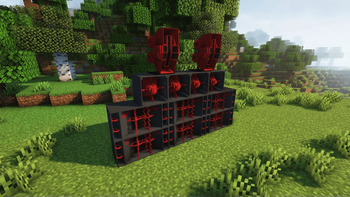
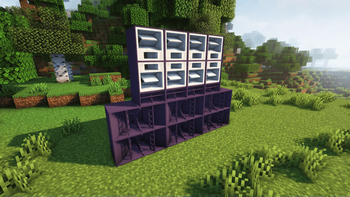
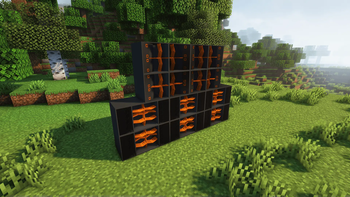
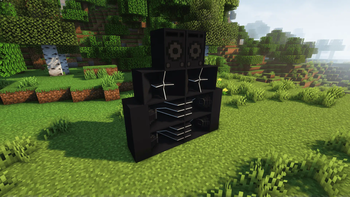
This Minecraft mod turns the game into a real immersive party experience. It allows players to organize parties in the game by adding new items and features, inspired by the culture of French Sound Systems!
Screenshots
About this Mod
Fabric:
Requires the recommended Fabric Loader version for your version of Minecraft.
Requires Fabric API.
Put Fabric API and TEKUBE in the mods folder.
NeoForge:
Requires the recommended NeoForge version for your version of Minecraft.
Requires Kotlin for Forge.
Put Kotlin for Forge and TEKUBE in the mods folder.
Main features:
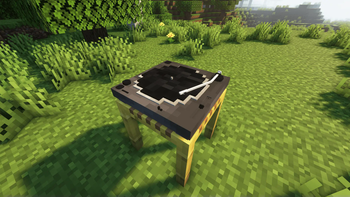
Sound systems: The mod introduces subwoofers and speakers, which play music in the world of Minecraft. Players can place them to create realistic sound space.
DJ Deck: A virtual mixer is built in, allowing players to control the music in-game. They can make transitions like a real DJ.
Vinyl and Music: A selection of vinyl records is available to enrich the musical atmosphere. Players can make, collect and play vinyls to personalize the atmosphere of their party. The records include various musical genres, ranging from electro to tekno.
Full party experience:
The mod offers the possibility to organize festive events in multiplayer. Friends can gather to dance and interact with music equipment. Dance animations and emotes make the experience even more immersive, allowing everyone to move to the rhythm of the music.
This mod is perfect for those who want to recreate the atmosphere of parties and festivals in Minecraft, offering a unique blend of creativity and musical friendliness.
Mod User Guide:
Vinyl turntable

Vinyl

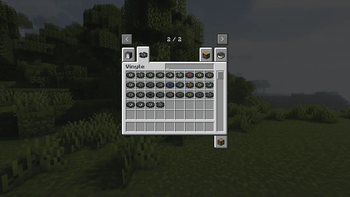
Vinyl cutting
To cut your vinyl, simply equip yourself with a Stone Cutter.
Place the vinyl in the slot on the left and choose the music you like best in the slot on the right!Vinyl on the turntable
To play the vinyl, simply Right-click on the turntable. To stop the music, click on it.
Speaker system
To craft a box, equip yourself with the Stonecutter.
Place a Note Block in the left slot and choose one of the available models!
Congratulations, now you know how to play the perfect party-goer!
Feel free to give me feedback on your experience
And remember: you can't stop people who dance. ;)
Available Versions
How to Install TEKUBE on Your Server
Order Server
Order a Minecraft Java server with at least 3 GB RAM (4 GB recommended).
Set fabric Loader
In the panel under "Egg", select the fabric loader and matching Minecraft version (1.21.8).
Install Mod
Open the mod browser in the dashboard and search for "TEKUBE". Click "Install" – done! Alternatively, upload the .jar via SFTP to the /mods folder.
Compatibility
Mod Loaders
Minecraft Versions
1.21.8, 1.21.4, 1.20.1
Server-side
✓ RequiredRecommended RAM
4 GB(min. 3 GB)Frequently Asked Questions
TEKUBE server crashes on startup – what to do?
Most common cause: wrong fabric version or insufficient RAM. Check the server log (latest.log) for "OutOfMemoryError" or "Mixin" errors. With Mado Hosting: ensure at least 3 GB RAM is allocated and the loader matches the mod version (1.21.8). You can switch loaders with one click in the panel.
Is TEKUBE compatible with fabric and forge and neoforge?
TEKUBE officially supports fabric, forge, neoforge for Minecraft 1.21.8, 1.21.4, 1.20.1. Note: Forge and Fabric mods are NOT cross-compatible – pick one loader and stick with it. The Mado dashboard automatically detects incompatible loader combinations.
Server lagging with TEKUBE – how to optimize performance?
Recommended RAM: 4 GB (per 8 players). Use /spark profiler to check if TEKUBE consumes the most tick time. Common fixes: reduce server view-distance to 8-10, install "performant" or "starlight" as supplementary mods on Forge. With Mado Hosting, your server runs on NVMe SSDs with dedicated CPU cores for minimal latency.
Similar Mods

![[ETF] Entity Texture Features](https://cdn.modrinth.com/data/BVzZfTc1/af683d206d50b05258d865b0d6e4aa2f2cee12f2_96.webp)
![[EMF] Entity Model Features](https://cdn.modrinth.com/data/4I1XuqiY/6e5bbd0d06b1741bfdab6c0cfab6de8fdaf0064c_96.webp)



Rent Modded Server
Install TEKUBE with just one click on your server.