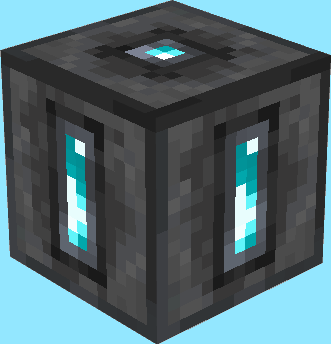
Teleportation Shrines
Linkable Shrines to fulfill all your teleportation needs!
Screenshots
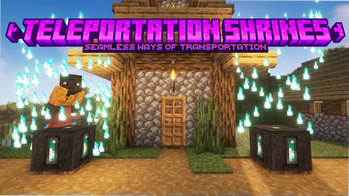
About this Mod
Are you tired of building nether portal hubs to connect your friends' and your homes, but in need for a fast and efficient way?
Seems like Teleportation Shrines are exactly what you were looking for!
This datapack adds mystical shrines which can be connected to travel between different places at ease :)
Usage
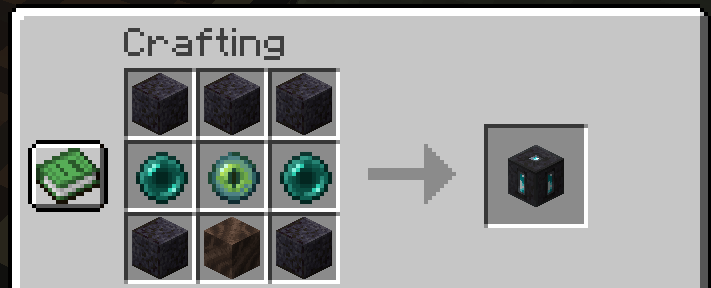
Teleportation Shrines can be crafted like this:
After you place them down you will be able to open their GUI and will be able to see and configure 5 carefully crafted refined types of the vanilla minecraft ores!
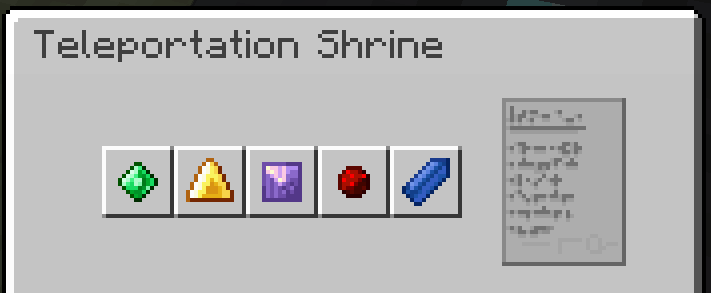
You can click them to select the next one. (Toggling happens in this order: Emerald, Gold, Amethyst, Redstone, Lapis, repeat 🔂)
If two shrines show the same collection of ores in the same order they will be linked - which means you can now teleport yourself from one to the other shrine!
To do so simply stand on top of a linked shrine and sneak for a few seconds. If blue particles start appearing around your character, that means you did everything correctly and will be teleported shortly :)
...however if red flames start appearing around you you might have done something wrong and I'd reccomend stepping off the shrine before it takes you to the wrong place... or causes you to splinch
The shrine you are teleporting to will also show particles to inform people around that someone new is arriving - keep that in mind while invading other people's places... your invisibilty potion won't help you when dabbling in ancient magic
Speaking of ancient magic... our current understanding of it is limited, preventing you from using this way of traveling in dimensions other than the overworld- this may be changed as our knowledge evolves
⚠️ Please note that even with the mod version of this datapack installed, you can not use /give to obtain shrines. Use /loot give @s loot tp_shrines:block/teleportation_shrine instead
Known Bugs
These Bugs are known and should be kept in mind and will be fixed in a future update. To report new bugs please visit this datapack's GitHub page
- trying to put any item into one of the 5 "ore slots" in a Teleportation Shrine will permanently delete it. don't do this.
- none :)
Interested in making your own datapacks? :)
I am part of a small team of people owning Datapack Hub, the perfect discord server for helping you do just that! Wether you are just getting started or have advanced questions, with 1700+ members and our team of verified helpers we got you covered!
(This is 100% a passion project and I don't get paid anything for promoting this :)) 
Need a minecraft server?
Available Versions
How to Install Teleportation Shrines on Your Server
Order Server
Order a Minecraft Java server with at least 3 GB RAM (4 GB recommended).
Set datapack Loader
In the panel under "Egg", select the datapack loader and matching Minecraft version (1.21.10).
Install Mod
Open the mod browser in the dashboard and search for "Teleportation Shrines". Click "Install" – done! Alternatively, upload the .jar via SFTP to the /mods folder.
Compatibility
Mod Loaders
Minecraft Versions
1.21.10, 1.21.9, 1.21.8 (+7 more)
Server-side
✓ RequiredRecommended RAM
4 GB(min. 3 GB)Frequently Asked Questions
Teleportation Shrines server crashes on startup – what to do?
Most common cause: wrong datapack version or insufficient RAM. Check the server log (latest.log) for "OutOfMemoryError" or "Mixin" errors. With Mado Hosting: ensure at least 3 GB RAM is allocated and the loader matches the mod version (1.21.10). You can switch loaders with one click in the panel.
Is Teleportation Shrines compatible with datapack and fabric and forge and neoforge and quilt?
Teleportation Shrines officially supports datapack, fabric, forge, neoforge, quilt for Minecraft 1.21.10, 1.21.9, 1.21.8. Note: Forge and Fabric mods are NOT cross-compatible – pick one loader and stick with it. The Mado dashboard automatically detects incompatible loader combinations.
Server lagging with Teleportation Shrines – how to optimize performance?
Recommended RAM: 4 GB (per 8 players). Use /spark profiler to check if Teleportation Shrines consumes the most tick time. Common fixes: reduce server view-distance to 8-10, install "performant" or "starlight" as supplementary mods on Forge. With Mado Hosting, your server runs on NVMe SSDs with dedicated CPU cores for minimal latency.
Similar Mods




Rent Modded Server
Install Teleportation Shrines with just one click on your server.
Details
- License
- Creative Commons Attribution Non Commercial No Derivatives 4.0 International
- Server-side
- Required