Tempestra
A visual overhaul of thunderstorms and lightning that adds custom arcing and branching to the main bolt.
Screenshots
About this Mod
Tempestra
Tempestra is a visual overhaul of thunderstorms and lightning.
The main goal of this mod is to make thunderstorms feel more interesting and powerful, without making them feel out of place in Minecraft. Vanilla lightning is very simple, so Tempestra changes it into a much thinner and more natural-looking bolt that arcs through the sky, glows, and can sometimes split before hitting the ground.
Lightning
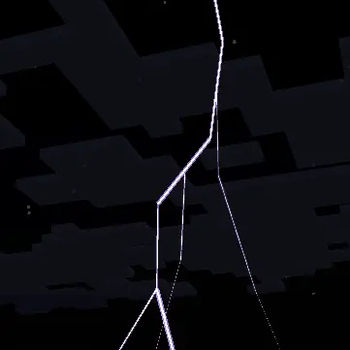
Tempestra replaces the normal lightning visual with a custom lightning effect. Instead of being one simple straight bolt, lightning now generates with a more curved and broken path, making each strike look different from the last.
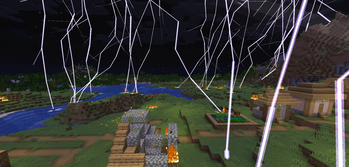
Lightning can also split into separate paths, and in some cases, it can hit the ground in more than one place. This makes storms feel a lot more dramatic, especially when multiple strikes happen close together.
Storms
Tempestra also adds stronger storm types. Normal thunderstorms still occur, but storms can also become more intense, leading to more frequent lightning.
Medium storms are slightly more active than normal thunderstorms, while heavy storms are much more intense and can fill the sky with lightning. This makes thunderstorms feel like something that actually changes the world's atmosphere, rather than just rain with the occasional lightning strike.
Compatibility
Tempestra is meant to be a simple visual improvement, so it works best with other atmosphere-focused mods.
I personally recommend using it with mods like Particle Rain and Immersive Thunder, since they improve the rest of the storm while Tempestra focuses on the lightning itself.
It should also fit into almost any modpack, since it is purely visual and still keeps a Vanilla+ feel. It works well in normal survival packs, atmospheric packs, and even fantasy packs that want storms to feel stronger and more intense.
License Information
Tempestra is licensed under Creative Commons Attribution–ShareAlike 4.0 International, also known as CC BY-SA 4.0.
This license allows others to use, modify, and redistribute this work, including for commercial purposes, as long as they give appropriate credit, indicate if changes were made, and distribute adaptations under the same license.
Available Versions
How to Install Tempestra on Your Server
Order Server
Order a Minecraft Java server with at least 3 GB RAM (4 GB recommended).
Set fabric Loader
In the panel under "Egg", select the fabric loader and matching Minecraft version (1.20.1).
Install Mod
Open the mod browser in the dashboard and search for "Tempestra". Click "Install" – done! Alternatively, upload the .jar via SFTP to the /mods folder.
Compatibility
Mod Loaders
Minecraft Versions
1.20.1
Server-side
~ OptionalRecommended RAM
4 GB(min. 3 GB)Frequently Asked Questions
Tempestra server crashes on startup – what to do?
Most common cause: wrong fabric version or insufficient RAM. Check the server log (latest.log) for "OutOfMemoryError" or "Mixin" errors. With Mado Hosting: ensure at least 3 GB RAM is allocated and the loader matches the mod version (1.20.1). You can switch loaders with one click in the panel.
Is Tempestra compatible with fabric?
Tempestra officially supports fabric for Minecraft 1.20.1. The Mado dashboard automatically detects incompatible loader combinations.
Server lagging with Tempestra – how to optimize performance?
Recommended RAM: 4 GB (per 8 players). Use /spark profiler to check if Tempestra consumes the most tick time. Common fixes: reduce server view-distance to 8-10, install "performant" or "starlight" as supplementary mods on Forge. With Mado Hosting, your server runs on NVMe SSDs with dedicated CPU cores for minimal latency.
Similar Mods

![[ETF] Entity Texture Features](https://cdn.modrinth.com/data/BVzZfTc1/af683d206d50b05258d865b0d6e4aa2f2cee12f2_96.webp)
![[EMF] Entity Model Features](https://cdn.modrinth.com/data/4I1XuqiY/6e5bbd0d06b1741bfdab6c0cfab6de8fdaf0064c_96.webp)



Rent Modded Server
Install Tempestra with just one click on your server.
Details
- License
- Creative Commons Attribution Share Alike 4.0 International
- Server-side
- Optional