
Tenites anchor optimizer
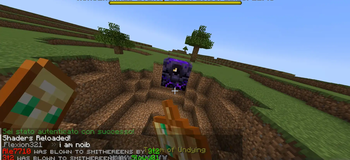
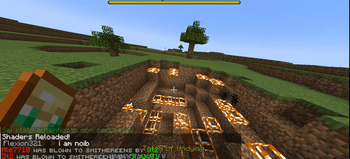
An anchor optimizer which when you explode an anchor calculates blocks that should explode and makes them invisible before the server actually explodes them.
Screenshots
About this Mod
Tenite's Anchor Optimizer
What it is
Tenite's Anchor Optimizer is a client-side Fabric mod that improves the visual response of respawn anchor explosions. In standard Minecraft, the time it takes for block destruction to happen after interacting with an anchor is network based. This mod aims to fix that.
How it Works
When a player right-clicks a charged respawn anchor, the mod predicts which blocks will be destroyed. The predicted blocks are immediately replaced on the client with a placeholder block, a pink tulip.
The client simultaneously sends a packet to the server to perform the explosion. Once the server confirms the explosion and updates the world state, the mod reverts the blocks on the client to match the server. This process ensures the client's view remains synchronized with the server's world while allowing players to see the result of the explosion without waiting for server confirmation.
Features and Commands
Client-Side Operation: This mod is client-side only and does not need to be installed on a server.
Customizable Behavior: The mod can be configured in-game using these commands:
/teniteanchor toggle: Toggles the mod's prediction functionality on or off.
/teniteanchor setdelay
/teniteanchor nodelay: Disables the fixed delay, causing the mod to revert blocks as soon as the server's explosion packet is received.
FAQ
-Is this a cheat?
No this aims to mimic the behaviour that players with lower ping get and does not distrupt any anticheats.
-Why are pink tulips appearing?
I have chosen the placeholder block to be pink tulips, it is recommended to use an invis pink tulips pack with the mod for best experience. invis poppies
-Is this the same as Hero's anchor optimizer
No, I took inspiration from him to make this mod and they do completely different things, Hero's optimizer targets the anchor itself while this one the explosion.
-Is this be allowed on VTL?
I don't know
Available Versions
How to Install Tenites anchor optimizer on Your Server
Order Server
Order a Minecraft Java server with at least 3 GB RAM (4 GB recommended).
Set fabric Loader
In the panel under "Egg", select the fabric loader and matching Minecraft version (1.21.4).
Install Mod
Open the mod browser in the dashboard and search for "Tenites anchor optimizer". Click "Install" – done! Alternatively, upload the .jar via SFTP to the /mods folder.
Compatibility
Mod Loaders
Minecraft Versions
1.21.4
Server-side
~ OptionalRecommended RAM
4 GB(min. 3 GB)Frequently Asked Questions
Tenites anchor optimizer server crashes on startup – what to do?
Most common cause: wrong fabric version or insufficient RAM. Check the server log (latest.log) for "OutOfMemoryError" or "Mixin" errors. With Mado Hosting: ensure at least 3 GB RAM is allocated and the loader matches the mod version (1.21.4). You can switch loaders with one click in the panel.
Is Tenites anchor optimizer compatible with fabric?
Tenites anchor optimizer officially supports fabric for Minecraft 1.21.4. The Mado dashboard automatically detects incompatible loader combinations.
Server lagging with Tenites anchor optimizer – how to optimize performance?
Recommended RAM: 4 GB (per 8 players). Use /spark profiler to check if Tenites anchor optimizer consumes the most tick time. Common fixes: reduce server view-distance to 8-10, install "performant" or "starlight" as supplementary mods on Forge. With Mado Hosting, your server runs on NVMe SSDs with dedicated CPU cores for minimal latency.
Similar Mods




Rent Modded Server
Install Tenites anchor optimizer with just one click on your server.