
Terrarium Expanded
Bring the Earth into Minecraft!
Screenshots
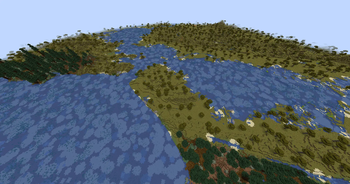
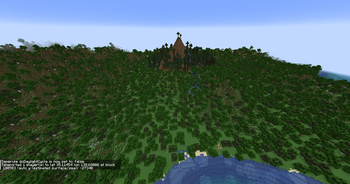
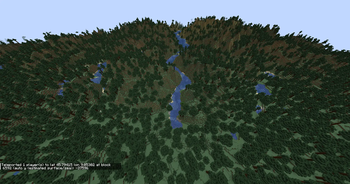
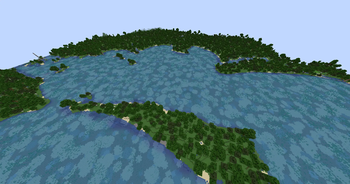
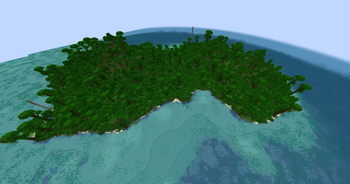
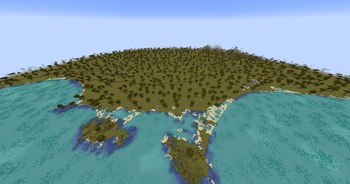
About this Mod
Terrarium Expanded
Bring the Earth into Minecraft with real-world terrain, biome-driven landcover, and configurable world scale.
Terrarium Expanded includes integrations for:
- Biomes O' Plenty
- Regions Unexplored
- Nature's Spirit
- Datapacks that increase the world's minimum or maximum Y level
Requirements
- Minecraft
1.21.1- Java
21+- A live internet connection during world generation and exploration
Terrarium Expanded fetches three live remote data sources:
- Terrain tiles
- Surface-water tiles
- Ecoregion tiles
If those services are unavailable or blocked, world generation quality and completeness will degrade.
What The Mod Does
Terrarium Expanded generates an Earth-shaped overworld from real map data instead of vanilla noise alone.
- Terrain comes from AWS Terrarium elevation tiles.
- Land biomes come from reduced WWF ecoregion tiles.
- Inland water uses global surface-water seasonality data.
- Ocean biome temperature is tiered using bundled WOA23 sea-surface temperature data.
You can also choose different zoom levels, which change the playable world's total size and the approximate real-world distance represented by each block.
Screenshot Gallery
Primary gallery below uses the vanilla biome integration at z=10.
San Francisco

Mt. Fuji

Strait of Gibraltar

Montreal

Grand Canyon

More screenshots and alternate biome-integration galleries are indexed in documentation/readme.md.
World Size / Zoom Levels
Higher zoom means a much larger playable world with finer real-world detail, but also heavier generation cost and more remote tile fetches.
| Zoom | World Size (blocks) | Approx. Scale | Guidance |
|---|---|---|---|
8 |
65,536 x 65,536 |
~611.50 m/block |
Broad regional scale, fastest option |
9 |
131,072 x 131,072 |
~305.75 m/block |
Large world, lighter runtime cost |
10 |
262,144 x 262,144 |
~152.87 m/block |
Good default balance for exploration |
11 |
524,288 x 524,288 |
~76.44 m/block |
Finer terrain detail, heavier generation |
12 |
1,048,576 x 1,048,576 |
~38.22 m/block |
Maximum scale and detail, slowest uncached exploration |
Requirements
- Minecraft
1.21.1 - Java
21+ - Internet access while generating or exploring Earth worlds
The mod depends on live requests for:
- terrain tiles
- surface-water tiles
- ecoregion tiles
These datasets are configurable in the Earth preset editor, but the default experience assumes the public tile services are reachable.
Performance Expectations
Performance can be poor when the game has to generate many chunks quickly or enter uncached regions for the first time.
- Generating many new chunks in a short period may be slow.
- Entering uncached regions may stutter while remote data is fetched and stored in the local cache.
- Higher zoom levels are the most expensive.
- First-time exploration is usually the worst-case path.
As the world generates, downloaded terrain, surface-water, and ecoregion files are written into a local cache. You can delete this cache at any time without breaking the world, but future generation will be slower until the files are downloaded again.
Once tiles are cached locally, revisiting the same regions should be smoother.
Data Sources
Terrarium Expanded currently uses:
- Terrarium elevation tiles for terrain height
- Global surface-water seasonality tiles for inland water detection
- Reduced WWF ecoregion tiles for land biome selection
- WOA23 mean annual sea-surface temperature as a bundled runtime data layer for ocean biome tiering
Default remote endpoints are currently configured as:
- Terrain:
https://elevation-tiles-prod.s3.amazonaws.com/terrarium - Ecoregions:
https://d127t6piqu53ls.cloudfront.net/tiles-reduced - Surface water:
https://storage.googleapis.com/global-surface-water/tiles2021/seasonality
Current Caveats
- AWS Terrarium source data can contain spikes or odd terrain artifacts.
- Those artifacts can become more noticeable at higher zoom levels.
- Remote-data availability directly affects first-time world generation quality and responsiveness.
For implementation details, see documentation/WORLDGEN.md.
Development / Local Build
Build from the repo root with:
.\gradlew build
The project targets Architectury with both Fabric and NeoForge enabled.
Available Versions
How to Install Terrarium Expanded on Your Server
Order Server
Order a Minecraft Java server with at least 4 GB RAM (6 GB recommended).
Set fabric Loader
In the panel under "Egg", select the fabric loader and matching Minecraft version (1.21.11).
Install Mod
Open the mod browser in the dashboard and search for "Terrarium Expanded". Click "Install" – done! Alternatively, upload the .jar via SFTP to the /mods folder.
Compatibility
Mod Loaders
Minecraft Versions
1.21.11, 1.21.1
Server-side
✓ RequiredRecommended RAM
6 GB(min. 4 GB)Frequently Asked Questions
Terrarium Expanded server crashes on startup – what to do?
Most common cause: wrong fabric version or insufficient RAM. Check the server log (latest.log) for "OutOfMemoryError" or "Mixin" errors. With Mado Hosting: ensure at least 4 GB RAM is allocated and the loader matches the mod version (1.21.11). You can switch loaders with one click in the panel.
Is Terrarium Expanded compatible with fabric and neoforge?
Terrarium Expanded officially supports fabric, neoforge for Minecraft 1.21.11, 1.21.1. The Mado dashboard automatically detects incompatible loader combinations.
Server lagging with Terrarium Expanded – how to optimize performance?
Recommended RAM: 6 GB (per 5 players). Use /spark profiler to check if Terrarium Expanded consumes the most tick time. Common fixes: reduce server view-distance to 8-10, install "performant" or "starlight" as supplementary mods on Forge. With Mado Hosting, your server runs on NVMe SSDs with dedicated CPU cores for minimal latency.
Similar Mods



Rent Modded Server
Install Terrarium Expanded with just one click on your server.