
Text Utilities
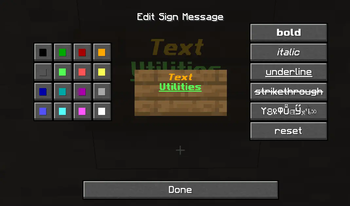
Adds buttons to format and color the text in signs, books, and anvils.
Screenshots
About this Mod
Text Utilities (for Fabric)




Text Utilities is a free and open-source mod for Minecraft which adds color and formatting
options to signs, books, and anvils.
Features
- Adds color and formatting buttons to the sign editor screen, anvil screen, and the book edit screen.
- Adds color and formatting support to fabric server's when installed on a server.
- Formatting code prefix is configurable to support servers that don't use the default
§(for example, Purpur has built in support for&). - Adds the ability to click-through signs and item frames when they are attached to containers.
- Sign click through is prevented when holding a sign, dye, an ink sac, or a glowing ink sac in your main hand.
- Item Frame click through is prevented while sneaking or if the item frame has no item in it.
- Supports adding custom blocks/entites to the click-through list
- Increases max width and height of chat hud so that you can adjust it to your liking.
NOTE: At the moment, you have to press a color before a format button if you want to use both.
Supported Mods
- Create Mod
- Adds click-through functionality to
create:placard
- Adds click-through functionality to

Installation


Manual installation
You will need Fabric Loader 0.10.x or newer installed in your game in order to load Text
Utilities. If you haven't installed Fabric mods before, you can find a variety of community
guides for doing so here.
Stable releases

The latest releases of Text Utilities are published to our Modrinth,
CurseForge,
and GitHub release pages. Releases
are considered to be suitable for general use, but they are not guaranteed to be free of bugs
and other issues.
Usually, releases will be made available on GitHub slightly sooner than other locations.
Bleeding-edge builds (unstable)

If you are a player who is looking to get your hands on the latest bleeding-edge changes for
testing, consider taking a look at the automated builds produced through our
GitHub Actions workflow.
This workflow automatically runs every time a change is pushed to the repository, and as such,
the builds it produces will generally reflect the latest snapshot of development.
Bleeding edge builds will often include unfinished code that hasn't been extensively tested.
That code may introduce incomplete features, bugs, crashes, and all other kinds of weird issues.
You should not use these bleeding edge builds unless you know what you are doing and are
comfortable with software debugging.
Reporting Issues
You can report bugs and crashes by opening an issue on our issue tracker.
Before opening a new issue, use the search tool to make sure that your issue has not already
been reported and ensure that you have completely filled out the issue template. Issues that are
duplicates or do not contain the necessary information to triage and debug may be closed.
Please note that while the issue tracker is open to feature requests, development is primarily
focused on improving hardware compatibility, performance, and finishing any unimplemented
features necessary for parity with the vanilla renderer.
License
Text Utilities is licensed under GNU LGPLv3, a free and open-source license. For more information,
please see the license file.
Available Versions
How to Install Text Utilities on Your Server
Order Server
Order a Minecraft Java server with at least 3 GB RAM (4 GB recommended).
Set fabric Loader
In the panel under "Egg", select the fabric loader and matching Minecraft version (1.21.8).
Install Mod
Open the mod browser in the dashboard and search for "Text Utilities". Click "Install" – done! Alternatively, upload the .jar via SFTP to the /mods folder.
Compatibility
Mod Loaders
Minecraft Versions
1.21.8, 1.21.7, 1.21.6 (+18 more)
Server-side
✓ RequiredRecommended RAM
4 GB(min. 3 GB)Frequently Asked Questions
Text Utilities server crashes on startup – what to do?
Most common cause: wrong fabric version or insufficient RAM. Check the server log (latest.log) for "OutOfMemoryError" or "Mixin" errors. With Mado Hosting: ensure at least 3 GB RAM is allocated and the loader matches the mod version (1.21.8). You can switch loaders with one click in the panel.
Is Text Utilities compatible with fabric?
Text Utilities officially supports fabric for Minecraft 1.21.8, 1.21.7, 1.21.6. The Mado dashboard automatically detects incompatible loader combinations.
Server lagging with Text Utilities – how to optimize performance?
Recommended RAM: 4 GB (per 8 players). Use /spark profiler to check if Text Utilities consumes the most tick time. Common fixes: reduce server view-distance to 8-10, install "performant" or "starlight" as supplementary mods on Forge. With Mado Hosting, your server runs on NVMe SSDs with dedicated CPU cores for minimal latency.
Similar Mods




![[ETF] Entity Texture Features](https://cdn.modrinth.com/data/BVzZfTc1/af683d206d50b05258d865b0d6e4aa2f2cee12f2_96.webp)
![[EMF] Entity Model Features](https://cdn.modrinth.com/data/4I1XuqiY/6e5bbd0d06b1741bfdab6c0cfab6de8fdaf0064c_96.webp)
Rent Modded Server
Install Text Utilities with just one click on your server.