
Textile
small changes to leather armor as well as new paper recipes (rotten flesh to leather recipe integrated)
Screenshots
About this Mod
This small mod makes leather armor a bit more survival-friendly and lets you create paper out of bamboo, seagrass and leather.
Leather Armor Changes
Theres never been a real use of leather armor because it's usually such a short time period between spawning into the world and getting iron armor, that it's better just to spare up for bookshelves
until you got yourself a enchanting table.
But now you can invest (with some luck) only around 4 leather for 28% armor reduction
(iron armor is 60%) as you get the rest of the invested leather back!
This both encourages using leather armor until it breaks and actually investing the time to even make it in the first place.
[Actual Recycling Values]
Helmet = 1-3 returned
Chestplate = 3-6 returned
Leggings = 2-5 returned
Boots = 1-2 returned
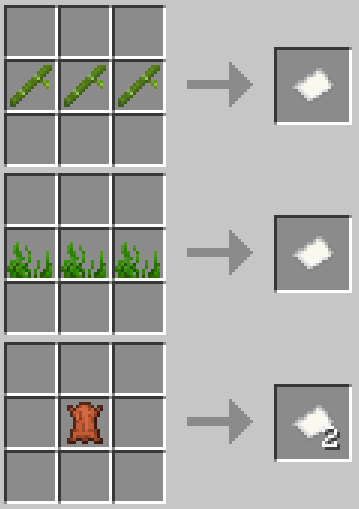
Paper Recipe Additions
It's quite unrealistic how you can only make paper from sugar cane although there are many other things here that you could make it out of just as well.
I know theres alot of sugarcane lying around, but that stuff sometimes takes quite the time to grow if you're busy doing other things. So this mod eases things and lets that seagrass rotting in the chest or the uncollected bamboo sitting there for weeks have a use (also cow farms get more use ig)!
[Recipes]
3 Bamboo = 1 Paper
3 Seagrass = 1 Paper
1 Leather = 2 Paper
Final Note: This mod adds rotten flesh to leather smelting recipe as well so thats neat.
made with MCreator
Available Versions
How to Install Textile on Your Server
Order Server
Order a Minecraft Java server with at least 3 GB RAM (4 GB recommended).
Set forge Loader
In the panel under "Egg", select the forge loader and matching Minecraft version (1.20.1).
Install Mod
Open the mod browser in the dashboard and search for "Textile". Click "Install" – done! Alternatively, upload the .jar via SFTP to the /mods folder.
Compatibility
Mod Loaders
Minecraft Versions
1.20.1
Server-side
✓ RequiredRecommended RAM
4 GB(min. 3 GB)Frequently Asked Questions
Textile server crashes on startup – what to do?
Most common cause: wrong forge version or insufficient RAM. Check the server log (latest.log) for "OutOfMemoryError" or "Mixin" errors. With Mado Hosting: ensure at least 3 GB RAM is allocated and the loader matches the mod version (1.20.1). You can switch loaders with one click in the panel.
Is Textile compatible with forge?
Textile officially supports forge for Minecraft 1.20.1. The Mado dashboard automatically detects incompatible loader combinations.
Server lagging with Textile – how to optimize performance?
Recommended RAM: 4 GB (per 8 players). Use /spark profiler to check if Textile consumes the most tick time. Common fixes: reduce server view-distance to 8-10, install "performant" or "starlight" as supplementary mods on Forge. With Mado Hosting, your server runs on NVMe SSDs with dedicated CPU cores for minimal latency.
Similar Mods




![[ETF] Entity Texture Features](https://cdn.modrinth.com/data/BVzZfTc1/af683d206d50b05258d865b0d6e4aa2f2cee12f2_96.webp)
![[EMF] Entity Model Features](https://cdn.modrinth.com/data/4I1XuqiY/6e5bbd0d06b1741bfdab6c0cfab6de8fdaf0064c_96.webp)
Rent Modded Server
Install Textile with just one click on your server.